

Hire Figma Designers With U.S. Support
Need predictive analytics and AI-driven insights? Hire expert Figma developer for smarter decision-making.
Senior Figma Engineers
Only vetted developers with 5+ years of experience.
24h Candidate Match
Receive the first matching profiles within one business day.
Delivery Team Included
We provide a complete delivery team to ensure results.
























Hire remote Figma Developer
Discover developers that match your project requirements.AS
Senior Front-End Developer with hands-on experience in TML5, CSS3, Scss.
AN
Middle+ Business Analyst with hands-on experience in Hypothesis formulation, implementation, business owners.
AD
– Experienced UI/UX Designer with a 7+ year proven track record of creating, improving, and developing IT solutions. Highly skilled in Figma and UX research. In a previous position at Nowy Styl, achieved 10% early completion of projects with a client satisfaction rate of 92%.
AH
Self-motivated and goal-oriented manual QA engineer, with strong attention to the details. Will be glad to ensure the functionality of the software is working properly, and identify critical issues that decrease user satisfaction. I like technologies and have a desire to improve software quality from the QA perspective. My strong sides are great analytical skills and attention to details. The most important for me is the result, and meeting the deadlines.
AD
I’m a manual QA engineer with a good understanding of various QA approaches, tools, and always work hard to ensure the software is running properly. In most cases, I’ve worked with the remote Agile teams, and actively took part in the team cooperation. My strong sides are: good soft skills, and passion for what I do. Honing skills is something I pursue, and don’t lose a chance to sharpen them, as well as discover something new in the QA field.
AF
Senior Front-End Developer with hands-on experience in Alpine.js, WordPress, Woocommerce.
AM
Strong and communicative 8+ years QA Engineer with big experience in software testing for Web and Mobile projects.
AN
Senior Full Stack Developer with hands-on experience in React, React Native, JavaScript.
AA
I am an experienced Project Manager with 5+ years of experience. You can count on me with my technical expertise as well as Jira, Asana, Trello, CRM systems, Postman, SEO and many others. I appreciate clear and SMART communication as well as deadlines, so I can easily team up with others.
BK
Creative and detail-oriented UI/UX designer with over 7 years of experience in delivering user-centric solutions across diverse industries. Proven track record of transforming complex ideas into intuitive designs that enhance user engagement and drive business success. Adept at collaborating with cross-functional teams to create cohesive digital experiences, while continuously seeking innovative approaches to design challenges. Passionate about understanding user needs and leveraging insights to craft visually appealing, functional interfaces.
DM
Software developer with 3 years of experience. Experience in PHP, Laravel, REST API. Proficient in JavaScript, Vue.js. Good expertise in HTML5, CSS3, SCSS. Strong knowledge of UX\UI design principles. Focus to create beautiful technical solutions and attention to details. Communication and listening skills. Strategic thinker, organized, stress resistant and responsible person. Understanding of business tasks.
DK
Middle Front-End Developer with hands-on experience in UI, Graphic Design, Visual Design.
What our Figma Developers can build

Which engagement model is right for you?
One engineer, ongoing delivery support, or a complete product team. You set the dial. The firm stands behind every level.

Strengthen your existing engineering team with senior specialists who integrate seamlessly into your workflows while you retain full ownership of priorities, roadmap, and day-to-day management.
- Senior engineer(s) integrated into your team.
- Fast onboarding into your workflow.
- Flexible monthly engagement.
- Replacement guarantee if needed.
- Direct communication and full transparency.
Ideal for teams that need experienced engineers backed by technical leadership, ensuring faster onboarding, predictable execution, and consistent delivery without adding management overhead.
- Dedicated senior engineer(s).
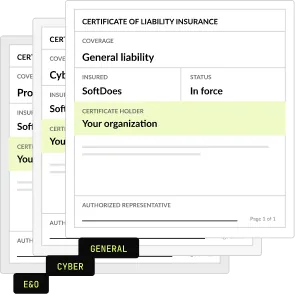
- SoftDoes delivery oversight.
- Regular technical and delivery check-ins.
- Optional code reviews and QA support.
- Escalation management.
- Replacement support.
- Flexible team scaling.

Launch products faster with a ready-to-work cross-functional team that brings together the right expertise from day one, helping you scale without the complexity of hiring each role individually.
- Engineers, QA, Designers, PMs, Tech Leads - assembled to fit your project.
- Cross-functional collaboration.
- One engagement structure and one point of contact.
- Easy scaling up or down.
- Team continuity throughout the project.
Need the outcome, not the team?
SoftDoes also delivers complete projects end to end.
- End-to-end project ownership.
- Dedicated Project Manager.
- Engineering, QA, Design, and Product expertise.
- Delivery planning and sprint management.
- Quality assurance throughout development.
- Transparent communication and regular progress updates.
- One accountable partner responsible for successful delivery.


Not sure which engagement model fits?
SoftDoes takes full ownership of delivery, combining project management, engineering, design, and QA into one accountable team focused on successful outcomes.
FIND THE
RIGHT expert, FASTER
Choose a role. Filter by technology.
Discover developers that match your project requirements.
Hire developers by role


Hire developers by tech stack





























Hire developers by industry











What we do for you
From sourcing and vetting to onboarding and ongoing support, we handle the entire process so you can focus on building products instead of managing hiring.




$14.5 / per hour
- Personal Recruitment
- Payroll Management
- Time Management & Reports
- 24/7 Support
- Free Trial

ONE ENGAGEMENT, NO SURPRISES
Work with senior engineers on a flexible monthly engagement. No recruiting fees, no long hiring cycle, no surprises in the invoice. Every placement is vetted, guaranteed, and backed by a firm you can reach when something needs attention.
Whatever Your Figma Challenge, We've Solved It Before
Whether you're scaling your team, modernizing an application, or accelerating product delivery, our React engineers become an extension of your team from day one.



Great engineering talent, simplified.
Remote developers - interviewed, verified, and ready for you.
Frequently Asked Questions
Everything you need to know about working with SoftDoes. Can’t find an answer?
How quickly can SoftDoes deploy senior designers with proven Figma expertise?
In most cases we can present vetted candidates within days, not months, because our designers have already been reviewed before you ever see a profile. Once you approve a candidate, onboarding can begin almost immediately, with access to your Figma teams, libraries, and backlog set up during the first week. Timelines depend on how specialized the role is, for example a design system lead versus a product designer focused on discovery, but our pre screened network removes the long sourcing cycles that slow traditional hiring. The goal is simple: senior Figma talent contributing real work while a conventional search would still be scheduling interviews.
What pricing models and rates should we expect when hiring dedicated Figma talent?
Pricing depends on seniority, specialization, and engagement structure. Most clients choose a dedicated monthly model, where a designer or pod works on their product full time, while others prefer a scoped engagement for a defined outcome such as a design system rebuild. Rates for senior designers with verified Figma expertise reflect their ability to reduce design debt and rework, not just produce screens. We share transparent rates during the discovery session once we understand your scope, required seniority, and team structure. Because there are no recruiting fees, benefits overhead, or long notice periods, the total cost is usually far more predictable than in house hiring.
How is time zone overlap with North America handled for Figma design teams?
SoftDoes focuses on North American clients, so we plan collaboration around your working hours from the start. Designers commit to meaningful daily overlap with your team for standups, design reviews, and live sessions with engineers and product managers. Figma itself helps here, because real time multiplayer editing, comments, and version history let work continue smoothly between synchronous sessions. We agree on core overlap hours, communication channels, and review rituals during onboarding so nobody waits a full day for feedback. The result is a team that feels embedded in your workflow rather than a distant vendor sending files over the wall.
What does your technical vetting methodology look like for Figma expertise?
Our vetting focuses on how designers actually work, not on how polished their portfolio thumbnails look. We review real shipped products and dig into the reasoning behind them, then open actual Figma files to assess structure, naming, component usage, Auto Layout, variables, and handoff readiness. Candidates complete a live design exercise where we watch them frame a user problem, make tradeoffs, and defend their decisions under pressure. We also evaluate accessibility awareness, including contrast and type choices, and test how well they collaborate with engineers and product managers. Only designers who pass every stage join the network we place with clients.
Who owns the intellectual property produced by designers working on our Figma files and design systems?
You do. Our agreements assign full intellectual property rights for all work produced during the engagement to your company, including Figma files, component libraries, design tokens, prototypes, FigJam boards, and documentation. Designers work inside your Figma organization and team spaces whenever possible, so the files live under your ownership and control from the very first day. Confidentiality and nondisclosure terms are standard in every contract. When an engagement ends or a designer rotates off, everything stays with you, fully organized and documented, so your team can continue building on that foundation without any dependency on SoftDoes or the individual designer.
How flexible are your contracts if our Figma project scope or team size changes?
Flexibility is built into how we work. Product roadmaps shift, funding cycles change, and design needs grow or shrink, so our contracts allow you to scale your team up or down with reasonable notice rather than locking you into rigid long term commitments. You can add a design system specialist for a library overhaul, expand into a full pod for a new product launch, or reduce capacity once a major release ships. If a designer is not the right fit, our zero risk replacement guarantee means we swap in another vetted professional quickly, keeping your Figma work moving without disruption.
The Executive Guide to Hiring Figma Expertise


A bad design hire rarely announces itself on day one. It shows up months later as tangled Figma files, components nobody trusts, engineers rebuilding screens from screenshots, and a roadmap that slips one sprint at a time. A slow hiring pipeline costs almost as much, because every week without senior design ownership means product decisions get made by default instead of by intent. The right senior Figma designer changes that quickly: cleaner handoff, faster validation, and a design system your engineers actually use. This playbook gives you a field tested strategy to define, vet, and integrate top tier Figma talent without gambling your budget.
What Is Really on the Line
Beyond Pixel Pushing: How Senior Figma Designers Actually Create Value
Mastery in Figma is not about knowing where the buttons are. It is about business impact, system resilience, and making smart tradeoffs under deadline pressure. Here is what senior designers own every day:
- Design system architecture. They build shared team libraries with components, variants, and component properties structured so that one update propagates cleanly across every product surface. They document usage rules so other designers and engineers stop guessing, and they treat the library as a living product rather than a static sticker sheet.
- Token governance. They use variables and modes to manage colors, spacing, typography, and light and dark themes as design tokens. They keep those tokens in sync with code through Figma variables exports or tools like Tokens Studio, which closes the drift between what design approves and what engineering actually ships.
- Responsive resilience. They use Auto Layout so frames adapt to real content, real languages, and real screen sizes instead of breaking the moment copy changes. This discipline prevents the endless cycle of engineers asking how a layout should behave and designers patching static mockups one breakpoint at a time.
- Prototype driven risk reduction. They build interactive flows with smart animate, conditional logic, and variables so your team can test ideas with real users before engineering commits a single sprint. That turns expensive build and rebuild cycles into cheap, fast learning that happens entirely inside the design tool.
- Handoff ownership. They prepare files for Dev Mode with clear ready for dev statuses, clean measurements, and components linked to real code through Code Connect. Engineers get inspect panels and snippets they can trust, which removes guesswork, reduces handoff errors, and stops the quiet rework that inflates every release.
- Design debt control. They audit messy files, reattach detached components, fix inconsistent naming, replace hard coded values, and impose a sane page structure. Senior designers treat file hygiene as operational risk management, because disorganized files slow every future handoff and make every redesign far more expensive than it should be.
The Return You Can Expect From Deep Figma Mastery
- Lower design debt. A disciplined library with tokens and well structured components means fewer one off screens and fewer contradictory patterns. Over time, your team spends less effort reconciling inconsistencies and more effort solving new user problems, which directly protects both design and engineering capacity across the roadmap.
- Faster release cycles. When files are organized, components map to code, and Dev Mode statuses are accurate, engineers stop waiting on clarifications. Handoff becomes a predictable step instead of a negotiation, so features move from approved design to production faster and with far fewer review loops along the way.
- Smarter engineering spend. Prototypes validated with users before development starts mean engineering hours go into ideas that already earned their place. Killing a weak concept in a Figma prototype costs a fraction of killing it after it has been built, tested, deployed, and then quietly rolled back later.
- Product consistency and accessibility. Senior designers bake WCAG contrast, accessible type scales, and consistent interaction patterns into the system itself. That reduces compliance risk, strengthens brand trust, and means every new screen inherits quality by default rather than depending on individual designers remembering the rules each time they work.
Groundwork Before You Open the Search
Audit Your Real Design Constraints First
Most failed design hires trace back to a fuzzy problem statement. Before you write a job post, get honest about what is broken and what success looks like in ninety days.
Pinpoint the Bottleneck Your Figma Hire Must Break
Start with the single systemic problem this person must solve first. Is it a fragmented library where every designer builds their own buttons? Is it handoff friction, where engineers rebuild screens because files lack structure and specs? Is it a missing validation step, where features ship untested and get reworked later? Each bottleneck demands a different profile. A design system specialist is not the same hire as a product designer who lives in discovery and prototyping. Name the bottleneck, write it down, and use it to filter every candidate conversation so you hire for the problem, not the title.
Embedded Specialist or Dedicated Design Pod
Decide how much autonomy the role needs. An embedded Figma specialist joins an existing product team, follows established rituals, and raises the quality bar on day one. That works when you already have design leadership and a clear system. A dedicated design pod, typically a lead designer plus supporting designers, owns a workstream end to end, from research through handoff. That model fits when you lack internal design leadership or need to stand up a new product quickly. Mismatching autonomy is a classic failure: a senior lead stuck taking tickets will leave, and a junior designer left alone will drift without direction.
In House Hiring Versus Vetted Dedicated Talent
Traditional in house hiring carries real friction: long sourcing cycles, multiple interview rounds, notice periods, benefits overhead, and the risk that the hire underperforms after months of investment. Vetted dedicated remote talent compresses that timeline and shifts the risk. You get designers whose Figma work has already been reviewed, who can start within days rather than months, and who can be replaced if the fit is wrong. Many teams blend both, keeping strategic design leadership in house while scaling execution through a partner offering product design services. Choose based on speed, risk tolerance, and how permanent the need truly is.
Build a Requirement Profile, Not a Generic Job Spec
Generic job specs attract generic candidates. Define these four non negotiable components instead:
- Core outcome and mission. State the business result, not the activity. "Ship a unified component library that reduces handoff questions" beats "create UI designs." A clear mission lets candidates self select, gives interviewers a shared yardstick, and tells you within weeks whether the hire is delivering real value.
- Tool and stack ecosystem. Specify where the designer will live: Figma libraries, variables and modes, FigJam for workshops, Dev Mode for handoff, and your engineering stack on the receiving end. A designer who understands how their components become React or native code collaborates far better than one working in isolation.
- Decision making authority. Spell out what the designer can decide alone, what needs product sign off, and who arbitrates conflicts with engineering. Senior talent needs real ownership to perform. Ambiguity here creates either a bottleneck where every choice waits on approval, or a rogue designer reshaping the product without alignment.
- System impact. Define how this hire will affect the wider design system and other teams. Will they own the shared library, contribute to it, or simply consume it? Clarifying system impact up front prevents duplicated components, conflicting tokens, and the slow erosion of consistency that happens when nobody owns the foundation.

Let’s Turn Your Idea into Scalable Software
Book a call with the representative to get answers to all the questions you may have.
Vetting and Onboarding Without the Guesswork
A Battle Tested Framework for Vetting Figma Talent
Resumes and polished portfolio shots tell you very little about how someone actually works in Figma. Your vetting process needs to expose real file discipline, real reasoning, and real collaboration.
Where Strong Candidates Really Come From
Traditional recruiters screen for keywords. They see "Figma" on a resume, match a few buzzwords, and forward a stack of profiles that look identical on paper. That pushes the real filtering onto your already busy design and product leaders. Pre screened design networks work differently: candidates have already shown shipped products, had their Figma files reviewed, and been assessed on reasoning and communication. Drawing from a curated talent network means your interviews start at the senior level instead of weeding out people who only know how to decorate screens. That difference alone can save weeks of leadership time on every single hire.
The Evaluation Pipeline That Exposes Real Skill
Skip trivia about menu locations. Run a live design exercise built around a real problem from your product and watch how the candidate frames the user need before touching a frame. Then open one of their actual Figma files and review it together: page structure, component usage, naming, Auto Layout, variables, and whether values are hard coded. Ask them to walk through a decision they would change in hindsight. Probe communication under pressure by challenging a choice and seeing whether they defend it with reasoning or fold. Finally, have an engineer and a product manager join one session to test cross functional fit.
The First 90 Days: A Frictionless Ramp Up Plan
- Days 1 to 30: access and audit. Grant access to every relevant Figma team, library, and FigJam board on day one, plus your product analytics and backlog. The designer audits existing files and the library, documents inconsistencies and design debt, and ships at least one small, production ready improvement to prove they understand your context.
- Days 31 to 60: ownership and handoff. The designer takes ownership of a defined feature or library area end to end. They deliver files marked ready for dev in Dev Mode, partner with engineers through implementation, and fix structural issues found during the audit. Expect measurable reductions in handoff questions and visible cleanup progress across shared libraries.
- Days 61 to 90: system leverage. The designer now multiplies output for others. They formalize tokens with variables and modes, align components with code through Code Connect where possible, and validate an upcoming feature with an interactive prototype and real users. By this point, their work should be shaping roadmap decisions, not just executing them.
Making the Hiring Decision
Interview Signals That Separate Hires From Regrets
Red flags
- Overdesigning simple problems. The candidate turns a straightforward form into an elaborate showcase with custom animations and novel patterns. It looks impressive in a portfolio but signals poor judgment about cost, timelines, and engineering effort, which becomes expensive fast inside a real product team.
- Tool obsession over outcomes. They talk endlessly about plugins, shortcuts, and clever Figma tricks but cannot explain what business or user problem their work solved. Craft matters, yet a designer who cannot connect pixels to results will optimize the wrong things on your roadmap.
- Messy, undisciplined files. Detached components, layers named "Frame 482," no page structure, and hard coded colors everywhere. If their showcase files look like this, your production files will look worse, and your engineers will pay for that disorder during every single handoff.
- No honest account of failure. They cannot describe a design that flopped, a library that broke, or a handoff that went wrong in a Figma environment. Seniority comes from surviving mistakes. A candidate with no failures to discuss either lacks real experience or lacks the candor you need.
Green flags
- Pragmatic tradeoff analysis. They explain why they chose a simpler pattern to hit a launch date, or why they invested in a component that would pay off across many screens. They weigh user value, engineering effort, and timeline openly instead of defending every design choice as sacred.
- Focus on system integrity. They talk naturally about tokens, variables, component properties, and how library changes propagate. They care whether design and code stay in sync. This mindset protects your product from the slow drift that makes every future release harder, slower, and more expensive.
- Proactive risk identification. Before you ask, they point out accessibility gaps, WCAG contrast issues, edge cases in empty and error states, and places where engineering will likely struggle. Designers who surface risk early save you from discovering problems in production, when fixing them costs far more.
- Deep understanding of Figma edge cases. They know where Auto Layout behaves unexpectedly, how variants scale poorly when overused, and when variables and modes beat duplicated components. This hands on depth shows they have built and maintained real systems, not just admired them from the outside.
Why Leaders Choose SoftDoes to Scale Design
SoftDoes is a North America focused custom software, design, and data and AI partner serving clients across the US and Canada. We do not hand you unmanaged freelancers. Every designer we place has verified Figma expertise, reviewed through real files and live exercises, and works under design led delivery oversight so quality stays consistent. We offer rapid deployment, the flexibility to scale up or down as your roadmap shifts, and a zero risk replacement guarantee if a fit is not right. Whether you need one senior specialist or a full pod, you can hire UI and UX designers who strengthen your Figma practice from the first week.
The Bottom Line and Your Next Move
In product companies, design execution is business performance, and the quality of the people working in your Figma files directly shapes how fast and how well you ship. Do not leave that to keyword matching and hopeful interviews. Book a technical discovery session with SoftDoes solution architects, walk us through your current design bottleneck, and get a clear plan for the senior Figma talent your product actually needs.