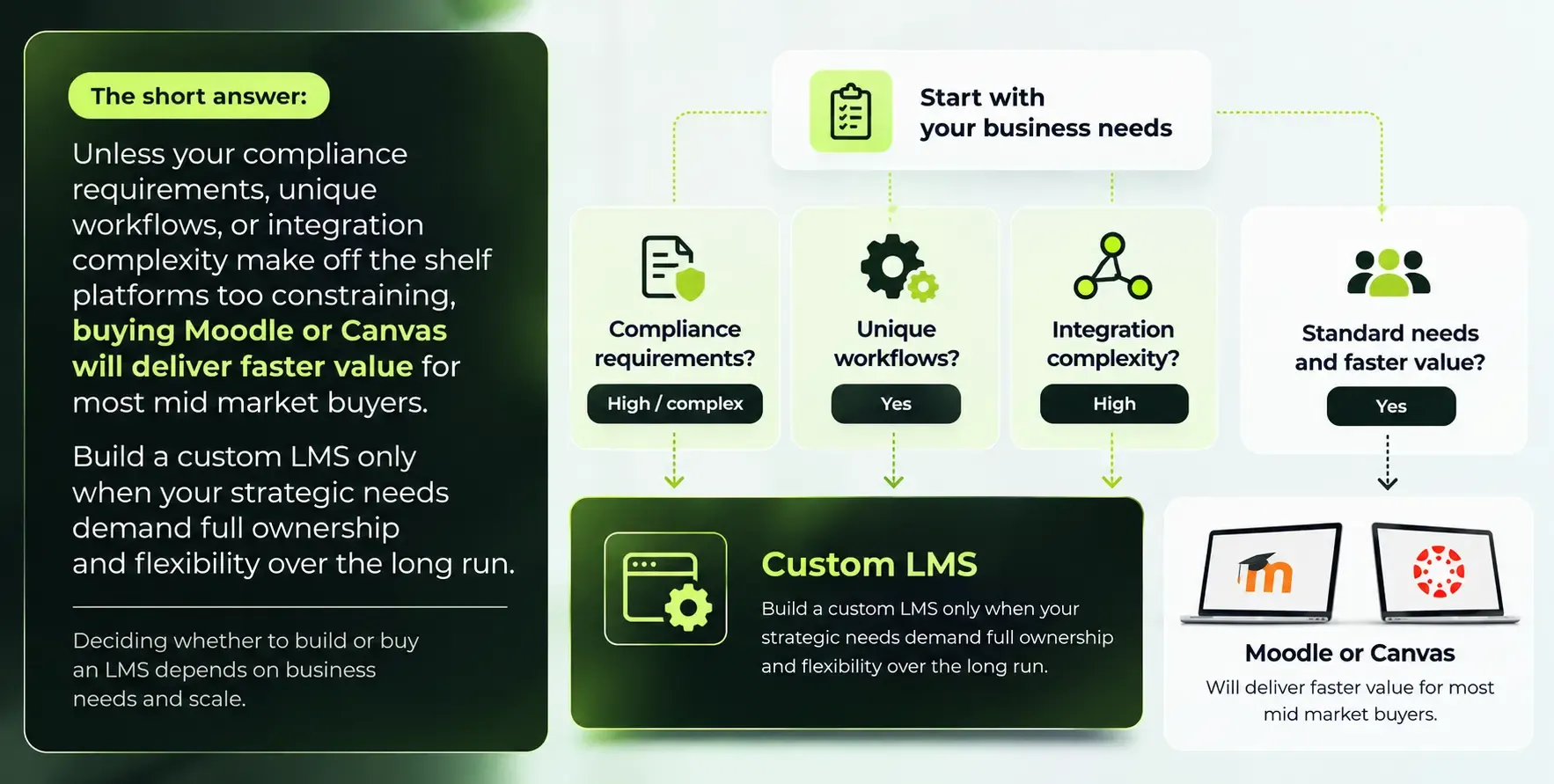
Choosing the right learning management system in 2026 comes down to one question: does your organization need a platform that fits your workflows exactly, or one that gets you running as fast as possible? For most U.S. and Canadian colleges, corporate training teams, and professional education providers, Moodle or Canvas will deliver a working learning platform faster and with less risk. But for organizations operating in regulated industries, managing complex internal systems, or treating education as a core product, a custom LMS is increasingly the smarter long term investment.The single biggest difference is ownership. A custom LMS gives you complete control over features, data, and roadmap. Canvas and Moodle give you speed, proven ecosystems, and predictable operations. Everything else in this LMS comparison flows from that trade off.
What Do We Mean by "Custom LMS," "Moodle," and "Canvas" in 2026?
Each comes with real trade offs in cost, control, and speed. Here is what defines each option in 2026.
What Is a Custom LMS in 2026?
A custom LMS is a bespoke learning platform designed and built with a software partner like SoftDoes, leveraging its custom software and app development services, hosted on cloud infrastructure (AWS, Azure, or GCP) or private servers, and tailored to your organization's exact workflows and compliance needs. Building a custom LMS can provide complete control over workflows and features.
- Total control over features and roadmap. You decide what gets built and when, rather than waiting on a vendor or plugin developer.
- Full data ownership. You control storage, schema, retention, audit logs, and data residency, which matters for organizations with regulatory constraints.
- Custom AI and ML capabilities. You can embed recommendation engines, adaptive assessments, and predictive analytics specific to your domain.
- Deep integration potential. Connect directly with HRIS, CRM, EMR, SIS, and internal tools with custom workflows and notification rules.
Trade offs are real: custom LMS builds often take months or even years to launch (8 to 18 months is typical for full platforms), upfront investment ranges from $60,000 to $400,000+, and you need ongoing engineering capacity. Maintenance and security are ongoing responsibilities with a custom LMS. Organizations should evaluate their internal capacity for ongoing engineering before deciding.
What Is Moodle in 2026?
Moodle stands as a mature open source LMS with a large global install base, widely used by colleges, school districts, nonprofits, and corporate academies across the U.S. and Canada. Moodle is open source and highly customizable.
- Moodle 5.x line is stable. Moodle Workplace adds corporate training features: multi tenancy, compliance tracking, certification expiry, learning paths, dynamic rules, and custom reporting.
- Hosting choices include self hosting on your own cloud or datacenter, certified Moodle partners, or managed cloud hosting. Moodle's open source nature allows for unlimited customization options.
- Plugin ecosystem. Moodle has over 2,700 plugins available for customization, covering assessments, analytics, certification, and compliance. Moodle supports LTI integrations for third party tools and xAPI.
- Cost control. No per seat license fees for the core platform. Moodle is free to use but incurs hosting costs. MoodleCloud hosting starts at $170 per year for 50 users.
What Is Canvas in 2026?
Canvas is a cloud based platform developed by Instructure, dominant in North American higher education with roughly 50% institutional market share. Canvas is a cloud based LMS designed for ease of use.
- Polished UX and adoption. Canvas offers a user friendly interface with minimal learning curve, strong mobile apps, and built in collaboration tools like messaging and video conferencing.
- SaaS only. No self hosting option. Vendor managed infrastructure handles updates, security patching, and release cadence. Vendor managed SaaS options handle updates and infrastructure automatically.
- Integration ecosystem. Canvas integrates with over 500 educational tools for enhanced user experience and supports LTI 1.3 / LTI Advantage. Canvas offers native integration with Google Docs.
- Subscription pricing. Canvas pricing ranges from $5 to $15 per user annually for the core LMS, with add ons (Studio, Catalog, Credentials) adding to total cost.
Custom LMS vs Moodle vs Canvas: 2026 Comparison at a Glance
The table below summarizes the key features and differences for a typical U.S. or Canadian buyer managing between 5,000 and 20,000 learners. Use it to identify which option aligns with your situation before diving into the detailed factors below.
Criteria |
Best Fit | Regulated enterprises (healthcare, government, finance), product training businesses, organizations needing extensive customization | Mid market colleges, school districts, associations, corporate academies needing flexibility and cost control | U.S./Canadian higher education, professional education providers, institutions seeking fast adoption and low IT overhead |
Typical Annual Cost | $60K–$400K+ build + 15–20%/year maintenance + infrastructure | $20K–$80K/year (hosting, staff, plugins, Workplace license) | $25K–$125K+ core for 5,000 users; add ons push higher |
Time to Launch | 10–16 weeks for MVP; 6–12+ months for full platform | 3–6 months with core + Workplace + plugins | 2–4 months after contract signed |
Customization Level | Unlimited: full control over UX, backend, data model | High: via plugins, themes, custom code; upgrade risk exists | Moderate: strong APIs and LTI but limited deep core changes |
Data Control | Full control over residency, audit logs, encryption, retention | Strong: self host or partner host; responsible for hardening | Vendor managed; some limits on hosting region and data structure |
Typical Buyer | Health systems, government, energy, credential marketplaces | Colleges with IT capacity, budget conscious training vendors | Institutions prioritizing fast adoption and vendor managed operations |
Canvas wins for simplicity and fast adoption. Moodle offers flexibility on a tighter budget. A custom LMS becomes the clear choice for organizations with unique, high stakes requirements. Choosing an established platform is better for most organizations, but custom solutions are often justifiable for businesses that treat education as a core product.
Decisive Factor #1: Total Cost of Ownership (2026–2030)
Total cost of ownership includes implementation, maintenance, and support, and evaluating it over three to five years matters far more than comparing sticker prices.
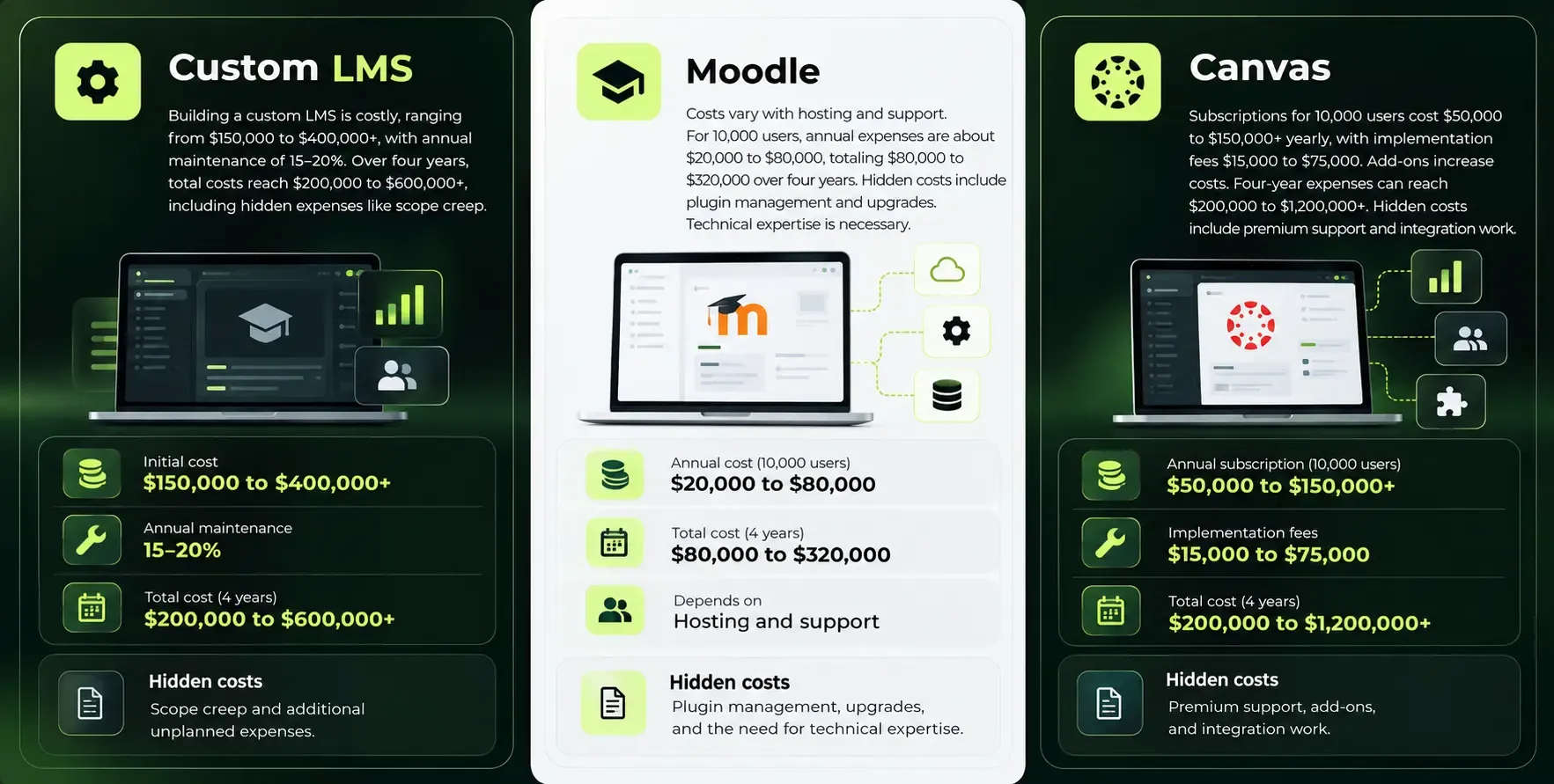
Consider a concrete scenario: a mid sized U.S. university or enterprise with 10,000 learners needing an LMS over four years.
Winner: Moodle offers the best value for most mid sized scenarios, particularly when your organization has enough technical staff to manage hosting and upgrades. Canvas delivers predictable, vendor managed costs but becomes expensive at scale due to per seat pricing and add on layers. A custom LMS has the highest upfront investment, but the payback period shortens significantly when standard platforms cannot meet compliance, branding, or integration requirements.
Decisive Factor #2: Customization, Integrations, and AI Capabilities
In 2026, AI assisted learning, personalized learning paths, and seamless integrations with HR, CRM, and compliance systems are standard expectations. The ability to create a tailored learning environment separates a productive LMS from one that generates workarounds.
Custom LMS: Full control over UX, workflows, microservices, and data model. A partner like SoftDoes can embed AI tutors, recommendation engines, predictive analytics, and content authoring tools tuned to your domain. Integrations with Workday, SAP SuccessFactors, Salesforce, EMR systems, or an internal data warehouse are built exactly to spec. There is no dependency on third party tools for core functionality, and no plugin compatibility risk.
Moodle: Moodle supports over 1,700 plugins for extensive customization, covering everything from interactive quizzes to analytics dashboards. Moodle provides customizable reporting features for detailed analytics. Moodle's analytics include predictive features for identifying at risk students. The platform supports LTI 1.3, xAPI, and open APIs for connecting external tools. Moodle allows custom themes and granular permissions configurations. The challenge: plugin quality varies, plugins may break during upgrades, and deep UI workflow changes require developer effort. Moodle Workplace promotes "AI flexibility" where organizations choose their own AI providers and features.
Canvas: Canvas supports over 500 integrations with educational tools and has a strong REST API. Canvas offers a New Analytics hub for tracking student performance and tracks student engagement through interactive graphs and tables. Canvas allows instructors to automate learning paths based on performance. Canvas has built in collaboration tools and integrates with tools like Microsoft Teams and Google Docs. However, customization without coding is limited in commercial products like Canvas. Canvas customization is restricted to surface level changes only. Vendor dependency can limit the flexibility of LMS platforms like Canvas. Deep UI or workflow customization beyond configurable settings requires vendor cooperation or costly custom connectors.
For example, a U.S. healthcare enterprise wanting to integrate its LMS with Workday, an EMR for clinician training, an internal video library, compliance reporting tools, and AI powered adaptive assessments would find a custom LMS build the most direct path. Moodle can achieve this via plugins and APIs but with more scaffolding and risk of plugin breakage. Canvas can connect through available integrations, but new or edge case connections often require compromises or expensive custom middleware.
Winner: Custom LMS leads for deep customization, integrations, and AI. Moodle is a strong second when you have skilled technical resources and can manage the plugin ecosystem. Canvas is best for organizations with standard integration needs who prefer a user friendly dashboard and vendor managed experience over extensive customization.
Decisive Factor #3: Compliance, Security, and Data Ownership
U.S. and Canadian regulations like FERPA, HIPAA (for clinical and patient training), SOC 2, state privacy laws, and provincial data residency requirements now set the baseline for any LMS decision. Data sovereignty is a key consideration for organizations with regulatory constraints.
Custom LMS: Can be architected with zero trust security, private cloud or on premises hosting, custom retention policies, and data residency choices within U.S. or Canadian regions. Custom LMS development can ensure adherence to specific regulatory standards. SoftDoes can design for SOC 2 and HIPAA ready patterns, detailed audit trails, role based access control, and encryption at rest and in transit. You own the compliance roadmap entirely. When data governance requirements change mid contract, you adapt your own platform rather than filing a vendor feature request.
Moodle: Source code visibility and full database access let you inspect and control everything. Self hosting or private cloud hosting gives you data residency control. Moodle Workplace is FedRAMP Ready, SOC 2 Type 2, and WCAG 2.2 AA certified for government agencies. Established LMS solutions comply with strict regulations. However, the organization is responsible for hardening, patching, and ongoing compliance configurations. The plugin ecosystem can introduce vulnerabilities if not carefully vetted.
Canvas: Vendor managed security, patching, and compliance certifications simplify operations. But customers have limited control over hosting region choices and data model. After a 2026 security breach impacting nearly 9,000 institutions globally, the importance of evaluating vendor incident response practices, SLAs, and data export terms has risen sharply. Organizations need to weigh whether vendor certifications alone satisfy their audit and compliance requirements.
Consider a U.S. health system training clinicians under HIPAA: encrypted PHI, controlled access, monitoring, retention and deletion policies, and detailed audit logs are non negotiable. With a custom LMS, these are designed from the ground up. With Moodle, they are achievable through careful configuration and hosting choices. With Canvas, you rely on the vendor's compliance posture and hope it aligns with your specific needs.
Winner: Custom LMS for organizations with stringent compliance and data sovereignty needs. Moodle comes second, especially when self hosted or partner hosted with proper hardening. Canvas works best when regulatory risks are moderate and the vendor's certifications satisfy your audit requirements.
Decisive Factor #4: User Experience, Adoption, and Time to Launch
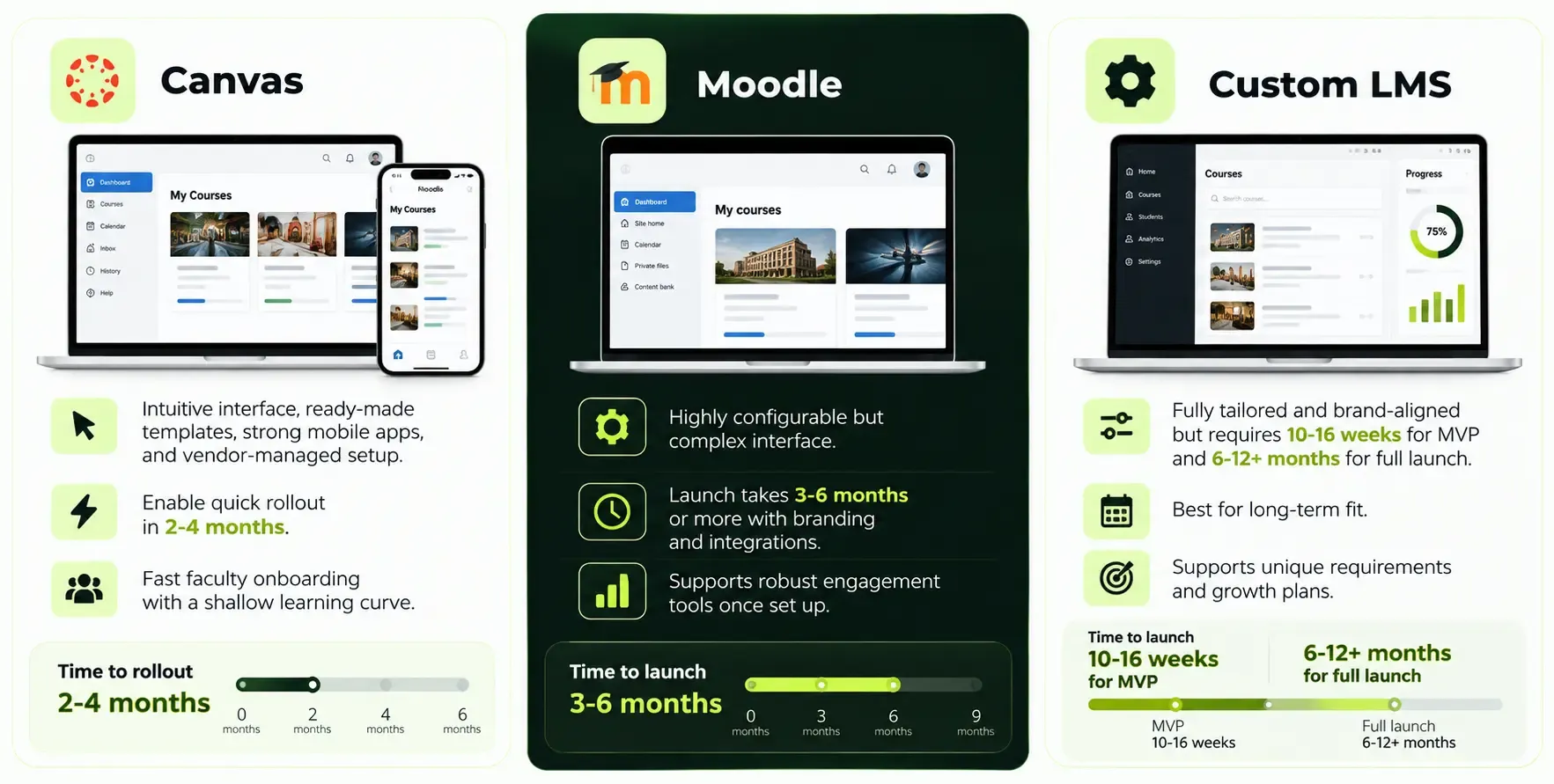
When implementing an LMS, the first 12 to 18 months are often decided by how fast stakeholders adopt the tool, how intuitive it is for new users, and how quickly you can launch something usable. Faster deployment can be achieved through established LMS like Canvas.
Consider the contrast: a Canvas instance can have faculty running online courses within weeks of going live. A Moodle deployment needs careful configuration to deliver the same level of intuitive interface. A custom LMS trades early speed for a learning experience that fits the organization perfectly over time.
Winner: Canvas wins when time to launch and adoption matter most, especially for institutions under pressure to modernize quickly. Moodle is next if you have internal capacity and willingness to invest in configuration. A custom LMS sacrifices launch speed for long term alignment with your interactive learning goals and brand.
Decisive Factor #5: Long-Term Flexibility and Vendor Lock-In
This factor determines what happens in 2029 and beyond: new modalities like micro credentials, XR and VR learning, AI driven personalized learning, new compliance rules, and changing integration partners.
Custom LMS: Full control over source code and architecture means you can adapt to new modalities without renegotiating vendor contracts, assuming a solid engineering partner like SoftDoes that provides product management services. Architecture can be designed for modularity, microservices, and future extensions. You own the roadmap and can pivot, change cloud providers, or integrate new systems on your own timeline.
Moodle: Open source LMS platforms like Moodle provide a hedge against vendor lock in. You can change hosting partners, bring things in house, or fork the code if needed. Moodle supports multiple languages and has strong community support. But dependencies grow: on plugin vendors, theme providers, and partner organizations. Upgrading major versions often surfaces plugin compatibility risk that demands careful testing.
Canvas: Commercial SaaS with contract terms that can limit flexibility. Doing something outside what the vendor supports often requires negotiation or custom contracts. Migrating away requires exporting course materials, analytics, and user data, then retraining everyone on the new platform.
Scenario: in 2029, leadership wants AI first learning journeys, tighter integration with a new HR stack, gamified micro credentials, mobile offline access, and immersive VR modules. With a custom learning platform, these are buildable with your development partner. With Moodle, possible via plugins or custom development but constrained by the open source ecosystem's pace. With Canvas, you likely need paid add ons or must wait for the vendor to deliver.
Winner: Custom LMS for long term flexibility and minimizing lock in. Moodle is close when you want open source freedom with less vendor dependency. Canvas offers a predictable roadmap but at the cost of accepting some degree of lock in. Organizations may benefit from choosing a hybrid approach to LMS development, starting with one platform and planning a migration path.
Who Should Choose Custom LMS vs Moodle vs Canvas?
There is no universal winner. The right choice depends on your organization's size, risk profile, strategic goals, budget, compliance demands, and technical resources.
Choose a Custom LMS (Built with a Partner Like SoftDoes) If…
- You are an enterprise in healthcare, finance, energy, or government with strict compliance and complex internal systems.
- You want AI native personalized learning paths, advanced overall course analytics in your own data lake, and deep integration into HR and operations tools.
- You anticipate unique business models such as paid academies, partner training portals, or credential marketplaces that standard LMS platforms cannot easily support.
- You need a tailored learning environment with real time interaction features, custom workflows, and branding that off the shelf products restrict.
- You have a 5+ year horizon and budget to treat the LMS as a core product.
- You want to track student progress and student performance with domain specific metrics and predictive analytics that no plugin can replicate.
- Your organization's learning process requires integration with systems like EMR, ERP, or specialized compliance tools.
Choose Moodle If…
- You are a college, school district, association, or training vendor wanting flexibility but need to control costs.
- You have or can hire technical administrators or partners to manage self hosting, upgrades, and plugins.
- You want multi tenancy for different faculties, brands, or customer academies without building from scratch.
- You need compliance features like certification tracking and compliance reporting, and want data residency options.
- You value Moodle's open source nature and want to minimize vendor lock in while accessing a rich plugin ecosystem for course creators.
- You need practice quizzes, interactive quizzes, and extensive course creation tools with community support behind them.
Choose Canvas If…
- You are a U.S. or Canadian higher education institution prioritizing fast adoption by faculty and students.
- You prefer predictable SaaS pricing and want the vendor to handle infrastructure, security, and most operational concerns.
- You value a polished, user friendly interface, strong mobile apps, and ready to use integrations more than deep customization.
- Your technical expertise is limited and you want a platform where new users can be productive quickly.
- Your needs for customization are moderate, and Canvas offers enough through its API, LTI support, and app center.
- You want built in collaboration tools, seamless integrations with tools like Microsoft Teams, and strong accessibility out of the box.
The "best" choice depends on strategic priorities. If you are still weighing options, revisit the verdict above: buy when speed and simplicity matter most, build when ownership, compliance, and long term flexibility are what your organization truly needs.
How SoftDoes Helps You Decide: Build vs Buy Roadmap
If you are not sure which route fits your organization, SoftDoes offers a structured advisory engagement, typically 3 to 6 weeks, designed to move you from uncertainty to a clear decision backed by real numbers.
- Discovery: Mapping current learning workflows, content library, compliance obligations, and technical landscape including existing HRIS, CRM, SIS, and cloud infrastructure, supported by SoftDoes' broader IT consulting services.
- Option modeling: Modeling total cost of ownership and risk for a custom LMS, a Moodle based solution, and a Canvas integration based on your actual user counts, regulatory requirements, and feature priorities.
- Proof of concept: Rapid prototyping, such as a custom portal on top of Moodle or Canvas, or a small custom LMS module, to validate the approach before committing budget.
SoftDoes is technology agnostic in recommendations and can implement all three paths:
- End to end custom LMS builds with AI, compliance architecture, and cloud hosting.
- Moodle configuration, plugin development, and managed hosting in North American regions.
- Custom integrations and extensions around Canvas via APIs and middleware.
Involve IT, L&D, and compliance stakeholders early when engaging SoftDoes. The best decisions happen when all three perspectives are in the room from day one.
Benefits of Working with SoftDoes on Your LMS Strategy
Regardless of which path you choose, working with an experienced partner reduces risk, accelerates timelines, and ensures that your learning platform aligns with both current needs and future strategy.
- Deep EdTech and enterprise experience. SoftDoes has worked across education, healthcare, finance, and regulated industries in the U.S. and Canada, giving the team direct exposure to the compliance, integration, and scale challenges that matter in these sectors.
- Full stack capabilities. Custom development, AI and ML, cloud architecture, data engineering, and UI/UX design for both greenfield LMS builds and extensions of Moodle or Canvas.
- Compliance aware engineering. Designing for SOC 2, HIPAA ready patterns, FERPA, secure data pipelines, and robust audit trails from the architecture level.
- Flexible engagement models. Discovery workshops, fixed scope MVP builds, and dedicated teams for long term evolution. You choose the model that matches your budget and timeline.
- Reliability and scale. Architectures tested for high concurrency across tens of thousands of learners, with monitoring, disaster recovery, and cloud hosting in North American regions.











Comments (0)
No comments yet.