If you run a construction business in the U.S. or Canada, you already know that tight margins, rising material costs, and disconnected tools are eating into profitability. Construction ERP development is about building a project centric platform that brings job costing, project management, field operations, and compliance under one roof so your teams can stop stitching together spreadsheets and start making decisions based on real data.This article walks through everything you need to know: why construction ERP matters right now, the core modules your system needs, architecture and integration choices, realistic cost ranges in USD, and how to prepare your organization for a successful rollout.
Key Takeaways
Construction ERP development means building or heavily customizing a platform specifically designed for project based businesses. Unlike generic ERP systems that revolve around inventory and warehouse management, construction ERP software integrates financials and project management around jobs, cost codes, and phases. It gives project managers and construction teams a unified platform to deliver projects on time and within budget by connecting accounting, field operations, and construction management workflows in one place.
Custom construction ERP helps construction companies gain real time visibility into project costs, resource allocation, equipment management, and compliance tracking. This is critical when profit margins in construction range from 3% to 8% and a single missed change order or billing delay can wipe out an entire project's margin.
Construction ERP software cost is driven by scope, meaning the number of modules you build (asset management, service management, payroll), the depth of integrations with tools such as Microsoft Dynamics 365 Business Central, and the complexity of your operations. Small construction ERP systems cost between $40,000 and $80,000, mid-sized builds range from $80,000 to $200,000, and enterprise level systems may cost $250,000 to $800,000 or more.
SoftDoes is a U.S. and Canada focused software engineering partner that designs, builds, and supports custom or hybrid construction ERP solutions using cloud, AI/ML, and robust integration practices. Below, we cover benefits, core modules, architecture choices, development phases, concrete cost ranges, and what to look for in a development partner.
Why Construction ERP Development Matters Now (2024–2027)
North American contractors are operating under sustained pressure. Skilled labor shortages continue to drive up wages and slow project timelines. Material prices remain volatile. Public and private bids demand tighter cost control, and compliance requirements around safety, prevailing wages, environmental reporting, and tax obligations grow more complex every year. Real time visibility into budgets is crucial for construction firms trying to protect already thin margins.
Consider a general contractor based in Texas working across multiple states. Each state brings different prevailing wage rules, tax structures, and permitting requirements. Without a unified system, project teams rely on separate spreadsheets for estimating, QuickBooks or Sage for accounting, and email threads for change order approvals. The result is delayed cost visibility, disputed change orders, and financial surprises that only surface at month end or project closeout. Data silos complicate integration of these multiple disconnected systems and leave project managers flying blind.
Purpose built construction ERP development replaces this patchwork with an integrated system. Finance, field data, scheduling, and procurement share a single data backbone. Project managers can see job costing and cash position by project in near real time. Construction ERP centralizes project management and financials so that every dollar is tracked against the right job, phase, and cost code.
Modern ERP initiatives increasingly require AI ready architecture, mobile first UX designed for construction environments where connectivity is spotty, and robust APIs that connect to estimating tools, BIM platforms, and payroll systems. That is why many construction firms now opt for custom or heavily tailored ERP instead of generic off the shelf products. A one size fits all approach simply cannot handle the unique demands of construction and manufacturing operations at the level of detail contractors need.
What Is Construction ERP? (And How It Differs from Generic ERP)
Construction ERP is a project centric enterprise system designed for general contractors, specialty contractors, developers, and owners. It manages estimating, procurement, job costing, project execution, asset management, billing, payroll, and regulatory compliance, all organized around projects rather than products or inventory locations.
The core difference from traditional ERP systems is structural. Generic ERP software tracks transactions around SKUs, warehouses, and manufacturing runs. Construction ERP systems track everything against jobs, cost codes, phases, and cost types. When a superintendent logs labor hours or a purchasing agent issues a PO for rebar, those costs immediately flow into the right project's budget vs actual report. Construction specific ERPs prioritize project based workflows and compliance over general features that most contractors will never use.
Construction ERP addresses unique demands like project accounting, subcontractor management, retainage on both payable and receivable sides, progress billing under AIA G702/G703 formats, lien waiver workflows, and WIP reporting. Progress billing relies on accurate tracking of work completed to date against invoices, something that traditional ERP platforms simply do not handle well without extensive modification.
How does this relate to project management tools like Procore? Procore integrates with ERP systems for financial data management, but it excels at drawings, daily logs, RFIs, and submittals rather than owning the general ledger. Construction ERP owns the project financials and general ledger while PM tools handle field collaboration. Custom ERP development often integrates both so project data and financial management stay in sync. Construction ERPs facilitate stronger project control via centralized data and financial management.
Core Modules in a Modern Construction ERP Platform
A high performing construction ERP is modular but unified by a single database. Below are the key features that development teams typically build or customize first.
Project Management and Controls. It syncs with job costing in real time so that when a change order is approved, the budget, committed costs, and forecast at completion all update automatically. Effective project tracking includes monitoring of timelines, budgets, and resource usage across multiple projects. Real time project dashboards provide insights into costs, schedules, and resource allocation for construction managers and executives.
Financials and Job Costing. The financial backbone covers AP/AR, the general ledger, cost codes, committed costs, WIP, retainage, and revenue recognition for U.S. and Canadian contracts, including percentage of completion methods. Construction ERP supports job costing and compliance tracking, giving controllers and CFOs the project financials they need without waiting for month end close. ERP systems improve operational efficiency by automating approvals and reporting processes across financial workflows.
Procurement and Inventory. Purchase requests, POs, delivery tracking, and inventory transfers all tie directly into cost codes and project forecasting.
Resource Management and Payroll. Labor planning, resource allocation across construction projects, field time capture, union vs non-union rules, and prevailing wage calculations all feed costs back into each job. Mobile field apps allow site crews to log reports and submit timecards from the field, eliminating manual processes and double data entry.
Equipment and Asset Management. For contractors with owned or rented fleets, this module tracks utilization, maintenance schedules, GPS and IoT data, and depreciation, linking every hour of machine time to the correct project for accurate cost allocation. Maintenance management within ERPs reduces equipment downtime and operational costs.
Service Management. Many construction firms, especially HVAC, electrical, and roofing contractors, run recurring service contracts alongside large projects. A service management module handles work orders, dispatching, SLAs, and automated invoicing on the same ERP backbone.
Analytics, Reporting, and Dashboards. Standard job cost reports, backlog analysis, margin at risk, cash flow by project, and project forecasting give decision makers the operational data they need.
Compliance and Document Management. Lien waivers, subcontractor insurance tracking, safety inspections, and document control keep firms audit ready. Effective subcontractor management ensures compliance and tracks vendor payments and insurance across every active job.
Most implementations begin with job costing, financials, and project controls, then layer on equipment management, resource management, and service management based on the contractor's specific operations.
Deep Dive: Job Costing and Project Costs
Imagine a $25M commercial build where the project team only reviews costs at month end. By the time the controller spots a $400K overrun on concrete and formwork, crews have already moved to the next phase. The margin is gone, and the only option is to negotiate with the owner, absorb the loss, or both.
Now picture the same project with a well designed construction ERP. Costs post daily as timesheets, material deliveries, and subcontractor invoices flow in. The system breaks everything down by cost code, phase, discipline, labor type, and equipment use. When concrete costs start trending 12% above budget in week three, the dashboard flags it. The project manager investigates, discovers a waste issue, adjusts the pour plan, and saves $180K before the overrun compounds. ERP systems help prevent cost overruns in construction projects by providing this level of visibility.
The data structures behind this matter. Developers must support cost code hierarchies, cost types (labor, material, equipment, subcontract, other), budgets vs actuals vs commitments vs forecasts, and change order management. These structures are central to any construction ERP development effort. Multi project accounting capabilities allow financial management across different job sites so that a contractor running 30 active jobs can see total exposure, backlog, and margin at risk in a single view.
Near real time job costing connects directly to dashboards for project managers and executives. Real time data visibility is crucial for construction ERP systems because it enables teams to reallocate crews, renegotiate subcontracts, or adjust scope before margins evaporate. Accurate estimating and budgeting rely on historical data for improved bidding accuracy, and every completed project feeds the cost library that makes the next estimate sharper.
Resource Allocation and Workforce Planning
Resource allocation is a chronic challenge for construction teams juggling multiple active jobs, often in different cities or states. A mechanical contractor running hospital projects in both Chicago and Toronto needs to know which crews are available, who holds the right certifications, who is approaching overtime limits, and where upcoming demand will outstrip capacity.
A well designed resource management module gives construction managers a centralized view of crew availability, certifications, overtime exposure, subcontractor capacity, and upcoming demand by project phase. The system factors in constraints like union rules, travel time, safety training requirements, and local regulations, then automatically flags resource gaps several weeks ahead so dispatchers and project managers can act before a project stalls.
Field to office integration helps eliminate delays and improve communication in construction. When crews log hours on site through a mobile app, that data flows back into the ERP for payroll processing, job costing, and productivity benchmarking. Over time, the system accumulates enough historical data to forecast how long specific work types take under various conditions, improving both scheduling accuracy and bid quality.
Resource management is not an HR exercise. It is a project performance lever. When a contractor can move a crew from a project ahead of schedule to one falling behind, without scrambling through phone calls and spreadsheets, the entire portfolio benefits.
Equipment and Asset Management Built into ERP
For heavy civil, infrastructure, and site work contractors that own large fleets of earthmovers, cranes, trucks, and generators, equipment management is not optional. It is a major line item on every project budget.
Asset management needs in construction go beyond simple tracking. Contractors must monitor location, hours of operation, preventive maintenance intervals, inspection status, fuel usage, and whether a piece of equipment is owned or rented, all linked back to the correct job for accurate cost allocation. Property management for temporary site facilities and laydown yards can also fall under this umbrella.
Developers can connect IoT and telematics feeds, inspection apps, and maintenance systems into the ERP to automate equipment utilization reporting and downtime alerts. One mid-sized earthwork contractor reduced idle equipment days by roughly 20% within six months of integrating telematics data with their ERP. The system flagged underutilized machines on one job that were urgently needed on another, cutting rental costs and improving project timelines.
The financial impact compounds quickly. Better utilization means fewer rentals. Fewer breakdowns mean less downtime and fewer emergency repairs. And cleaner fixed asset accounting gives CFOs and controllers accurate depreciation figures and project cost data for financial reporting.
Specialized Workflows: Service Management for Construction Firms
Many U.S. and Canadian contractors, particularly in HVAC, electrical, plumbing, and roofing, operate both large construction projects and recurring service contracts. Too often these two sides of the business run on separate systems, creating blind spots in customer history, asset records, and margin analysis.
A service management module built on the same ERP data model handles work orders, dispatching, recurring maintenance plans, SLAs, mobile technician apps, and automated invoicing. Because it shares customers, assets, sites, and contracts with the project side, everyone sees the full picture.
When a technician arrives at a building to service an HVAC unit, they pull up the full equipment history, including the original installation project, past service tickets, and warranty status. Building service management on the ERP backbone means margin visibility extends across the entire project lifecycle and beyond.
Architecture Choices for Construction ERP Development
Modern construction ERP projects in North America typically lean toward cloud native or hybrid architectures. Cloud based construction ERPs improve accessibility and enable remote collaboration, which matters when office and field teams are spread across job sites in different states or provinces. That said, some large construction firms still require on premise components for specific compliance or performance reasons.
The choice between a monolithic architecture and a modular or microservices approach involves real tradeoffs. A modular monolith is simpler to operate and maintain, especially for firms without large DevOps teams. Microservices allow faster iteration, meaning a new AI job costing assistant or an equipment analytics module can be deployed independently. But microservices add infrastructure overhead. For most mid-market contractors, a modular monolith with clean internal boundaries is the pragmatic starting point.
Database design must account for multi-entity support (holding companies with multiple subsidiaries), multi-currency for cross border U.S. and Canada operations, and strong audit trails on every financial and compliance transaction. Cost code hierarchies, intercompany eliminations, and role based security all need to be baked in from the start. User permissions and role-based security enhance data privacy and project management by controlling who can approve POs, post journal entries, or modify budgets.
API first design is non-negotiable. The ERP must integrate cleanly with tools like Procore, BIM platforms, payroll providers, and accounting systems such as Business Central. SAP S/4HANA is ideal for large construction firms that need deep enterprise functionality, but even those environments benefit from APIs that connect field data and operational systems. Choosing the right architecture now determines how easily you can add modules, swap integrations, or adopt AI capabilities over the next five to ten years. For guidance on selecting the right data integration approach, it pays to plan before you build.
Mobile access allows field teams to update project data instantly, so offline first design with local data stores and reliable synchronization is essential for any construction environment where connectivity is unreliable.
Integration Strategy: ERP, Business Central, and Existing Tools
Most contractors are not starting from zero. They already use accounting software like QuickBooks, Sage 300 CRE (widely used by U.S. contractors), or Business Central, plus separate project management or estimating systems. Custom ERP development often begins by unifying rather than replacing everything on day one.
Two common integration patterns emerge. In the first, the ERP becomes the system of record for project operations while Business Central continues to handle core financials and the general ledger. In the second, the ERP becomes the new financial core and Business Central acts as a satellite for specific entities or regions. Both approaches work; the right choice depends on how many entities you operate, your team's familiarity with existing tools, and your timeline.
Typical integration touchpoints include chart of accounts, cost codes, vendors, customers, project master data, invoices, and payment status. Sync frequency matters: labor and material costs captured in a mobile app should flow to the ERP within hours (near real time), while summarized journal entries posting to Business Central for financial reporting can happen nightly. REST APIs and webhooks handle most of these flows, but the real challenge is eliminating manual data entry and preventing mismatched cost codes between systems.
Here is a concrete example: field crews capture time and material usage on a mobile app. The ERP consolidates labor and material costs against the correct job and cost code. Summarized entries post to Business Central overnight for the general ledger and financial reporting. Project documentation, lien waivers, and subcontractor compliance records stay in the ERP's document management module while Procore handles drawings and daily logs. The result is centralized data control without forcing every user onto a single monolithic tool.
Step-by-Step Construction ERP Development Lifecycle
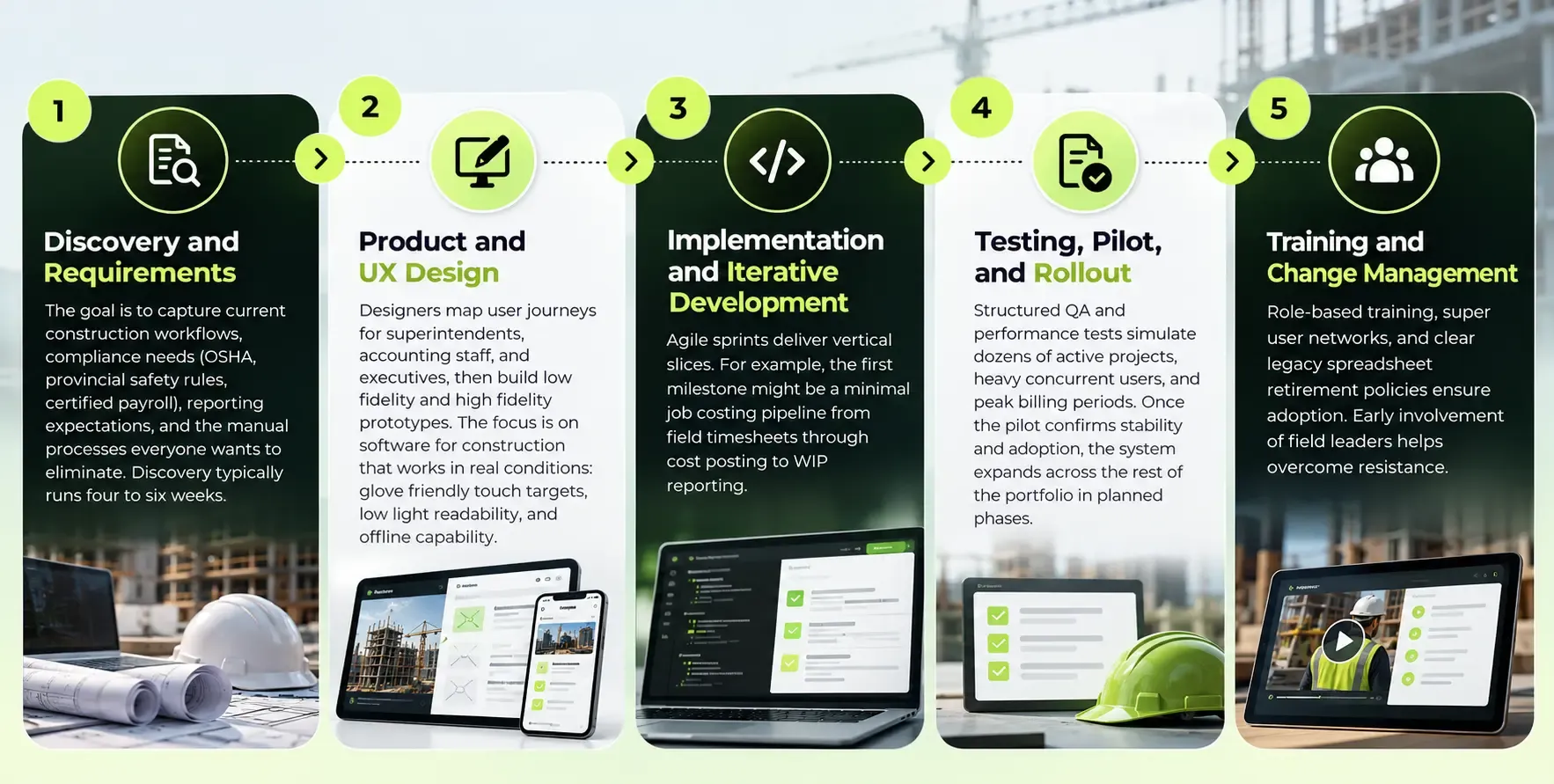
This section outlines the practical phases SoftDoes typically follows when building or modernizing a construction ERP, anchored in real North American project expectations, and many of the same delivery patterns apply to our defense technology software development work in other high-stakes environments.
For a mid-sized contractor, expect a construction ERP implementation timeline of roughly 8 to 12 months from discovery through initial production rollout. Larger multi-entity programs stretch to 18 months or more with phased go-lives by division or region.
Construction ERP Software Cost: What Drives the Budget?
Construction ERP software cost must be viewed as a three to five year total cost of ownership, including development or customization, integrations, data migration, training, and ongoing support.
Here are directional budget bands for U.S. and Canadian firms:
Tier |
Small / focused | Job costing, basic project controls, limited integrations | $40,000 – $80,000 |
Mid-market | Multiple modules, integrations with accounting and PM tools | $80,000 – $200,000 (up to $300K for custom builds) |
Mid-market custom platform | Broader platform with custom UX, mobile, analytics | $300,000 – $750,000 |
Enterprise / multi-entity | Full suite, multi-region, AI/ML, extensive integrations | $250,000 – $800,000+ |
Key cost drivers include the number of modules (job costing, payroll, asset management, service management, analytics), integration complexity, volume of historical data to migrate, security and compliance requirements, and mobile and offline capabilities.
Typical ROI levers include faster billing cycles, fewer manual reconciliations, lower equipment downtime, reduction in rework, and more accurate bidding based on historical job costing data. A painting contractor with roughly $3.2M in revenue improved job costing accuracy to approximately 95%, cut estimate creation time in half, and increased profit margins by 8 to 12% within six months of ERP implementation.
Data, Analytics, and AI in Construction ERP
Integrated data is the real asset of a construction ERP. Without it, analytics and AI are just buzzwords. With clean, consistent project data flowing from every job, the system becomes a competitive advantage for better bids, smarter risk management, and more accurate project forecasting.
The analytics layer should include standard dashboards for project managers (project costs vs budget, open RFIs, pending change orders), executives (backlog, margin at risk, cash flow by project), and finance teams (WIP, revenue recognition, financial reporting by entity). These dashboards turn operational data into action.
AI features in ERP help predict project risks and optimize resources. Realistic use cases for 2024 through 2026 include predicting cost overruns based on early spending trends, suggesting resource allocation adjustments, flagging risky subcontractors based on past performance, and auto-classifying supplier invoices to cost codes. For example, a Midwest contractor could use historical weather data combined with crew performance records to forecast concrete pour delays, giving project managers a two-week planning advantage.
Data governance in construction ERPs ensures reliable data handling and compliance tracking. Without consistent cost codes, data quality checks, and clear ownership, AI will amplify noise rather than deliver insight.
Security, Compliance, and Audit Readiness
Security and compliance are non-negotiable for any construction ERP handling payroll, project financials, contracts, and safety data.
Expected security practices include role based access control, encryption in transit and at rest, multi-factor authentication, comprehensive logging, and regular security testing. User permissions and role-based security enhance data privacy and project management by ensuring that a field foreman sees different data than a controller or an executive.
Compliance aspects span OSHA and local safety record keeping, certified payroll requirements on public works, tax rules that vary by state and province, and document retention policies for audits or legal disputes. Construction ERP improves compliance with regulatory requirements by embedding these rules into approval workflows, automated compliance tracking, and document control processes.
Developers should build auditability into every workflow: immutable logs of approvals, version controlled documents, and clear traceability from source documents like timesheets and invoices to financial postings. Automated compliance tracking simplifies regulatory requirements in construction projects and keeps your firm audit ready without adding manual overhead.
Benefits of Working with SoftDoes on Construction ERP Development
SoftDoes is a seasoned custom software and app development partner for enterprises and scale-ups in North America that need reliable, compliant construction ERP solutions. Our team understands that a construction business is not a generic enterprise. Every workflow, from bid day through closeout, revolves around projects, cost codes, and field operations.
We bring domain experience in project based industries with deep understanding of job costing, resource allocation, asset management, and service management workflows. Select partners with proven construction industry experience, and evaluate their technical architecture expertise for scalability and performance. SoftDoes checks both boxes.
Our technical strengths include cloud native architectures on AWS and Azure, integration expertise with systems like Business Central, Sage, Procore, and payroll providers common across the U.S. and Canada, and a custom software development practice built for complex, regulated environments supported by broader IT consulting services. We ensure robust security and compliance standards across every engagement.
SoftDoes minimizes project risk through discovery workshops, proof of concept builds, data migration planning, and staged rollouts designed to avoid disruption on active jobs. Long-term support is crucial for ERP system evolution, and we build partnerships. Choose partners who understand project-driven business models.
Our value add capabilities include AI and ML for forecasting project costs, automated anomaly detection in job costing, data engineering for historical cost libraries, and UX teams that design for job site use with offline, low light, and glove-friendly interfaces.
How to Prepare Your Organization for a Construction ERP Project
ERP success depends as much on internal preparation as on technology. Before engaging a development partner, there are concrete steps your organization can take to set the project up for success.
Define clear business outcomes. Statements like "cut month end close from 15 to 7 days" or "get next day visibility into project costs across all active jobs" are far more useful than vague goals like "improve efficiency." Prioritize five to seven must-have workflows for phase one based on where you lose the most time or money today.
Build a cross-functional steering group. Include representation from finance, operations, project managers, equipment management, and IT, plus at least a few respected field leaders. The field perspective matters because superintendents and foremen are the ones who will either adopt the system or ignore it.
Perform a system and data inventory. List every tool your teams use today: accounting software, estimating tools, scheduling platforms, spreadsheets, and field apps. Document who owns each data source, where cost codes are defined, and known data quality issues.
These steps can be completed in 30 to 60 days and dramatically improve the quality of your discovery phase when you engage a partner.
Common Pitfalls in Construction ERP Development (and How to Avoid Them)
Many construction ERP implementation efforts fail not because of technology, but because of scope creep, misaligned expectations, and weak change management. Here are the most frequent pitfalls and how to avoid them.
Going big bang. Trying to deploy every module across all departments and job sites at once is a recipe for chaos. Budget overruns often occur due to underestimated project complexity. The counter-strategy is phased rollouts. Start with job costing and project controls for one division, prove the value, then expand.
Underestimating data migration. Legacy spreadsheets, inconsistent cost codes, and missing historical records create serious problems during migration. Timeline delays can arise from incomplete data migration preparation. Profile and clean your data early, ideally during or immediately after discovery.
Customization overload. Customization overload can introduce technical risks and maintenance burdens. Every custom field, custom report, and unique workflow adds cost now and complexity later. Adopt standard business processes where possible and reserve customization for genuine competitive differentiators.
Neglecting field user experience. If the system is clunky on a phone, requires perfect connectivity, or takes too many taps to log a timesheet, field teams will not use it. Project data stays fragmented. Involve superintendents and foremen in UX testing from the design phase.
Consider two specialty contractors. One let scope creep extend their go-live by six months, adding modules no one had asked for while the core job costing engine remained untested on real data. The other stuck to a strict phase one scope, covering job costing, procurement, and basic project controls, went live on schedule, and achieved measurable margin improvement within a year.











Comments (0)
No comments yet.