AI tutors are the most requested feature of 2026 across higher education and corporate training. The global online tutorial system market is projected to reach $23.6B by 2027, and organizations across the U.S. and Canada are racing to figure out how to build an AI tutor that actually works. This article is a practical guide. It covers architecture, instructional design, cost, compliance, and the decisions you need to make before writing a single line of code.Table of contents1. Key Takeaways2. What an AI Tutor Is (and Is Not)3. Define Goals, Learners, and Pedagogy Before You Touch Code4. Core Architecture of a Modern AI Tutor5. Designing the Learning Experience and Instructional Flows6. Grounding Answers with Retrieval Augmented Generation (RAG)7. Building the Tutor Backend: APIs, Models, and Chat Logic8. Memory, Personalization, and Supporting Multiple Students9. Designing the Frontend: UI and UX for Learners and Instructors10. Guardrails, Safety, and Pedagogical Controls11. Analytics, xAPI-style Tracking, and Measuring Learning Impact12. Costs, Trade-offs, and Build vs Buy Decisions13. Compliance, Privacy, and Data Governance for Education and Training14. How SoftDoes Helps You Build and Scale an AI Tutor15. Benefits of Working with SoftDoes on Your AI Tutor16. Implementation Roadmap: From Idea to Deployed AI Tutor Key Takeaways
- A modern AI tutor is more than a chatbot. It integrates a large language model with retrieval augmented generation, student modeling, and instructional design to create personalized learning experiences.
- Teams must choose between hosted APIs and custom builds. The real cost includes both engineering (typically $60,000 to $150,000) and ongoing token usage that can exceed $5,000 per month.
- Grounding answers in course content, enforcing strong guardrails, and maintaining persistent memory are mandatory to avoid harmful or incorrect answers at scale.
- A personalized AI tutor must support multiple students, store semantic memories (not raw chat history), and adapt its teaching style over time based on individual needs.
- SoftDoes designs and builds custom AI tutoring systems for U.S. and Canadian education and training organizations, handling everything from architecture through compliance.
What an AI Tutor Is (and Is Not)
An AI tutor is a conversational system designed to teach specific skills or domains. It diagnoses learner strengths and weaknesses, delivers instruction, guides practice, gives feedback, and tracks progress over time. It is not a generic Q&A bot that spits out answers to any question a user types in.
The difference matters. A simple FAQ chatbot responds turn by turn without memory, adaptation, or alignment to learning goals. A personalized AI tutor uses adaptive learning, remembers where a student struggles, follows a pedagogy, and adjusts difficulty and explanation style based on performance. AI tutors integrate large language models with pedagogical frameworks to create something that actually teaches rather than just answers.
The typical 2026 tech stack for an AI tutor includes a large language model (the reasoning engine), retrieval augmented generation (grounding answers in your actual curriculum), a student model or memory layer, analytics, and governance layers. Use cases span the map:
- Higher education: Practice problem generation, exam prep, feedback on writing or code
- Corporate training: Compliance training, sales skill coaching, onboarding programs
- K–12: Remedial math support, personalized practice sequences, science tutoring
Define Goals, Learners, and Pedagogy Before You Touch Code
Consider a nursing program that wants to help students learn pharmacology dosing before clinical rotations. The temptation is to jump straight into building the AI. Resist that. The most important work happens before anyone opens a code editor.
Here is what product managers and learning designers must complete first:
- Specify your target audience and learning outcomes. "First-year nursing students will accurately calculate pediatric drug dosages with 90% accuracy by week six." Not vague. Measurable.
- Choose a tutoring style. The Socratic method encourages critical thinking through guiding questions. Step by step guidance works well for procedural tasks. Exam prep coaching fits test-heavy courses. Most effective AI tutors use a mixed approach.
- Define instructional design basics. Write learning objectives. Plan scaffolding sequences. Build in formative checks (diagnostic assessments that evaluate existing knowledge to tailor learning plans) and feedback loops.
- Start narrow. Pick one subject and one goal. "Help Algebra I students master factoring quadratics in four weeks" is a better starting scope than "teach all of math." A Wharton study of 10 high schools found that personalized practice sequences improved exam scores by about 0.15 standard deviations, roughly six to nine months of extra learning, without increasing teacher load.
- Map prior knowledge requirements. What do learners already know? What misconceptions will they bring? Subject matter experts should document these before you build custom learning platforms.
Personalized learning adapts the teaching approach based on individual learner needs. You cannot personalize what you have not defined.
Core Architecture of a Modern AI Tutor
A modern AI tutor is modular. Here is how each component fits together:
Component |
Frontend UI | Chat interface, progress dashboards, instructor views | React, Next.js, Flutter |
Tutoring API | Orchestrates requests, manages sessions, routes logic | Python (FastAPI), Node.js |
Language Model | Generates responses, reasoning, explanations | OpenAI GPT, Anthropic Claude, open models |
Retrieval Layer | Searches vetted course content before generating answers | Vector DB (Pinecone, Weaviate, Milvus) |
Memory Store | Persists per-student learning profiles and semantic facts | Postgres, Redis, Mem0 |
Analytics | Tracks interactions, misconceptions, usage patterns | xAPI, data warehouse |
Admin Tools | Content management, guardrail configuration, user roles | Custom dashboards |
If you are weighing a custom LMS software development approach, the AI tutor often becomes a module within a larger learning platform rather than a standalone product.
Designing the Learning Experience and Instructional Flows
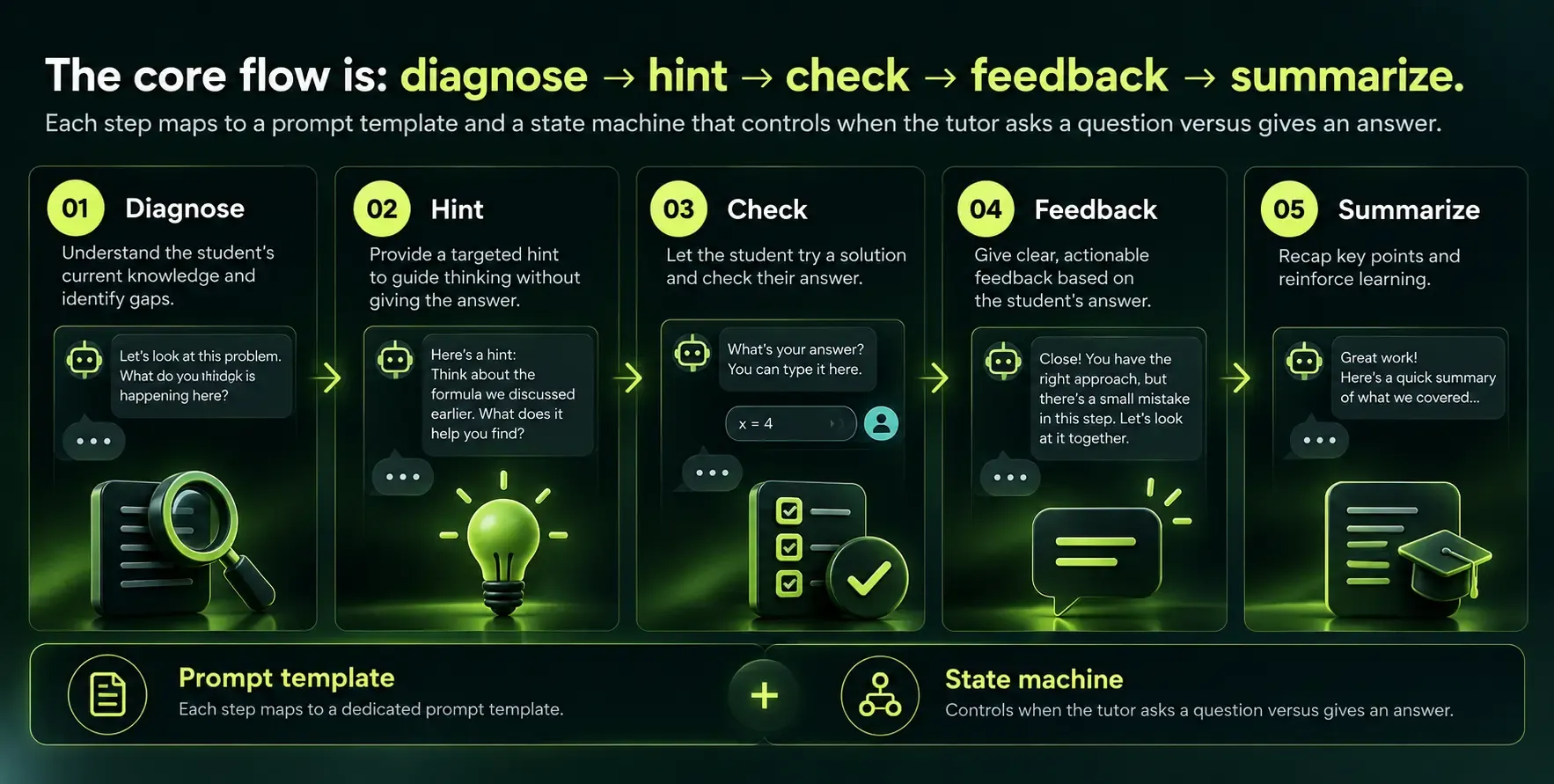
Effective AI tutors guide students toward maximizing their learning potential. They do this through structured instructional flows, not by dumping information. Here is how to translate classic instructional design into AI tutor behavior:
Reusable conversational templates:
- Worked examples: Show a solved problem, then prompt the student to solve a similar one with decreasing support. AI tutors can provide real time feedback on assignments as the student works through each step.
- Error spotting exercises: Present a flawed solution and ask the student to find errors.
- Scaffolding with fading hints: For difficult tasks, provide more hints early. As student mastery increases, reduce hinting. Adaptive learning engines adjust difficulty based on real time proficiency levels.
- Spaced review: Spaced repetition enhances long term retention of learned material. The tutor revisits previously learned concepts at increasing intervals.
- Diagnostic checks: Before starting a new topic, the tutor assesses prior knowledge to determine the right entry point.
Subject matter experts, instructional designers, and AI engineers should collaborate when drafting system prompts and flows. The same logic that makes a great human tutor (patience, sequencing, checking for understanding) needs to be encoded into the system. Personalized learning improves student engagement and motivation when done right.
Grounding Answers with Retrieval Augmented Generation (RAG)
Think of retrieval augmented generation as "open book AI." Before the tutor answers a question, it searches your vetted content, finds the relevant passages, and uses them to generate a grounded response.
Here is how the pipeline works:
- Index your content. Textbooks, slide decks, PDFs, and LMS lessons are chunked into passages and converted into embeddings. Vector databases store and retrieve educational content efficiently.
- Query flow. When a student asks a question, the system extracts intent, retrieves the top matching passages from the vector database, builds a structured prompt that includes those passages as context, calls the language model, and cites sources explicitly.
- Retrieval augmented generation uses specific curricula and textbooks for alignment.
Knowledge retrieval systems ensure tutors provide curriculum aligned answers. In practice, retrieval augmented generation reduces incorrect answers to about 1.5%. That is a significant improvement over ungrounded generation, where hallucination rates can exceed 15 to 20%.
Example: A nursing pharmacology tutor retrieves dosing tables from the institution's approved drug reference before answering any medication question. Without this grounding, the model might generate plausible but dangerously wrong dosage information.
RAG does not eliminate errors entirely. But it makes the tutor dramatically more reliable and gives you control over what content the system draws from.
Building the Tutor Backend: APIs, Models, and Chat Logic
The backend is where the tutoring session comes to life. Here is what to build:
- Design a /chat or /tutor API that accepts messages, user_id, course_id, and returns streaming responses.
- Hosted vs. self hosted models. Hosted LLM APIs give you speed to prototype. Token costs for AI models can reach $10 per million output tokens for frontier models, though newer options like GPT-5.6 Luna offer rates as low as $0.20 per million input tokens. Self hosting a 70B parameter model on dedicated GPUs runs roughly $70,000 to $115,000 per year in total cost. The trade off comes down to volume, compliance requirements, and operational capacity.
- Model routing for cost optimization. Use lighter, cheaper models for routine questions (vocabulary definitions, simple recall) and heavier models for complex reasoning (multi-step math problems, code debugging).
- Chat history management. Do not dump the entire chat into every prompt. Use truncation policies and summary strategies. Prompt caching can further reduce costs by reusing common prompt prefixes across sessions.
For teams exploring machine learning model development options, the hosted vs. self hosting decision often depends on data sensitivity and expected volume.
Memory, Personalization, and Supporting Multiple Students
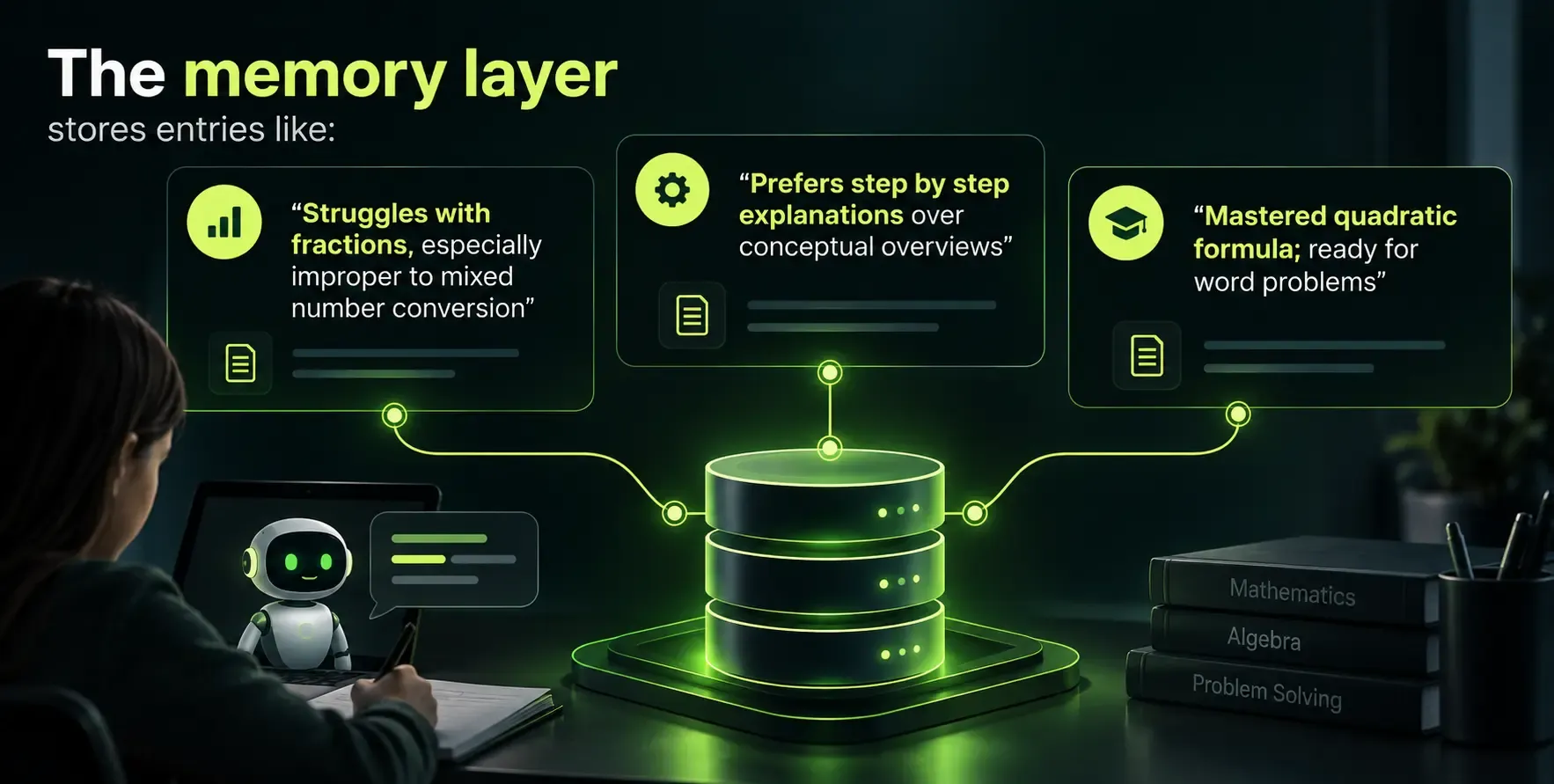
Chat history alone is not enough for personalization. A transcript of every message a student has ever sent is too large to fit in context, too noisy to be useful, and too risky to store raw.
Instead, build a structured learner model. Tools like Mem0 extract semantic facts instead of storing raw chat logs.
Dynamic student profiles track mastery of sub topics and misconceptions. Each response queries the memory store by user_id (and optionally subject) to personalize explanations and difficulty.
Session 1 vs. Session 5 example:
Aspect |
Greeting | "Welcome! Let's start with a quick check on what you already know about fractions." | "Welcome back. Last time you nailed adding fractions. Today we'll tackle multiplying mixed numbers." |
Difficulty | Starts at baseline | Adjusted based on accumulated profile data |
Hints | Generous scaffolding | Reduced; student has proven capability |
Designing the Frontend: UI and UX for Learners and Instructors
The frontend is what students learn through and what instructors monitor. Get it wrong and engagement collapses. In the Khanmigo study, only 17% of error sessions involved substantive dialogue, largely because of friction in the interface.
For learners:
- Chat style interface with clear roles (student vs. tutor) and visual message separation
- Loading indicators for streaming answers
- An "ask for a hint" button and toggles for more or less detailed explanations
- Progress dashboards that visualize learner strengths and areas needing improvement
- Citations and linked source passages so students can see where the tutor's answer comes from
- Multi-modal interaction that supports text and voice inputs for learners
For instructors:
- Aggregated analytics showing most missed concepts and average time to mastery
- Alerts for risky misconceptions or topics triggering frequent human escalation
- Exportable reports for academic review boards or training managers
AI tutors can use various interaction modes to cater to different learning styles. Design for mobile responsiveness, accessibility (screen readers, keyboard navigation), and low distraction layouts.
Guardrails, Safety, and Pedagogical Controls
Students will try to break your tutor. They will ask it to write their essays, reveal exam answers, or go off topic. Guardrails prevent AI tutors from providing direct answers to prevent dependency.
Layers of defense:
- Strict system prompts that define the tutor's role, boundaries, and refusal patterns. A system prompt might include: "You are a math tutor. Never provide final answers to graded assignments. Always ask the student to show their work first."
- Content filters that catch profanity, harmful content, and out of scope requests
- Deterministic checks on output (e.g., regex for exam answer patterns, keyword blocklists)
- Human escalation paths for ambiguous or high stakes answers, especially in healthcare, finance, and compliance training
- Rules like "do not simulate self-harm discussions" enforced through both code and prompt engineering
The trade off is between safety and smooth UX. Too many guardrails create frustration. Too few create risk. Test extensively with real learners and iterate. Feedback should help learners understand their mistakes and guide corrections, not just block them.
Analytics, xAPI-style Tracking, and Measuring Learning Impact
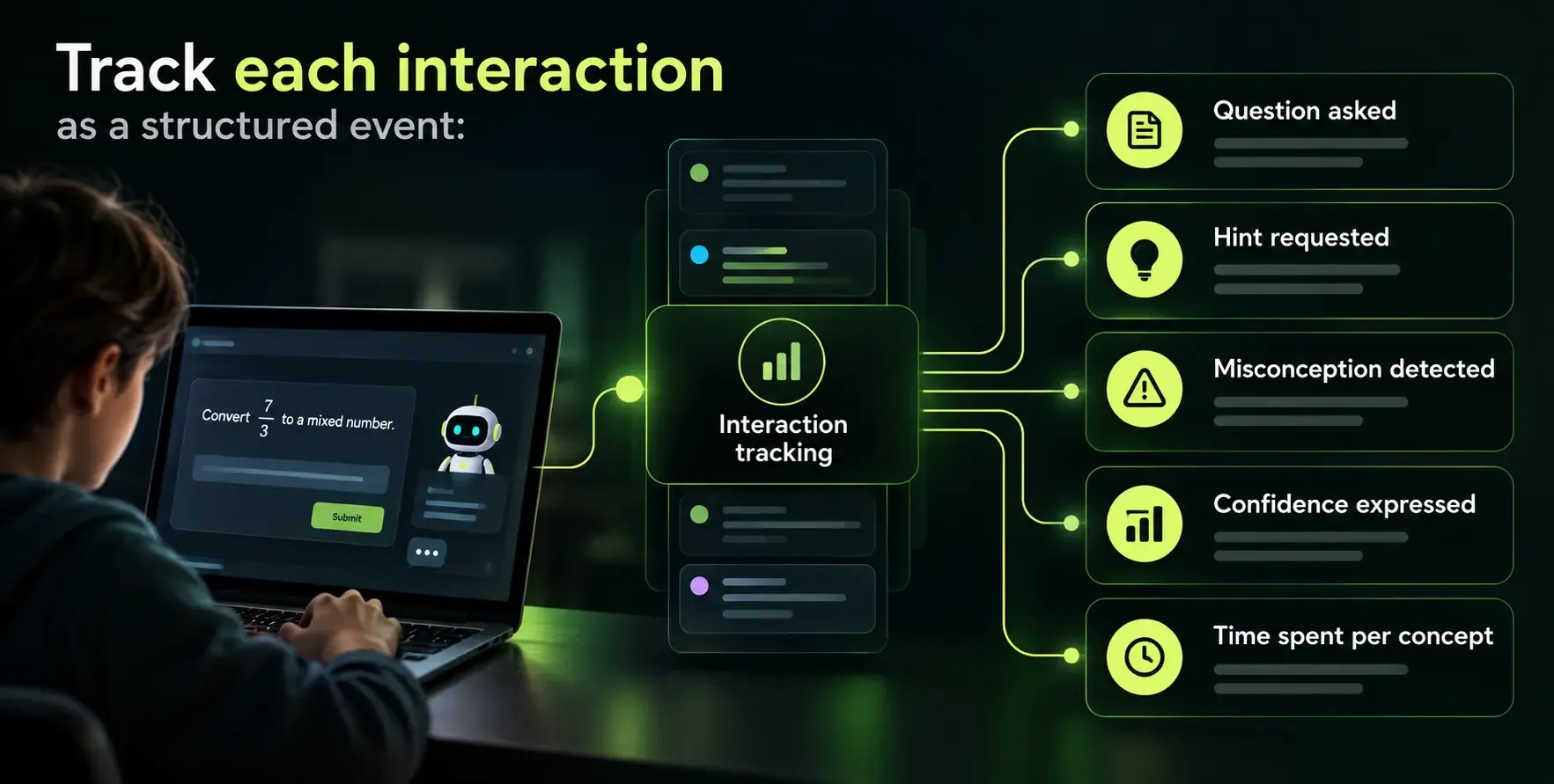
If you cannot measure it, you cannot improve it. AI tutoring systems can track student progress and performance at granular levels.
Use xAPI-like schemas and a learning record store or analytics warehouse so learning teams can run longitudinal studies. Automated evaluations assess tutor performance based on learner interactions.
Corporate training example: A financial services firm tracks which compliance modules generate the most tutor escalations. They discover that anti-money laundering scenarios are consistently misunderstood and redesign those lessons, cutting repeat training time by 30%.
College example: A U.S. university correlates AI tutor usage with midterm scores. Stanford research found that data from just two to five hours of student interaction with intelligent tutoring tools predicted performance on external standardized tests months later.
A well-built AI tutor produces learning gains of about 0.66 standard deviations. Intelligent tutoring systems can raise learning outcomes by about 0.71 standard deviations when properly designed and deployed. AI tutors can improve student engagement through interactive content, but only when you track what is working and iterate.
Costs, Trade-offs, and Build vs Buy Decisions
Here is where leadership pays the closest attention. Breaking down the real cost of an AI tutor:
Build costs:
- Building an AI tutor costs between $60,000 and $150,000 for a focused pilot (single subject, limited user base, core features)
- Full scale deployments across multiple subjects can run $1M to $3M including UX, content pipelines, compliance, and analytics
Run costs:
- Monthly run costs for AI tutors can exceed $5,000, covering token usage, hosting, monitoring, and content updates
- A hosted tutoring API charges per learner indefinitely, which adds up fast at scale
- Token costs vary widely: frontier models may charge $5 to $15 per million tokens; newer models are much cheaper
Build vs. buy comparison:
Factor |
Speed to launch | Fastest | Fast | Slowest |
Control over pedagogy | Low | Medium | Full |
Data privacy | Vendor dependent | Moderate | Full control |
Long term cost | Subscription scales linearly | Per-learner fees | Higher upfront, lower at scale |
Customization | Limited | Moderate | Unlimited |
Retrieval augmented generation and smarter prompts (prompt caching, model routing) reduce ongoing spend significantly. For top education software development companies and data-driven AI consulting partners with Databricks expertise, helping clients optimize these costs is a core value proposition.
Decision factors for U.S. and Canadian technology leaders:
- If you need full control over data and pedagogy, build custom
- If you need to launch in weeks, buy or integrate
- If your budget is tight but volume is low, hosted APIs win
- If your volume exceeds tens of millions of tokens monthly, self hosting or hybrid architectures start making sense
Compliance, Privacy, and Data Governance for Education and Training
In the U.S., FERPA governs student education records. Educational compliance requires adherence to regulations like COPPA and FERPA. In Canada, PIPEDA applies federally, with provincial laws in Alberta, British Columbia, and Quebec adding additional requirements.
Key principles:
- Consent and data minimization. Collect only what you need. Store learning profiles, not full conversation transcripts with personally identifiable information.
- Models that do not train on customer data. Many institutions prefer self hosting or private API endpoints with clear data use agreements.
- Logging and audit trails. Who accessed what student record, when, and for which purpose.
- Keep the AI tutor as a teaching aid, not the final decision maker for grades, promotions, or compliance certification.
Sending raw PII or full academic records to third party APIs without safeguards is a compliance risk. Review your data governance frameworks before selecting an architecture.
How SoftDoes Helps You Build and Scale an AI Tutor
SoftDoes is a software engineering and AI partner that builds custom AI tutors for enterprises, universities, and training providers in the U.S. and Canada. We work with organizations that need more than an off the shelf product.
Core capabilities:
- LLM integration and model selection (hosted, self hosted, or hybrid)
- Retrieval augmented generation pipelines for curriculum grounding
- Student modeling and memory architecture
- Secure cloud deployment with compliance controls
- Integration with LMS platforms (Canvas, Blackboard, Moodle) and HRIS systems (Workday, Salesforce)
How engagements typically run:
- Discovery workshops to define learners, pedagogy, and success metrics
- Architecture design aligned to your compliance and budget requirements
- Pilot build targeting a single course or training program
- Iterative tuning based on real learning data and instructor feedback
We have experience working in regulated environments where privacy, uptime, and compliance determine whether a tool can be deployed at all. Whether you are building an onboarding program for a financial services team or a degree support system for a university in hubs like New York, our AI development services for New York enterprises can help you choose the right digital transformation partner and move from idea to production.
Benefits of Working with SoftDoes on Your AI Tutor
Working with SoftDoes means you get a partner who handles the full stack, not just the AI layer.
- End to end support: From instructional design input and UX design to AI engineering, data pipelines, and production monitoring. No handoffs between five different vendors.
- Integration with your existing systems: Canvas, Blackboard, Moodle, Salesforce, Workday, and custom portals used across North America. We build connectors, not workarounds.
- Long term cost optimization: Model selection, prompt caching, retrieval design, and inference routing that keep run costs predictable, not just low at launch.
- Transparent, trustworthy systems: Clear guardrails, analytics dashboards, and audit trails so educators and leaders can trust and refine the tutor over time.
- Flexible engagement models: Staff augmentation, dedicated teams, or full project delivery depending on your internal capacity and timeline.
For organizations exploring custom AI solutions, including enterprises in regions like Kansas custom AI solutions and consulting services bring the artificial intelligence and education domain expertise needed to build powerful tools that actually produce measurable learning outcomes.
Implementation Roadmap: From Idea to Deployed AI Tutor
Here is a practical roadmap for a mid-sized deployment:
Phase 1: Discovery (2 to 3 weeks)
- Define target learners, learning outcomes, and success metrics
- Audit existing content and technology infrastructure
- Select initial subject and scope
Phase 2: Prototype (3 to 4 weeks)
- Build core tutoring API, RAG pipeline, and basic chat UI
- Create initial system prompts and conversational flows
- Connect to one content source (textbook, slide deck, or course module)
Phase 3: Content Ingestion (2 to 3 weeks)
- Index full curriculum into vector database
- Validate retrieval quality with subject matter experts
- Fine tune prompt templates based on test conversations
Phase 4: Pilot Launch (2 to 4 weeks)
- Deploy to a small group of real learners (one course, one section)
- Collect usage data, satisfaction surveys, and instructor feedback
- A/B test against control groups where possible
Phase 5: Scale Out (4 to 8 weeks)
- Expand to additional courses, subjects, or departments
- Add instructor dashboards and analytics
- Integrate with LMS and student information systems
Phase 6: Continuous Improvement (ongoing)
- Monitor learning outcomes, engagement, and cost metrics
- Update content as curriculum changes
- Refine model routing and prompt strategies based on data
A focused team with a partner like SoftDoes can launch a limited pilot within 8 to 12 weeks. Campus-wide or enterprise-wide rollouts take longer due to integration and governance requirements, but the staged approach keeps risk low and value visible from the start.












Comments (0)
No comments yet.