Key Takeaways
- AI powered document automation can cut common drafting, document review, and contract management tasks by 50 to 80% for U.S. and Canadian law firms and in house legal teams.
- Combining rules based templates with AI tools for clause suggestions and contract analysis delivers better accuracy and risk control than relying on generative AI alone.
- Secure integration with existing document management and contract management systems is essential to protect client data and meet professional obligations.
- A step by step rollout starting with one or two high volume workflows like NDAs or engagement letters reduces change risk and speeds up ROI.
- SoftDoes can build custom AI powered document automation solutions tailored to regulated industries across the U.S. and Canada.
What AI Legal Document Automation Actually Means in 2026
By 2026, U.S. and Canadian legal teams are using AI tools daily for document drafting, contract review, and document management. Legal document automation with AI is part of everyday legal work at firms and corporate legal departments of all sizes.
So what does the term actually mean? Legal document automation combines two layers. The first is rules based automation: templates, clause libraries, and conditional logic that adapt documents based on inputs like governing law or payment terms. The second is AI powered features like summarization, clause suggestions, contract analysis, and document review assistance. Legal AI applications now span drafting, document review, summarization, and legal research, all from within a single workflow.
Lawyers still own the final legal judgment. But AI handles much of the repetitive legal work, including populating client and matter data, checking defined terms, and flagging missing or risky clauses. The document lifecycle begins with client intake for information and extends through execution and archival.
Typical users include law firms, in house legal departments, legal operations teams, and business stakeholders in procurement, HR, and sales who need fast contract workflows. This article covers practical use cases, platform selection criteria, implementation steps, and how SoftDoes helps build secure, customized automation for legal teams in the U.S. and Canada.
From Manual Drafting to AI-Powered Workflows: How Legal Work Has Evolved
For most of the last two decades, legal drafting looked the same. Attorneys opened Microsoft Word, found the last version of a similar agreement, ran find and replace for party names and dates, and hoped nothing carried over from the old deal. This "copy, edit, hope" approach was standard across law firms and corporate legal departments alike.
Document automation software minimizes human error in legal drafting, but without it, errors multiplied. Wrong party names, outdated clauses, and jurisdiction specific mistakes were common. Automated documents reduce copy paste errors and jurisdiction specific mistakes, which is exactly why the industry started looking for better tools.
Classic document automation and mail merge tools arrived in the mid-2010s. They handled basic template filling but struggled with complex conditional logic and clause variations. If a contract needed different indemnity language based on the counterparty type or the state of execution, the system often could not keep up.
Generative AI entered legal practice around 2023 to 2024, first as an experiment and then as embedded features inside document management systems and contract lifecycle management platforms. By 2025, blended workflows became common, with rules based automation handling the structural parts and AI handling suggestions, first drafts, and risk analysis.
The transition to AI driven workflows shifts focus from labor intensive tasks to strategic advisory work. Attorneys spend less time on manual data entry and more time advising clients, reviewing risk, and negotiating terms that actually matter, especially when they partner with teams that specialize in custom AI and machine learning services to align automation with their specific practices.
Core Components of AI-Powered Document Automation
Understanding the building blocks of AI powered document automation helps you evaluate tools and plan implementation. Here are the main components.
Intelligent templates are documents with variables, clause libraries, and conditional logic that auto adjust based on answers. For example, a template might swap governing law clauses, adjust payment terms, or include different representations depending on whether the counterparty is a corporation or an individual. Automated documents follow pre-approved templates to ensure consistency across every output.
AI assisted drafting goes a step further. Instead of just filling blanks, AI drafting features auto generate first drafts for NDAs, MSAs, or employment agreements, and propose alternative legal language aligned with your playbooks. Automated document generation can be triggered by structured data inputs from intake forms, CRM records, or matter management systems.
AI powered document review and contract analysis can summarize agreements, extract key fields like parties, dates, and liability caps, flag risky clauses, and compare language against fallback standards. AI automates the extraction of key terms from legal documents, replacing hours of manual scanning. Structured intake workflows capture legal requests as discrete records, feeding them directly into the review pipeline.
Integrations tie everything together. Platforms can integrate with Microsoft Word for seamless document editing, and connect with e-signature tools, practice management systems, and document management systems. Think of it as connecting disparate systems so nothing falls through the cracks.
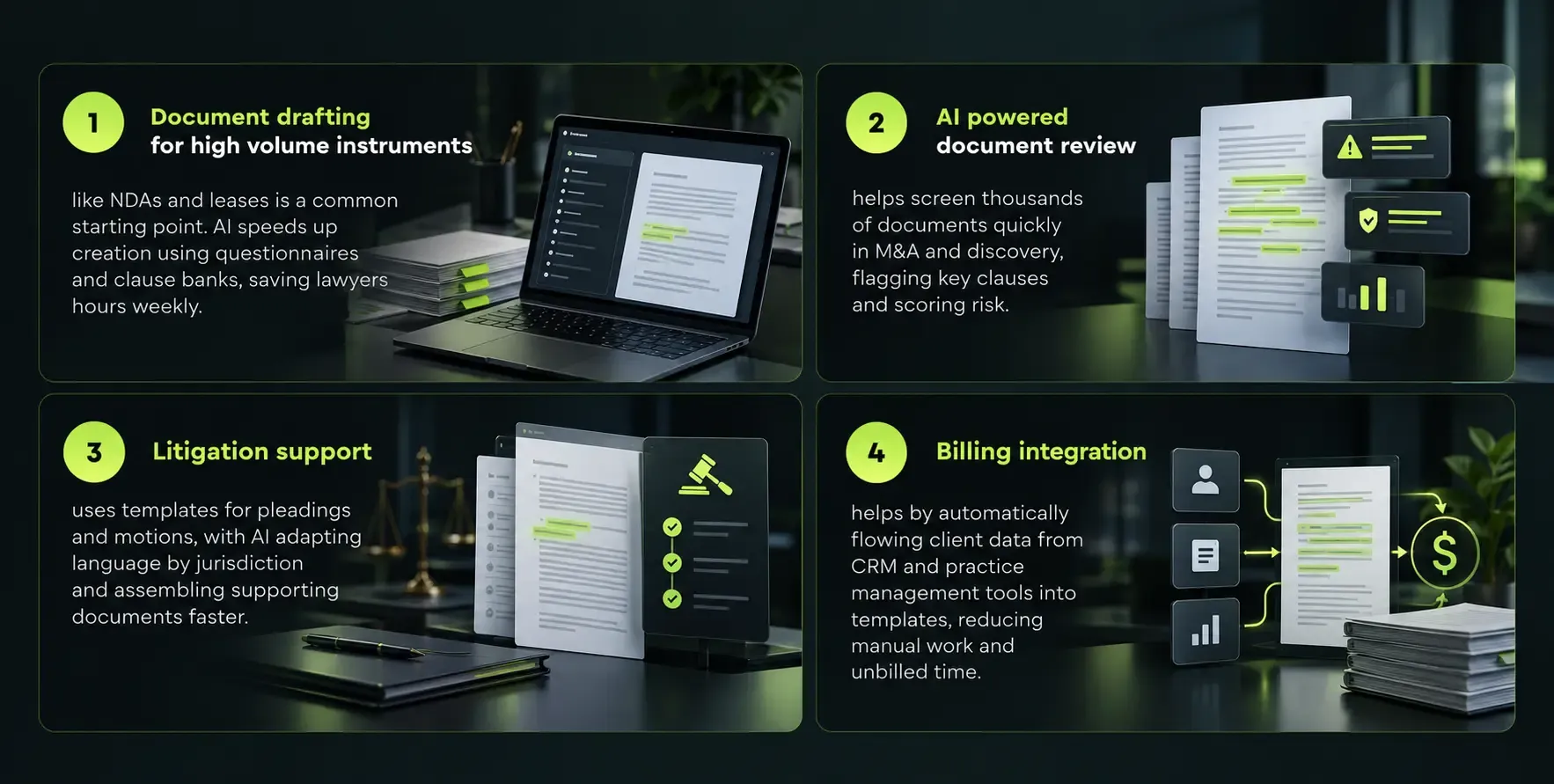
High-Impact Use Cases for Law Firms
High-Impact Use Cases for In-House Legal and Corporate Teams
Corporate legal departments and legal operations teams focus on speed, self-service, and consistency for business stakeholders. The priorities differ from law firms but the tools overlap.
Self-service document automation portals let sales, HR, and procurement teams generate pre-approved NDAs, data processing agreements, and offer letters by answering guided questions. In house legal teams shift from drafting every document to governing the templates and business rules behind them. This is similar to the approach used in building custom learning platforms, where the system empowers end users while centralized teams maintain quality controls.
AI powered contract review accelerates redline review for vendor agreements, software licenses, and partnership contracts. AI highlights non-standard clauses, compares them against approved positions, and suggests fallback language. AI can reduce intake triage time from 30 minutes to seconds when intake workflows are properly structured. Contract management automation reduces review time by up to eight hours weekly for in house teams handling large volumes.
Automated contract management helps track renewal dates, notice periods, SLAs, and indemnity provisions with alerts and dashboards. Legal teams can automate document review to enhance consistency and speed across the entire contract portfolio. Automation in legal workflows improves capacity without increasing headcount, and automation can increase legal team capacity equivalent to several additional lawyers.
One U.S. company processing over 200 contracts per month cut turnaround from weeks to days by automating intake, approval workflows, and standardized contract templates across its legal department.
Where AI Drafting and Review Deliver the Biggest Time Savings
AI reduces document drafting time by up to 80% for routine contracts like NDAs, SOWs, and basic corporate resolutions. AI can process legal requests in seconds instead of minutes, and legal document automation creates measurable impact during template population, the step where most manual time was historically spent. Firms using AI for drafting report reclaiming up to 240 hours per lawyer per year.
More bespoke matters like complex commercial litigation briefs see smaller but still meaningful gains. AI generated first drafts and citation checks save attorneys from starting with a blank page, even if the final product requires substantial revision.
AI suggestions for clauses and definitions cut negotiation cycles by pre-populating fallbacks and pre-approved alternative wording. When legal document automation tools offer relevant clauses from a firm's own clause library, attorneys can move through document production much faster.
AI can accelerate contract review processes significantly, improving turnaround times. AI can reduce contract review time by up to eight hours weekly for teams doing regular deal work. But attorneys still must review every AI output. They start from a high quality baseline instead of a risky copy paste file, which changes the nature of the work without removing the need for legal judgment.
Data, Templates, and Clause Libraries: Getting the Foundations Right
AI tools are only as good as the templates, clause libraries, and client data they rely on. Getting these foundations right determines whether your automation scales smoothly or creates new problems.
Master templates should be designed for each recurring document type. Include variables for party names, dates, governing law, and jurisdiction specific clauses. Document automation software should allow easy template updates so that legal staff can make adjustments without needing developer support for every small change.
Clause libraries organize preferred, fallback, and prohibited language for key topics:
Topic |
Limitation of liability | Mutual cap at contract value | Cap at 2x fees paid | Unlimited liability |
Indemnification | Mutual, carve-outs for IP | One-way with cap | Broad uncapped indemnity |
IP ownership | Work product assigned to client | Licensed to client | Vendor retains all IP |
Data security | Industry standard encryption | Reasonable measures | No data protection terms |
Clean client data from CRM, practice management, and contract management systems is essential. If matter data is fragmented or error-prone, automation will propagate those mistakes. This is where strong data governance frameworks pay dividends.
Schedule a periodic review, quarterly or twice a year, where partners and senior counsel validate templates and clause standards against current law, regulation, and firm policies.
Security, Confidentiality, and Compliance for Client Data
Data confidentiality is a key concern when using AI for legal document automation. In the U.S., ABA Formal Opinion 512 (July 2024) requires lawyers using AI to maintain competence, protect confidentiality, get informed consent, and supervise AI output. In Canada, law societies require technological competence and disclosure to clients when AI tools are involved. California has proposed amendments to its Rules of Professional Conduct that explicitly address AI.
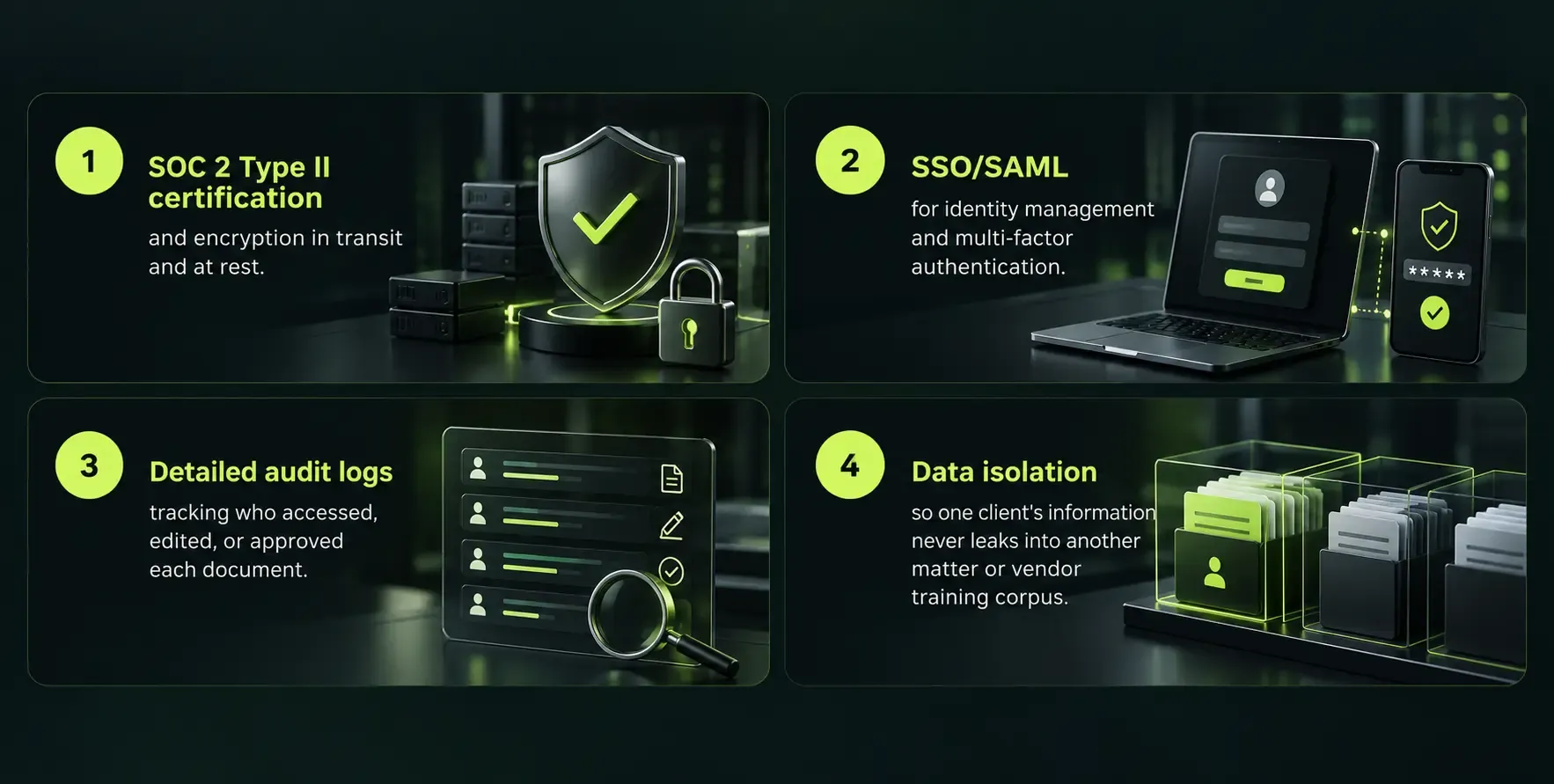
Legal teams should demand the following from AI powered document automation vendors:
Generative AI can produce plausible but incorrect legal content without proper validation. AI systems may not reliably account for jurisdiction specific legal requirements, especially across U.S. states and Canadian provinces with different statutory frameworks. At the same time, AI tools monitor hundreds of regulatory changes across multiple jurisdictions, which helps legal professionals stay informed but does not replace careful review.
Policies should specify which AI tools can access privileged documents, how to configure redaction or exclusion rules for sensitive matter data, and when to disclose AI use to clients. SoftDoes designs AI solutions with security and regulatory expectations for industries like healthcare, finance, and energy front and center.
Evaluating AI Legal Document Automation Platforms
Many legal AI tools and legal specific platforms sound similar on paper. Law firms and in house legal departments need a clear evaluation checklist to separate real capability from marketing.
Product criteria:
- Depth of document automation, including support for complex conditional logic and clause variations
- Quality of AI drafting and contract analysis, tested against your own documents and playbooks
- Ease of building and updating templates without coding (no-code or low-code editors)
- Document summarization and data extraction accuracy
Technical fit:
- Microsoft Word integration for seamless document editing
- Connections to Outlook, Teams, document management systems, and contract management platforms already in use
- Integration with existing tools is crucial for workflow efficiency; effective AI implementation requires integration with existing legal systems and processes
Governance features:
- Role based access and approval workflows
- Redline tracking and document versions management
- Support for different playbooks by practice area, business unit, or jurisdiction
Team size considerations:
- Smaller teams need simple, intuitive software solutions that deliver value without heavy configuration
- Larger firms prioritize scalability and advanced features across multiple offices and practice areas
- Pricing models should align with your budget and usage volume
Involve legal, IT, security, and operations leaders in pilot evaluations. Use real sample documents and time actual drafting and document review tasks. When Wilson Sonsini ran competitive bake-offs for contract analysis tools, they found accuracy ranged from 40% to 95%, a gap that only shows up when you test with your own data.
How to Implement AI Document Automation Step by Step
Firms in the U.S. and Canada can roll out AI powered document automation in stages to reduce risk and increase adoption. Here is a practical plan.
- Select 1 to 2 high volume document types. NDAs, retainer agreements, or engagement letters are common starting points. Map the current workflow end to end and define success metrics like turnaround time, error rate, and hours per document.
- Convert existing documents into structured templates. Add conditional logic for jurisdiction, entity type, and other variables. Connect templates to client data sources from CRM, practice management, or contract management systems. Structured intake workflows can reduce request triage time from 30 minutes to seconds. Document automation minimizes human error in legal drafting processes at this stage.
- Pilot with a small group. Select attorneys and paralegals who will test the AI system, gather feedback, and iterate on templates and clause libraries. This is similar to how organizations approach data migration projects, starting small and expanding after proving results.
- Integrate with the same platform ecosystem. Connect the AI platform to document management, e-signature, billing, and time tracking so the workflow runs on the same platform where people already work.
- Document change management items. Create training sessions, internal guidelines, and a clear policy on what AI generated content always requires human review.
Measuring ROI: Beyond Time Savings
While hours saved on document drafting and document review matter, leadership also cares about broader business impact. Here is how to build a compelling case.
Quantitative metrics:
- Reduction in contract cycle time from request to execution
- Fewer drafting errors and resubmissions
- Improved compliance with playbooks and outside counsel guidelines
- Number of documents processed per month per role after task automation
- Cost savings in salary hours for associates and paralegals on document production
Qualitative benefits:
- More predictable workload for lawyers
- Better client service through faster turnaround
- More time for litigation strategy, advisory work, and complex documents instead of administrative tasks
In many law firms and corporate legal departments, even a 20 to 30% productivity gain on high volume processes translates into six or seven figures of annual value. A 2026 global survey found that 93% of legal professionals believe there is strong profitability potential in streamlining administrative tasks, and 42% report spending two to five hours daily on administrative work.
Use dashboards from contract management and document management systems, combined with billing or time tracking data, to tell a clear ROI story to leadership.
Common Pitfalls and How to Avoid Them
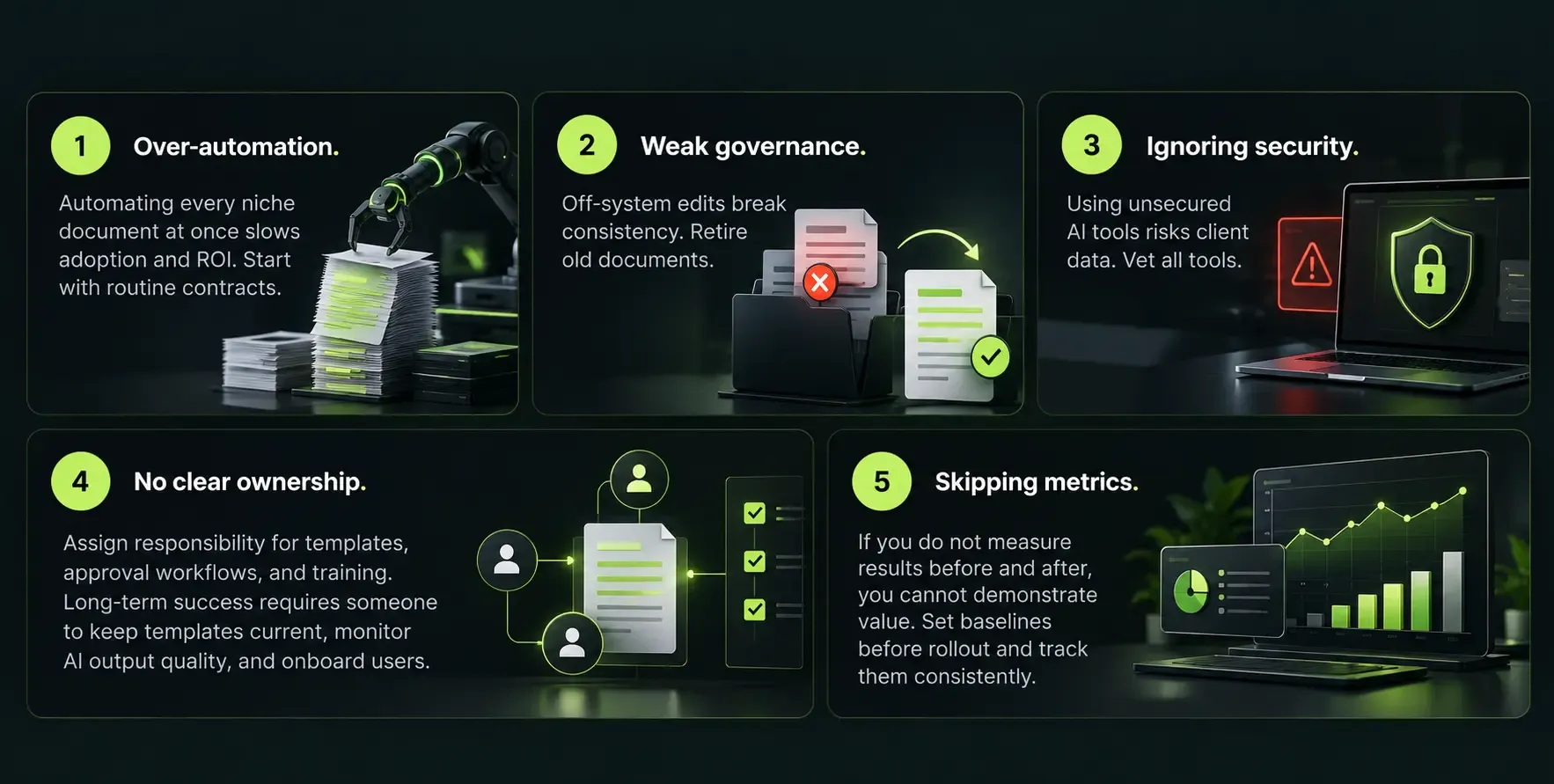
Failed pilots and underused subscriptions are common when AI tools are deployed without a clear plan. Here are the most frequent mistakes and how to avoid them.
Benefits of Working with SoftDoes on AI Document Automation
SoftDoes is a software engineering and AI partner for enterprises and scale-ups in the U.S. and Canada that need reliable, compliant document automation, including organizations looking for custom AI solutions and consulting tailored to their local markets.
Custom solutions that fit your systems. SoftDoes designs and builds custom AI powered document automation solutions that integrate with existing systems like CRM, document management, and contract management platforms. No forced migrations or rip-and-replace projects.
Deep AI and data engineering capability. With expertise in AI and machine learning, data engineering, and modern data architecture, SoftDoes handles secure ingestion and processing of large volumes of client data and contracts.
Regulated industry experience. SoftDoes works with finance, healthcare, education, and energy organizations where confidentiality and auditability are not optional, including data-driven software for the oil and gas industry. Every solution is built with security, access controls, and audit trails from the start.
Low-code flexibility for legal teams. After initial engineering, SoftDoes configures systems so legal staff can manage template updates and clause library changes themselves, reducing ongoing dependence on developers.
Phased engagement model. SoftDoes can help you assess current legal workflows, design a phased automation roadmap, and deploy production grade solutions that legal teams will actually use, from initial pilot through full rollout.
What's Next: Agentic AI and Fully Connected Legal Workflows
By the late 2020s, legal automation is moving from "assistive" AI to more agentic systems with guardrails. The vision is a workflow automation chain where AI handles intake, drafts first versions, routes for approvals, suggests redlines, and prepares final clean copies and signature packets, all with human oversight at critical decision points.
Success will depend on well structured templates, clean client data, and clear policies that tell AI tools when to escalate decisions to lawyers. Lawyers remain responsible for all work product, so the system must know when to stop and ask a human.
Firms investing in organized clause libraries and connected document management today will be better positioned for these advanced workflows. Every template you build, every clause library you organize, and every integration you complete is a step toward more intelligent, end to end workflow automation.
Start with practical AI powered document automation now. Treat each project as a building block.











Comments (0)
No comments yet.