Clio dominates the North American legal practice management market for a reason: it works out of the box for most firms with standard workflows. But not every firm fits that mold. Once your intake rules, billing logic, or reporting needs outgrow what packaged tools can support cleanly, the question shifts from "which plan?" to "should we build?"This article breaks down the real differences between Clio and custom legal software, with actual cost figures, concrete use cases, and a practical framework for deciding what fits your firm.
Key Takeaways
- Clio Manage and Clio Grow cover case management, document management, billing, and client intake for firms with standard workflows. Custom legal software makes more sense once your processes, reporting, or compliance needs can no longer be forced into packaged templates.
- The tipping point often arrives around 10 or more attorneys, complex billing or case management rules, and growing "shadow systems" in spreadsheets and side apps that fill gaps Clio leaves.
- Total cost of ownership over three to five years includes Clio subscriptions, add-ons, hidden costs like extra seats and manual workarounds, and the long term cost of not automating what matters most.
- A hybrid approach is realistic: many firms keep Clio for matter management and document storage while building custom layers for intake, reporting, or specialty workflows.
- SoftDoes is a U.S. and Canada focused legal software development partner that helps law firms evaluate, design, and build custom legal systems around their real operating model.
Clio in 2026: What You Actually Get Out of the Box
Clio is the SaaS standard for small and mid size firms across the U.S. and Canada that need a practice management platform without an internal IT team. It offers immediate setup with a broad feature set, and Clio provides ready-made functionalities that reduce development time for law firms getting started.
Clio Manage handles case management, document management, time tracking, billing, basic reporting, and trust accounting. It integrates with QuickBooks Online for financial management, along with Outlook, Google Workspace, and other tools most firms already use. Clio launched Clio Accounting in early 2026, though it supports cash-basis accounting only for small firms at this stage. Clio's workflows are structured around standard legal practices.
Clio Grow adds client intake, e-signatures, a basic legal CRM, and simple marketing workflows. The newer Grow AI features handle calls, chats, and follow up for leads. Firms using Grow AI report that matters are about three times more likely to convert. Clio includes built-in compliance features for legal practice, frequent updates, extensive help content, and a large ecosystem of third-party integrations.
The limits are real, though. Clio's roadmap is controlled by the vendor, not the firm. Deep customization of workflows, unusual billing splits, jurisdiction-specific deadline logic, and custom fields beyond what Clio supports all require workarounds. Clio's integration with external tools incurs additional costs, and published pricing does not always reflect what firms end up paying once add-ons and extra seats stack up.
Custom Legal Software: What "Build Custom" Really Means
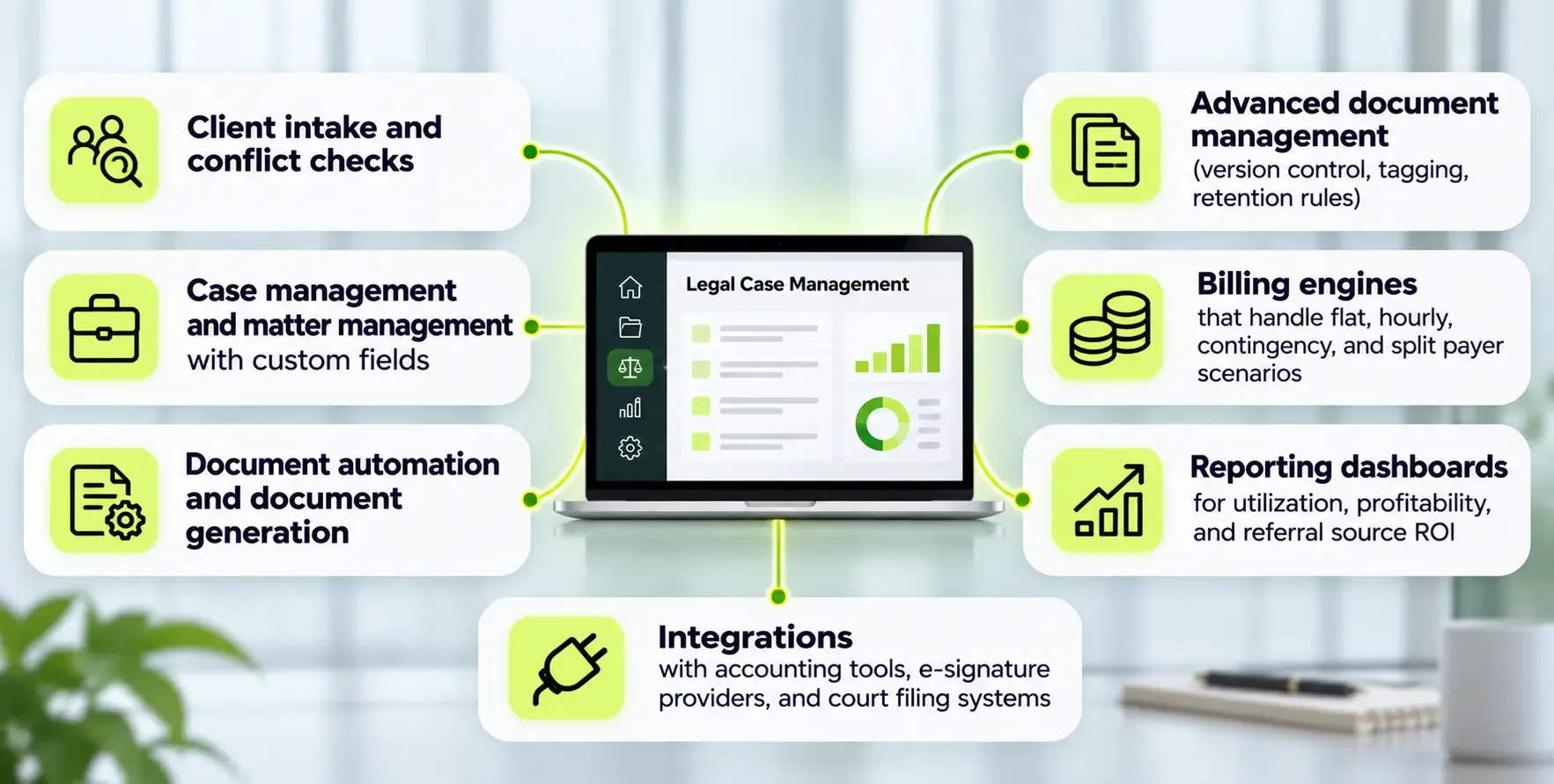
Custom legal software refers to systems built around a firm's specific workflows, data model, and compliance requirements. These are not adapted from generic templates. Custom software development can range from a focused module (a client portal, an intake platform, a settlement calculator) to a full practice management system with document management, case management, billing, and reporting.
Common components include:
Custom software allows seamless integration with existing tools your firm already relies on. It can provide unique functionalities not available in standard solutions. The firm owns and controls the data model, logic, UI, integrations, and release schedule. Custom software can be tailored to a firm's specific workflows, and that tailoring is the core reason firms choose to build.
Custom CRM build costs range from $15,000 to $60,000 for a focused module. Full practice platforms run higher. Custom software requires ongoing maintenance and updates by the developing firm or partner.
Custom Legal Software vs Clio: A Practical Comparison
This comparison goes beyond feature checklists. What matters is the impact on daily work, operating cost, and strategic control.
Speed vs. fit. Clio can be live in days with standard templates. Custom software development typically has long implementation timelines; a focused build takes 8 to 12 weeks, and full platforms take several months with phased rollouts. But Clio's speed comes with a tradeoff: your intake, approval, and document management flows must fit inside Clio's model. A custom system mirrors your exact processes.
Control. Clio features evolve on Clio's roadmap. If you need a feature Clio has not prioritized, you wait or build a workaround. Custom systems evolve on your roadmap, with direct alignment to your business case. There is no vendor lock in because the code and data are yours.
Starting point. Many firms start with Clio, then add custom modules when pain from manual workarounds, duplicate data entry, and limited reporting becomes measurable. Lawmatics, for example, tracks revenue back to lead sources for marketing analysis, a capability some firms bolt on alongside Clio because Clio's native reporting cannot deliver it. Other firms choose MyCase, which starts at $50 per user per month for practice management, before realizing they need something built for their specific practice area.
Firms with non-standard operational workflows may benefit more from custom software. The choice between Clio and custom software depends on firm size and unique needs.
Costs and Hidden Costs: Clio vs Custom Build
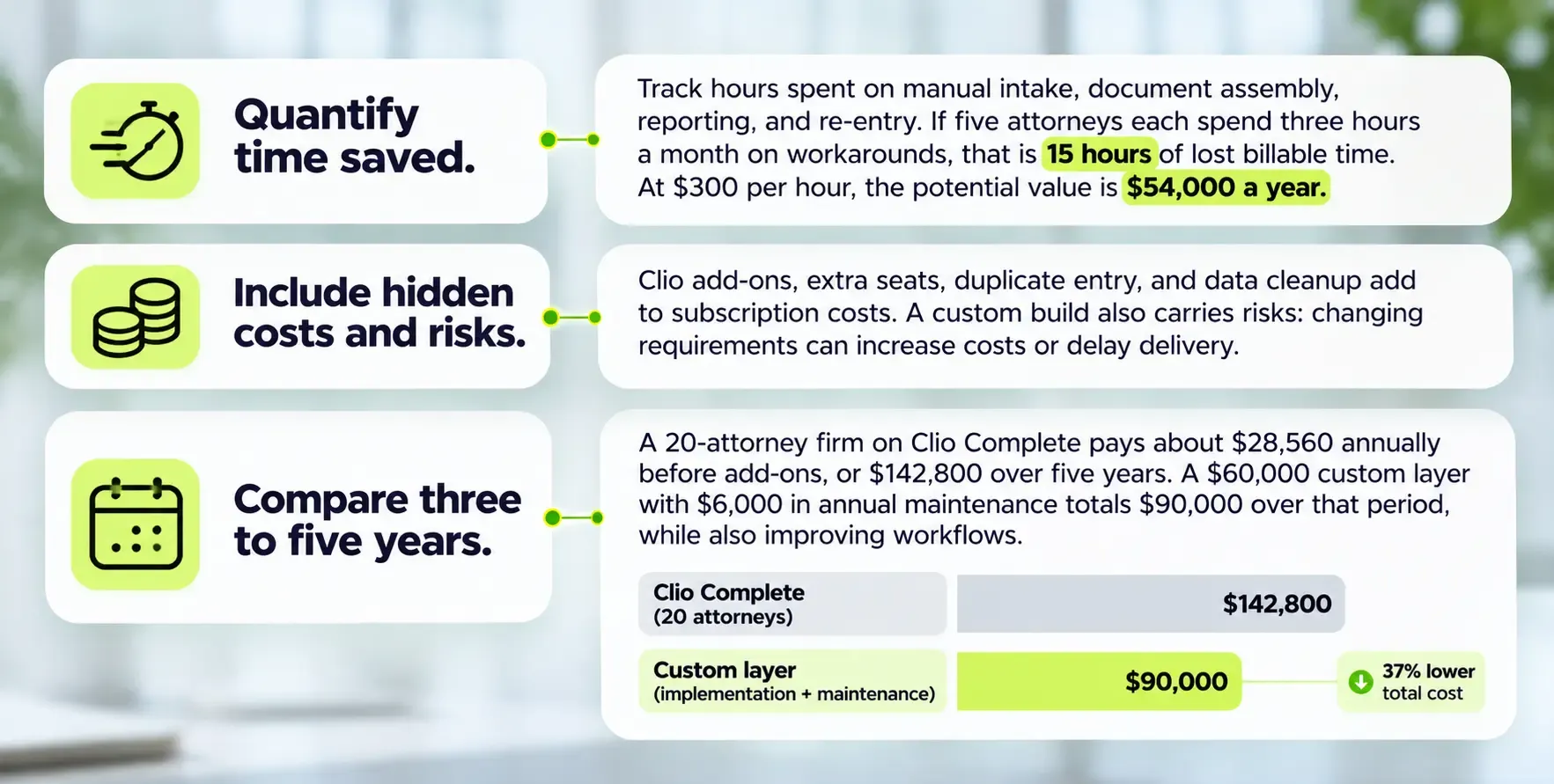
Firms should evaluate total cost over three to five years, not just first-month subscription versus build estimate.
Clio pricing
Clio's pricing starts at $49 per user per month for Manage (Starter). Clio's cost starts from $39 to $129 per user per month depending on the plan and any promotional pricing. The Complete plan for Clio costs $119 per user per month, bundling Manage and Grow.
Firm Size |
10 attorneys | ~$5,880 | ~$14,280 |
20 attorneys | ~$11,760 | ~$28,560 |
30 attorneys | ~$17,640 | ~$42,840 |
Hidden costs with Clio
- Extra seats for paralegals, staff, and consultants
- Add-ons for specific practice area modules, document automation, and storage overages
- Accountant access fees
- Soft costs: hours spent on manual workarounds, double data entry, and data inconsistency fixes
- Migration costs if you later switch platforms
Clio charges for features that firms assume are included, and the gap between published pricing and actual spend can be substantial.
Custom build costs
Building custom software typically requires high upfront development costs. Focused modules (intake automation, a client portal, or a settlement calculator) start around $40,000 to $80,000. Multi-practice full coverage platforms run $100,000 to $180,000. Custom legal software can exceed $500,000 for complex systems with AI, multiple jurisdictions, and deep integrations. Custom CRM hosting and maintenance costs $200 to $800 per month, and annual maintenance typically runs 15 to 20 percent of the initial build cost.
Custom solutions can lead to lower total costs over time. The inflection point usually appears around 10 to 15 users with multi-practice workflows: at that firm size, a custom system's amortized cost plus lower friction undercuts rising per seat SaaS spend. Custom CRM build costs range from $15,000 to $60,000 for focused CRM layers, making a phased approach feasible.
When Clio Manage and Clio Grow Are Usually the Right Answer
For many U.S. and Canadian law firms, especially in their first three to five years, Clio is the smartest starting point.
Clio Manage simplifies case management and document management for small firms and mid size firms without requiring engineering resources. Clio Grow and Grow AI make sense when the firm wants to centralize client intake and follow up inside the Clio ecosystem, using Clio's intake forms and campaigns.
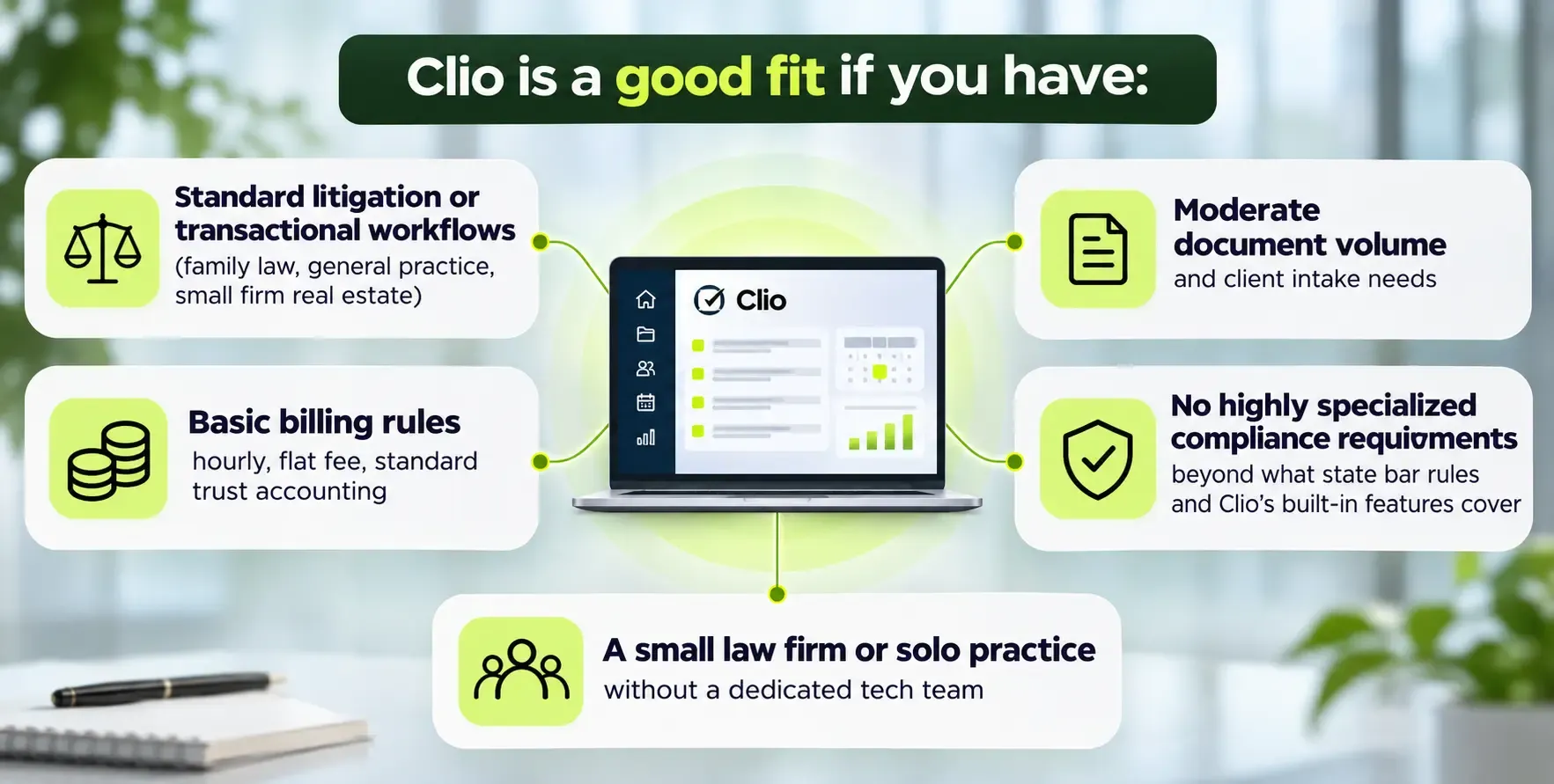
If your main need is to "get organized fast" and your process roughly matches how Clio thinks about cases and matters, building custom is overkill at this stage. Most firms under 10 attorneys fit this description.
Signs You Are Outgrowing Clio and Need a Custom Legal Layer
These are concrete signals, not vague feelings.
Intake complexity. Your client intake involves multiple stages across practice areas with different qualification and conflict rules. Multilingual communication (for example, Juryo handles intake in English and Spanish via phone and WhatsApp) is a requirement, and Clio Grow does not support cleanly the routing and follow up logic you need.
Workflow sprawl. Teams rely on spreadsheets, Airtable, and email threads for approvals and task handoffs because Clio's tasking and workflows are too generic. These shadow systems multiply data entry and error rates.
Reporting gaps. Partners cannot get accurate, real-time dashboards on matter status, settlement pipelines, referral sources, or attorney utilization. Stock Clio reports do not surface cross-practice profitability or marketing ROI by channel. Custom reporting becomes a weekly pain point.
Compliance and data ownership. You need a detailed audit log, retention schedules, data residency controls, or field-level permissions that Clio does not support natively. Effective data management is crucial in legal practice management systems, and gaps here create real risk. Concerns about where your data lives and fear of vendor lock in are valid reasons to evaluate alternatives.
Use Cases Where Custom Legal Software Beats Clio
These are concrete scenarios where firms or legaltech founders gained measurable advantage by building custom.
Personal injury (contingency fee). Mid size contingency fee practices need to model lien payoffs, trust disbursement across client ledgers, and complex fee splits. A custom case management and settlement calculator replaces the manual spreadsheets that most firms default to. One firm we studied tracked matter balance and settlement distributions across 200+ active cases; Clio's billing engine could not handle the math without extensive workarounds.
Immigration law. Custom workflows tied to specific USCIS forms, deadlines, and practice-specific document checklists outperform generic case management. Each visa type requires distinct steps, and Clio's templates cannot accommodate all variations without manual intervention.
High-volume client intake. Firms spending heavily on marketing need fast lead qualification, scoring, and routing across channels. AI-driven, multilingual intake and automated follow up convert leads more reliably than generic intake forms and email reminders. LeanLaw integrates with QuickBooks Online for legal billing, giving these firms a cleaner financial picture alongside their custom intake platform.
Legaltech startups. Founders building vertical platforms for estate planning, workers compensation, or other specific areas need to own their IP. Clio is not a product foundation. Custom builds as core IP let these companies differentiate on features that Clio covers only generically.
Data, Compliance, and Risk: Why Architecture Matters
Software choice is tied directly to obligations under ABA Model Rule 1.6 (duty of confidentiality) and Canadian privacy laws like PIPEDA. Client information management is central to effective legal practice solutions, and architecture determines how well a firm meets those obligations.
Both Clio and custom systems must address confidentiality, access control, encryption, and breach response. But custom software can provide greater control over data and security policies. Examples of what custom architecture enables:
- Audit log tracking down to document-level and field-level access
- Granular role-based permissions beyond what Clio's tiers offer
- Custom retention and deletion schedules aligned to state bar guidelines and firm policy
- Data residency choices: U.S. or Canadian cloud regions, with no ambiguity about where client records are stored
North American considerations include IOLTA rules for trust accounting (requiring per-client ledgers, three-way reconciliation, and bank statement matching), state bar expectations for cloud vendors, and Canadian law society requirements. Custom CRMs can connect to Clio Manage through its API, so firms do not have to choose one architecture for everything. LeanLaw connects client trust records to QuickBooks Online, adding another layer to the compliance stack for firms with complex trust arrangements.
SoftDoes can design architecture for these requirements, including data residency controls across major cloud providers.
Hybrid Strategy: Custom Layers on Top of Clio
The hybrid approach is the most realistic path for firms that like Clio's base features but need more features and more control in a few critical areas. Hybrid solutions can combine the strengths of Clio and custom software without forcing a full migration.
Custom intake or CRM layer. Build an intake platform that handles complex qualification, multilingual client communication, two way messaging, scoring, and follow up, then pushes accepted matters into Clio Manage via API. This bypasses Clio Grow's limits while preserving Clio's matter management strengths.
Custom reporting and analytics. Extract Clio data via API or exports. Build dashboards for cross-practice profitability, referral source ROI, attorney utilization, and billable hours analysis that Clio's native reports cannot deliver. Enterprise data management approaches from other regulated industries apply directly here.
Custom document automation. When firms need advanced document generation, assembly logic, or version control beyond Clio's templates, a custom layer tied into Clio's document storage fills the gap. Clio Draft, for instance, covers basic needs; custom builds handle the rest.
Building the Business Case for Custom Legal Software
A business case is a concrete calculation of benefits, costs, and risks. Not a wish list of more features.
Decision checklist:
- Are you running shadow systems outside Clio? → Consider custom layers
- Is your firm size above 10 attorneys with multiple practice areas? → Model the economics of custom vs. escalating per seat cost
- Do you have compliance, data ownership, or audit requirements Clio cannot meet? → Custom architecture is likely necessary
- Are you building a legal product or platform? → Custom is not optional; it is your product
The upfront investment is real. But so is the cost of staying on a system that no longer fits.
Benefits of Working with SoftDoes on Custom Legal Software
SoftDoes is a software engineering partner for U.S. and Canadian firms that need reliable, compliant custom legal systems built by a team that understands regulated industries, including healthcare and dental practice workflows.
What SoftDoes brings:
- Custom software development for practice management tools, intake automation, client portals, and document management
- AI and machine learning for client intake scoring, document intelligence, and workflow automation
- Cloud and data engineering with U.S. and Canadian data residency options
- Experience with full compliance requirements in finance, healthcare, and education, directly applicable to law firms facing strict privacy and audit rules
- Engagement models from discovery and architecture consulting through MVP delivery, phased rollout, and ongoing maintenance
SoftDoes integrates with existing tools, including Clio Manage, accounting platforms, and e-signature providers. Whether you need a custom layer on top of Clio or a full practice management platform, the approach is phased, tested, and built around your actual operating model.
Ready to evaluate your options? Schedule a consultation to map your current Clio setup, identify gaps, and explore whether a custom layer or full system makes more sense for your legal practice.
Choosing the Right Path for Your Firm
There is no universal best Clio alternative. The decision depends on your current workflows, growth plans, and appetite for owning your technology. Clio remains a strong choice for firms needing standard case management and document management, especially in early growth stages.
Custom legal software or a hybrid approach becomes attractive when Clio forces too many manual workarounds, or when intake automation, custom reporting, or client experience become strategic differentiators. For other firms, the answer is somewhere in between: keep what works, build what Clio cannot do.
SoftDoes can help assess your options and design a roadmap that balances quick wins with a longer term platform vision.











Comments (0)
No comments yet.