
Table of contents1. Key Takeaways2. Why Virtual Classroom Development Cost Matters in 20263. Quick Answer: How Much Does It Cost to Build Virtual Classroom Software?4. Cost Drivers: What Makes Custom Virtual Classroom Software Expensive or Affordable?5. Feature Level Cost Breakdown for a Custom Virtual Classroom6. Core Real Time Classroom Layer: Video and Audio Conferencing7. Interactive Whiteboard and In Class Collaboration Tools8. Assignments, Quizzes, and Assessment Features9. Recording, Replay, and Educational Content Library10. Scheduling, Calendars, and Notifications11. User Management, Roles, and Access Control12. Analytics, Dashboards, and Learning Insights13. Integrations with LMS, Google Classroom, and Payments14. Design, UX, and Accessibility Requirements15. Platform Choices: Web Only vs. Web Plus Native Mobile Apps16. Infrastructure and Ongoing Operational Costs17. Compliance, Security, and Data Protection Costs18. Development Process: How to Structure Work So Costs Stay Under Control19. Build vs. Buy vs. Hybrid: Cost Implications20. Who Typically Invests in Custom Virtual Classroom Software?21. Strategies to Optimize and Reduce Development Costs22. Benefits of Working with SoftDoes on Custom Virtual Classroom Software Key Takeaways
- In 2026, a basic custom virtual classroom software MVP for U.S. and Canadian markets costs roughly $60,000 to $110,000, while advanced AI ready platforms range from $150,000 to $300,000 or more.
- The biggest cost drivers are feature depth (video and audio conferencing, interactive whiteboard, analytics), scale (concurrent classrooms and users), integrations (LMS, Google Classroom, payments), and compliance requirements (COPPA, FERPA, SOC 2).
- Audio conferencing and video alone are not the most expensive parts. Synchronized interactive whiteboards, recording pipelines, and analytics dashboards often consume more of the budget.
- Costs for developing virtual classroom software can vary widely based on complexity, target platforms, and regulatory obligations.
- SoftDoes can estimate and optimize your virtual classroom development costs in 3 business days based on scope, timeline, and risk constraints.
Why Virtual Classroom Development Cost Matters in 2026
Custom virtual classroom software went from a niche investment to a mainstream requirement after COVID-19. About 70% of higher education institutions adopted virtual classrooms during and after the pandemic, and the demand has not slowed down. U.S. and Canadian schools, EdTech startups, and enterprises now need clear cost expectations before they commit to building.
Many organizations started with quick wins using Zoom or Google Classroom, and those tools still work well for basic online classes. But as the education sector matured, so did expectations. Modern virtual classrooms need interactive whiteboards, analytics dashboards, assessment engines, and revenue models that off the shelf tools simply do not support. Virtual classrooms allow students to attend classes from anywhere, learn at their own pace, and reduce costs by eliminating travel expenses, which makes them worth the investment for the right organization.
This article focuses specifically on how to estimate and control the development cost when you build virtual classroom software from scratch or extend a learning management system. We will cover feature level pricing, compliance costs, infrastructure bills, and strategies to keep budgets realistic. SoftDoes is a North America focused custom software development partner that helps enterprises and scale ups plan realistic budgets and timelines for exactly this kind of build, and its custom virtual classroom software development services are tailored specifically to education and training teams.
Quick Answer: How Much Does It Cost to Build Virtual Classroom Software?
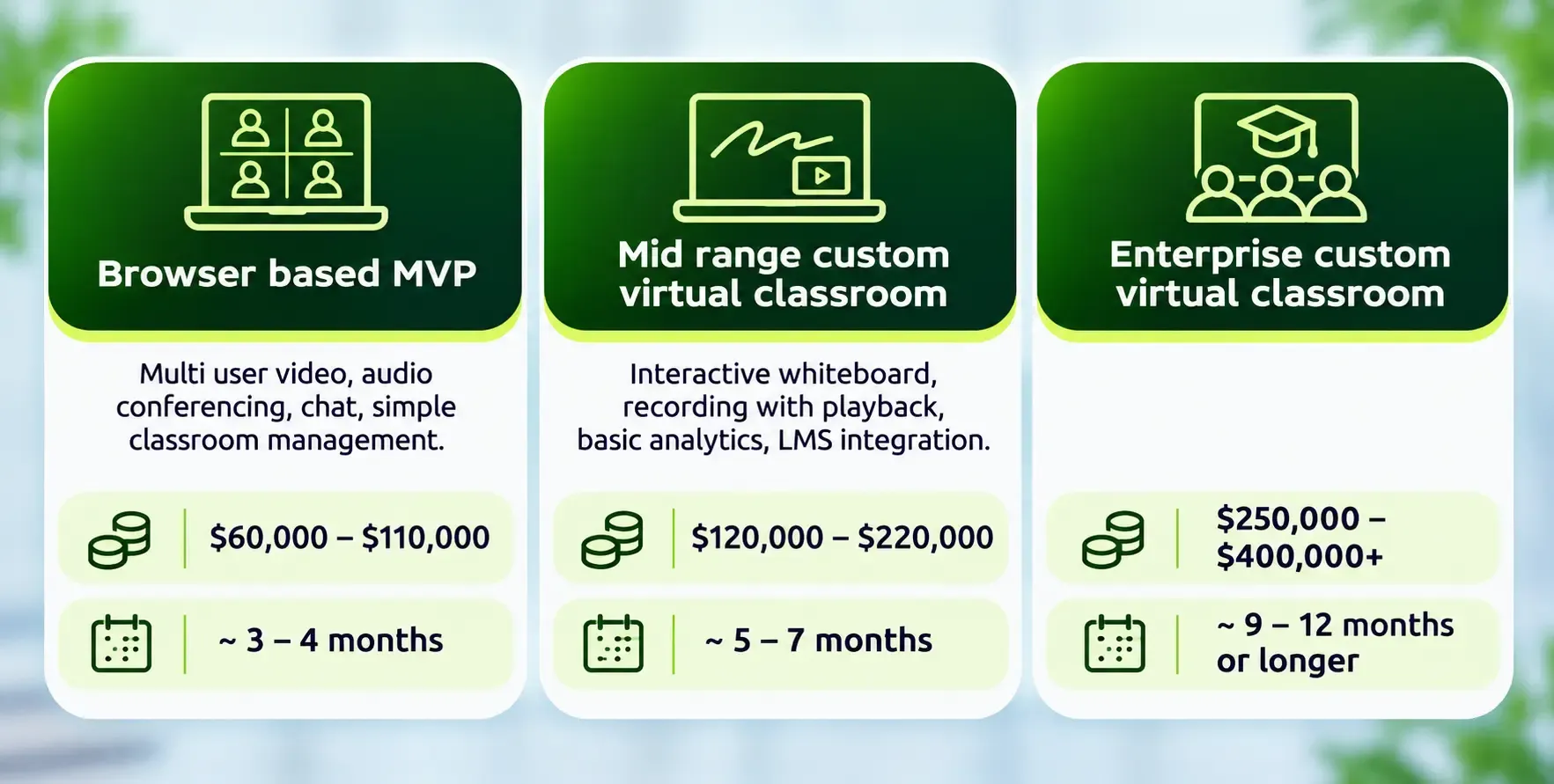
If you are looking for a quick number before diving into the details, here are the 2026 ranges for U.S. and Canadian markets. These cover software development effort only and exclude ongoing cloud bills, content creation, and on premise hardware.
Basic virtual classroom platforms cost $50,000 to $100,000. A basic minimum viable product for virtual classrooms, with stripped down features, usually costs around $30,000 to $75,000 on the low end, but most serious builds land higher. Here are more specific tiers:
Advanced platforms with AI features range from $150,000 to $300,000 depending on the depth of intelligence built in.
Learning materials, curriculum design, lesson materials, and educational content creation are separate budgets and not part of the software engineering cost ranges above.
Cost Drivers: What Makes Custom Virtual Classroom Software Expensive or Affordable?
Feature complexity significantly influences the cost of virtual classroom development, but costs are driven more by complexity and risk than by simple feature counts. Two platforms with the same feature list can differ by $100,000 or more depending on how deeply each feature is implemented.
Here are the key cost drivers:
- Number and depth of features: Audio conferencing features, online whiteboard capabilities, quizzes, digital certificates, and screen share functionality each have a basic version and a polished version. The gap between them is substantial.
- Concurrency targets: Supporting 20 students in a room is straightforward. Supporting 500 concurrent classrooms with 10,000 live users requires a fundamentally different architecture. Scalability is an important aspect of virtual classroom architecture for supporting many users.
- Integration density: Connecting to a learning management system, Google Classroom, SIS platforms, and payment gateways adds layers of testing and edge case handling. Third-party integrations can add complexity and costs to virtual classroom systems.
- Security and compliance level: COPPA and FERPA for K through 12, SOC 2 for B2B buyers, and PIPEDA for Canadian data privacy each add engineering and consulting effort.
- Target platforms: Web only is cheapest. Adding iOS and Android expands scope and budget by 15 to 25% or more.
- Design quality: A basic functional UI costs far less than a polished, user tested custom UX with accessibility support.
- Average rates for software development vary significantly by geography. U.S. and Canada grade engineering costs more than offshore alternatives, but the difference shows up in quality, compliance awareness, and communication speed.
Early discovery and clear scoping with a partner like SoftDoes helps keep these factors under control and prevents the 30 to 50% budget overruns that are common in classroom software development projects.
Feature Level Cost Breakdown for a Custom Virtual Classroom
This section breaks down typical 2026 price and timeline ranges for core modules in U.S. and Canadian markets. Each range assumes a modern tech stack. React.js, Angular, and Vue.js are popular frontend technologies for these builds. Node.js is preferred for real time applications in backend frameworks. PostgreSQL and MySQL are common database solutions for structured data.
Costs assume mid senior engineers with QA support, not offshore bargain rates. Implementing all modules at once usually gives better economies of scale than commissioning them as separate mini projects.
Real time chat systems should support public and private messaging, and most of the modules below assume that chat is woven into the core classroom experience rather than treated as a standalone feature.
Core Real Time Classroom Layer: Video and Audio Conferencing
Stable, low latency video and audio conferencing is the foundation of any virtual classroom platform. Real time video and audio capabilities are major components of virtual classroom software, and virtual classroom software development includes real time communication infrastructure that must be architected correctly from day one.
Video conferencing must support under 200ms latency for interaction to feel natural. Video and audio integration costs around $25,000 and takes 4 weeks for a basic implementation. For a more complete multi party WebRTC based system with teacher controls, mute all, device settings, and support for 20 to 30 participants per room, expect roughly $25,000 to $45,000 over 4 to 6 weeks. WebRTC is essential for peer to peer video streaming in classrooms and remains the standard protocol for live video conferencing and real time video delivery.
Using a CPaaS or SDK (Agora, Vonage, Zoom SDK) can reduce initial development time but shifts costs into per minute usage fees. For reference, managed CPaaS platforms bill roughly $3.50 to $9.00 per 1,000 participant minutes depending on resolution. A custom SFU requires more upfront investment but is cheaper per minute at scale, especially beyond about 2.9 million participant minutes per month.
Interactive Whiteboard and In Class Collaboration Tools
A truly interactive whiteboard with multi user drawing, text, shapes, and file annotations is one of the most underestimated and cost heavy components of virtual classroom software solutions. Interactive whiteboards enable collaborative note taking and drawing, and they are central to what makes modern virtual classrooms effective for active learning.
For a production ready collaborative online whiteboard with sub 200ms sync, undo and redo, and basic templates, budget about $20,000 to $40,000 over 4 to 8 weeks.
Cost add ons include:
- Math notation and handwriting recognition
- Multi page boards and persistent board history
- Support for touch devices and styluses
- Interactive tools that enhance student engagement beyond basic drawing
Enterprises and EdTech startups can ship a simpler whiteboard MVP in the first release, then iterate based on user feedback and budget availability. The collaborative tools layer is where many custom virtual classroom apps differentiate themselves from generic web conferencing tool alternatives.
Assignments, Quizzes, and Assessment Features
Assessment surfaces are essential for educational institutions and corporate L&D programs. Educational tools like these are necessary components of virtual classroom software and directly affect both budget and adoption. Assignment management tools must support various content types including documents, images, video submissions, and code.
Expect a rough cost band of $15,000 to $35,000 over 3 to 6 weeks for:
- Assignment creation and submission upload
- Auto grading for simple question types (multiple choice, fill in the blank)
- Teacher feedback tools where teachers can provide instant feedback
Exam modes with timed tests, proctoring hooks, and randomized questions increase complexity and cost, especially when tied to external LMS gradebooks. Integrating quiz results with analytics dashboards and digital certificates can be batched together during development to save money.
Recording, Replay, and Educational Content Library
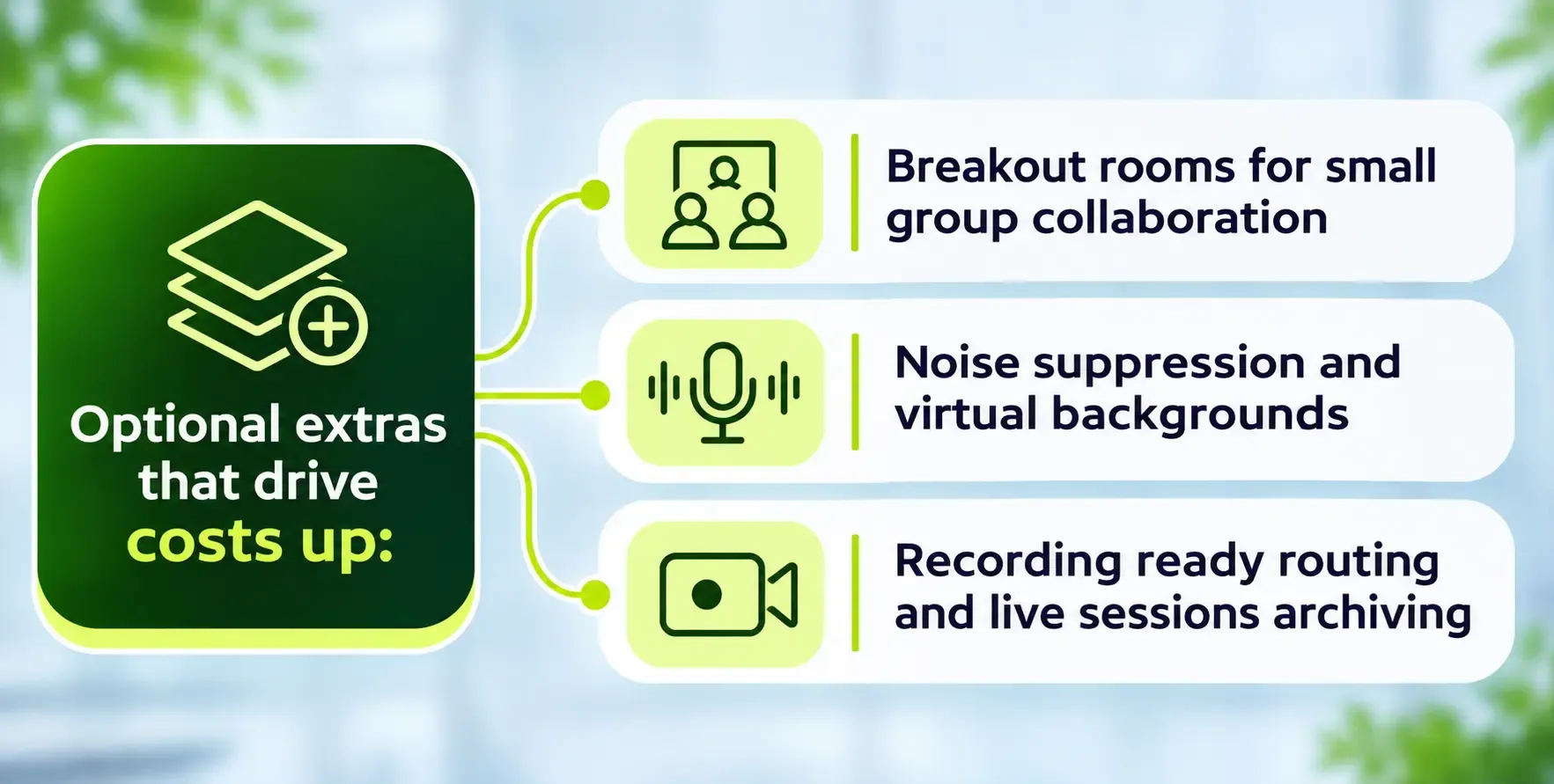
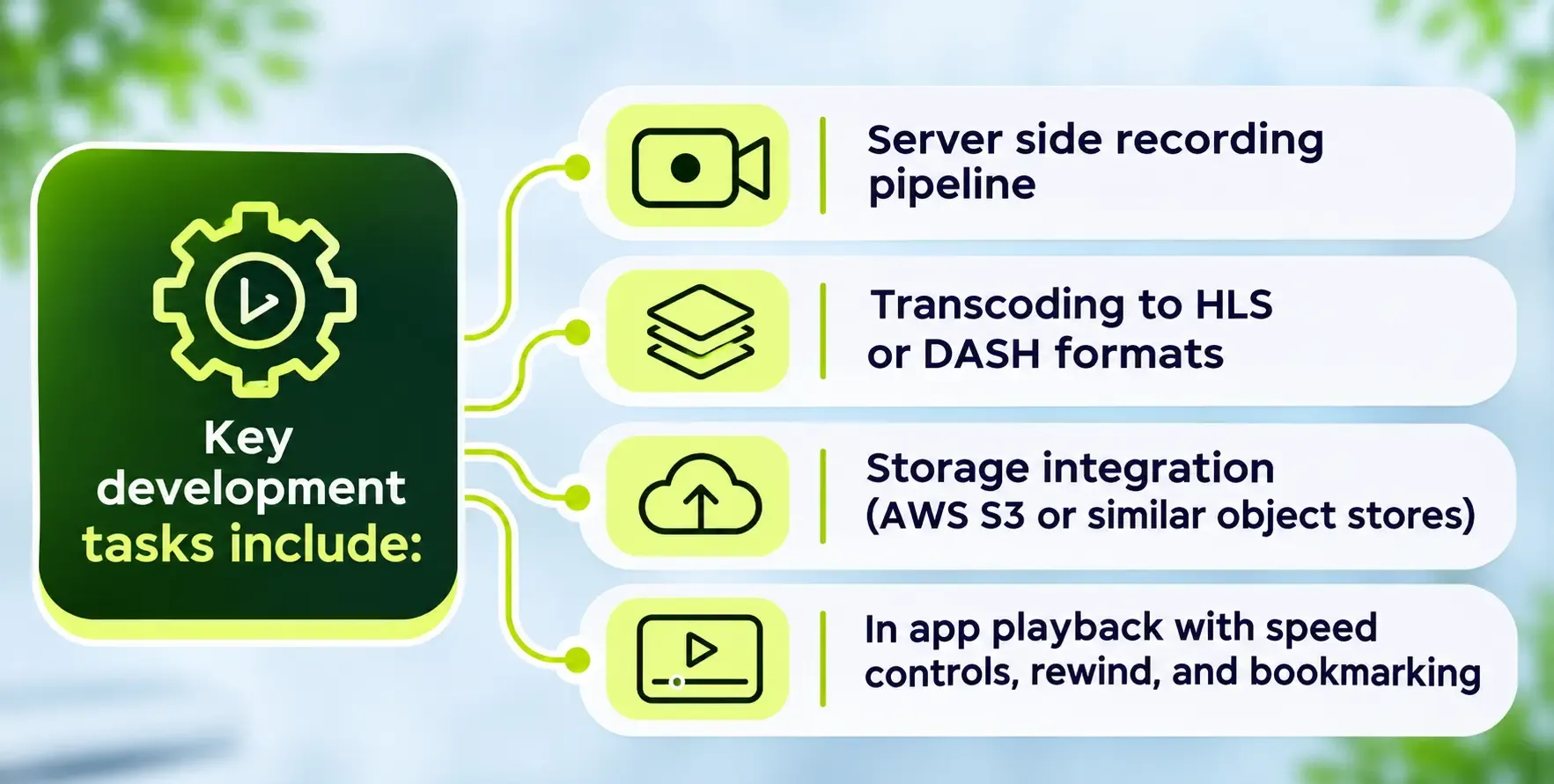
Recording and a searchable content archive multiply the ROI of each live class. They support asynchronous learning by letting students review lesson materials at their own pace. But the architecture behind recording is more involved than most buyers expect.
Budget around $20,000 to $40,000 over 3 to 6 weeks for a robust recording and replay feature set.
Building a course and educational content library with folders, tagging, search, and access rights typically adds $15,000 to $30,000 and another 3 to 5 weeks. This library is where multimedia resources and learning materials live, and it becomes a key part of the virtual learning experience over time.
Scheduling, Calendars, and Notifications
Scheduling and reminders significantly affect whether users actually show up and engage students consistently, but they are relatively moderate on the budget scale.
- Core scheduling: Session scheduling UI, recurring class logic, time zone handling, and in app notifications cost roughly $8,000 to $18,000 over 2 to 4 weeks.
- Calendar integrations: Connecting to Google Calendar, Outlook, and Apple Calendar plus transactional email and SMS reminders can add $5,000 to $15,000 depending on reliability requirements.
- Corporate L&D: Syncing with HR calendars and meeting rooms may require extra API work and testing, increasing costs. This is relevant for organizations using virtual classrooms for occupational retraining or compliance training programs.
User Management, Roles, and Access Control
User management is essential in virtual classroom software development. The mix of user types (admin, teacher, student, corporate trainer, parent) drives access rules, permissions logic, and dashboard variations.
Expect $10,000 to $25,000 over 3 to 5 weeks for:
- Registration, login, and password reset
- Basic role based access control for web users
- Profile management and class enrollment
Adding SSO via SAML, OAuth 2.0, or OpenID Connect with campus or corporate identity providers adds roughly $10,000 to $25,000 if required. Parent and guardian views in K through 12 platforms often require specific dashboards and permissions that push cost to the upper bound. These capabilities enable educators and administrators to manage their virtual classroom environment with appropriate security boundaries.
Analytics, Dashboards, and Learning Insights
Analytics dashboards track attendance and participation metrics, and they are crucial for administrators and instructors who need to measure learning outcomes and student progress. The development effort here comes from data modeling and UI design rather than raw complexity.
Budget $20,000 to $40,000 over 4 to 8 weeks for:
- Attendance stats and session summaries
- Basic engagement graphs
- Per student progress reports
Integrating event based tracking (xAPI structures, engagement scores) and connecting to BI tools or a data warehouse can increase effort. Including at least a basic analytics MVP in the first release helps validate the learning process and improve adoption before investing in heavier analytics later.
Integrations with LMS, Google Classroom, and Payments
Integrations often drive procurement decisions for universities and enterprises and significantly affect the development cost of learning platforms. Connecting to existing learning management systems can add development hours that many teams underestimate.
- Deep LMS integration (Canvas, Moodle, Blackboard, or Google Classroom style workflows including learning tools interoperability support): $15,000 to $35,000 over 4 to 8 weeks.
- Lightweight syncs (read only roster or grade pulls): less expensive but still require careful error handling.
- Full gradebook write back, roster sync, and single sign on: higher end of the range.
- Payment integration (Stripe, PayPal, or enterprise billing) for monetized online education courses: typically $8,000 to $20,000 including subscription management and invoices.
LMS integration is one of the areas where working with a partner experienced in custom LMS software development can save significant time and rework.
Design, UX, and Accessibility Requirements
Intuitive UI/UX design is critical for the success of virtual classroom software. The interface must serve students, enabling teachers, and sometimes parents across multiple devices and operating systems.
- UX research, wireframes, and high fidelity UI design for a mid sized custom virtual classroom: $15,000 to $40,000 over 3 to 6 weeks.
- WCAG 2.1 AA accessibility work (color contrast, keyboard navigation, screen reader support, captions integration): may add $10,000 to $25,000 depending on rigor.
Investing in UX and accessibility early prevents expensive rework later. U.S. and Canadian public education contracts increasingly require documented accessibility compliance, and many top education software development companies build it into their standard process rather than treating it as an afterthought.
Platform Choices: Web Only vs. Web Plus Native Mobile Apps
Most teams start with a responsive web app that runs across web browsers and add native mobile later as adoption and budgets grow. Cross platform development can increase the scope of virtual classroom applications substantially.
- Responsive web app: Already covered in earlier sections. Making it truly mobile friendly can add 15 to 25% design and frontend effort on top of the baseline.
- Native iOS and Android apps (or React Native and Flutter implementations): roughly $60,000 to $150,000 extra depending on scope and reuse of web components.
- Chromebook and tablet districts: For U.S. K through 12, native apps are often important because many districts rely heavily on Chromebooks and tablets, which influences total budget decisions.
The choice of operating systems and devices should be driven by your target audience. A corporate training platform might be web only, while a K through 12 virtual classroom app development project might require both web and native mobile from day one.
Infrastructure and Ongoing Operational Costs
Earlier sections covered the development effort. This section focuses on recurring cloud and maintenance expenses after launch. Ongoing server infrastructure is a significant ongoing cost in managing virtual classrooms.
- Monthly cloud infrastructure for 50 to 100 concurrent classrooms (video servers, storage, CDN, monitoring): approximately $5,000 to $20,000 per month depending on stack and regions. For about 100 concurrent classrooms with 3,000 live students, benchmarks show roughly $15,000 to $25,000 per month. AWS, Azure, and Google Cloud provide the necessary cloud infrastructure for these deployments.
- Ongoing maintenance costs are 15 to 20% of initial development annually for bug fixes, updates, security patches, and small enhancements. Some sources cite up to 25% depending on the pace of change.
- AI services (transcription, translation, recommendation engines) are often billed per minute or per API call and can materially impact monthly spend. Budget for them separately.
Compliance, Security, and Data Protection Costs
Compliance is non negotiable when serving K through 12 schools, universities, healthcare training programs, or regulated corporate environments in the U.S. and Canada. Virtual classroom software must comply with regulations like FERPA and COPPA. Security and compliance monitoring are essential for virtual classroom platforms at any scale.
Key regulatory frameworks:
- COPPA: Required for users under 13. As of April 22, 2026, updated rules require separate parental consent for third party data sharing, written retention policies with deletion deadlines, and a formal security program.
- FERPA: Mandatory for U.S. schools and universities handling student educational records. First year compliance costs for a startup often run $5,000 to $20,000.
- PIPEDA: Canadian data privacy requirements.
- ADA/WCAG: Accessibility mandates.
- SOC 2: Increasingly expected by enterprise B2B buyers.
The incremental development and consulting cost for a compliance aware build (end to end encryption, audit logs, consent flows, data retention and data residency tools) runs $20,000 to $60,000 on top of base functionality. Formal certifications like SOC 2 and ISO 27001 are separate projects with their own budgets, but they should inform architecture from day one.
Organizations dealing with healthcare compliance requirements for training programs will find significant overlap in the security and audit infrastructure needed, and many of the same patterns apply when working with healthcare software development companies focused on HIPAA and data security.
Development Process: How to Structure Work So Costs Stay Under Control
A staged development process reduces risk and cost overruns when you develop virtual classroom software. Choosing the right partner matters just as much as the plan, and many buyers use structured criteria for selecting a software development company without wasting budget. Virtual classrooms often require rigorous QA and testing to ensure reliability, and phasing the work ensures testing is thorough at each stage.
Typical phases:
- Discovery and requirements (2 to 4 weeks): Produce scope, estimates, and a release roadmap. This prevents scope creep later.
- UX/UI design (3 to 6 weeks): Wireframes, prototypes, user testing.
- MVP build (8 to 12 weeks): Core classroom with limited features, covering the essential virtual classroom experience.
- Pilot launch: Deploy to a small group of users for real world feedback.
- Iterative expansion: Add modules (advanced whiteboard, analytics, AI features, mobile apps) based on feedback and priorities.
SoftDoes uses agile iterations with clear sprint goals and early demos to avoid surprises in budget and the development timeline. The development team stays aligned with product goals through regular check ins rather than long stretches of heads down coding.
Build vs. Buy vs. Hybrid: Cost Implications
Organizations can either buy classroom software, build custom virtual classroom software, or combine both approaches. Here is how they compare:
Approach |
Buy SaaS (Microsoft Teams, Google Classroom) | Low | Limited | Limited | Fast |
Hybrid (SDK + custom layer) | Medium | Moderate | Moderate to Full | Moderate |
Full custom build | High | Complete | Full | Slower |
Key considerations:
- Existing solutions offer lower upfront costs and faster deployment, but existing platforms limit branding options and feature customization.
- Custom solutions provide complete control over features and data ownership. Custom development typically requires a higher investment and longer timelines.
- Custom solutions are ideal for organizations with unique compliance needs or when the virtual classroom platform is core IP.
- A hybrid approach uses video solutions from SDK providers with a custom layer for your own virtual classroom UX, analytics, and integrations.
When you are evaluating how to build custom learning platforms, model 2 to 3 year total cost of ownership rather than focusing only on the first invoice. Per minute SDK fees can exceed custom infrastructure costs surprisingly fast.
Who Typically Invests in Custom Virtual Classroom Software?
Not everyone needs a custom virtual classroom. This section helps you determine whether the investment fits your situation.
- Universities and school districts: Need branded platforms with deep LMS integrations, accessibility compliance, and parent dashboards. Government organizations also use virtual classrooms for occupational retraining programs, and these buyers often share the same procurement requirements.
- EdTech startups: EdTech startups benefit from custom education platform development and custom virtual classroom software for differentiation in a crowded market. They need speed to market and a unique virtual learning experience that generic tools cannot deliver.
- Enterprises with complex workforce training: Corporate training departments require customized virtual classroom solutions for onboarding, compliance, and performance tracking. These buyers often need HRIS integration and detailed analytics.
- Healthcare and professional training: Healthcare training programs utilize virtual classrooms for compliance and simulation based learning. Certification bodies need exam modes, proctoring, and accreditation tracking.
Each segment's priorities (deep analytics for L&D, compliance for K through 12, monetization for EdTech) shape both scope and cost. SoftDoes typically engages when customers have at least a mid six figure total digital learning budget or clear long term ROI behind the build.
Strategies to Optimize and Reduce Development Costs
Cost optimization does not mean cutting corners on quality. It means sequencing investments smartly and reducing manual work wherever possible.
Practical tactics:
- Start web first: Build a responsive web MVP before investing in native mobile apps. This covers the widest audience at the lowest cost.
- Prioritize must have features: Audio conferencing, basic whiteboard, and assignments cover the core virtual classroom experience. Defer advanced AI, virtual reality features, and complex analytics to later phases.
- Reuse open source components: Libraries for chat, notification queues, and auth flows can save weeks of engineering.
- Adopt SDKs for media in phase one: Use a managed video SDK initially, then evaluate a custom SFU once usage justifies it.
- Focus on one primary audience in v1: Trying to serve K through 12, corporate L&D, and higher ed simultaneously inflates scope. Pick one and expand from there.
- Run design and requirements workshops up front: Partners like SoftDoes facilitate these to avoid building unused features that waste 10 to 30% of the initial budget.
The development effort saved by clear scoping almost always exceeds the cost of the scoping process itself. An immersive learning experience does not require every feature on day one. It requires the right features, built well.
Benefits of Working with SoftDoes on Custom Virtual Classroom Software
SoftDoes is a U.S. and Canada focused software engineering partner with hands on experience in custom virtual classroom and EdTech builds. Here is what makes the partnership effective:
- End to end services: Product discovery, UX research, backend and frontend engineering, AI and ML integration, cloud architecture, and data engineering, all under one roof. No need to coordinate five vendors.
- Compliance aware engineering: Experience building systems that meet COPPA, FERPA, SOC 2, and accessibility requirements from architecture through deployment.
- Cost transparency: Detailed estimates per feature group, phased delivery plans, and early architecture decisions that keep long term software development and cloud costs predictable.
- Flexible engagement models: Team extension for organizations with existing engineering leadership, or full product squads for those starting from scratch. Learn more about how SoftDoes builds learning platforms that fit specific business needs.
- AI integration done right: Live transcription, analytics, and adaptive recommendations built into classroom software while respecting privacy and regulatory constraints, often delivered through custom AI solutions and consulting that align with each institution's data and compliance needs.
Whether you are launching a remote learning MVP or scaling an enterprise online learning environment, SoftDoes helps you get from idea to first live class without budget surprises.










Comments (0)
No comments yet.