About half of large construction projects in the U.S. finish over budget. One root cause: BIM models and ERP systems operate as disconnected islands, forcing teams to rekey quantities into spreadsheets and reconcile costs manually. This guide shows how linking BIM directly to a custom ERP solves that problem.Key Takeaways
Connecting BIM models with a custom ERP system gives construction owners and general contractors in the U.S. and Canada real-time cost management, scheduling, and procurement visibility. Instead of waiting for monthly reconciliation reports, a project manager sees variances the moment a model quantity changes. Integration allows real-time updates between BIM and ERP systems, turning cost control from a reactive exercise into a proactive one.
Tight BIM ERP integration leads to fewer errors in quantities, purchase orders, and invoices because data flows from a single source of truth. ERP systems can manage budgets, contracts, and schedules from BIM, removing the need to copy numbers between tools. Integrating BIM with ERP enhances project visibility and financial control across every phase of a project.
SoftDoes builds custom ERP systems and integration layers (APIs, middleware, data hubs) so companies are not locked into rigid off the shelf platforms. Quick wins include:
- Automated quantity to budget updates whenever the model changes
- Live cost control dashboards showing variance by trade or building level
- Instant impact analysis when architects revise scope or materials
The rest of this post covers a concrete integration roadmap, common pitfalls, and real world examples.
From Standalone BIM Models to Connected ERP Systems
Most U.S. and Canadian construction teams run BIM in Revit, Navisworks, or Autodesk Construction Cloud, while cost and procurement data lives in a separate ERP. The typical workflow involves manual exports: someone pulls quantities from the model, pastes them into a spreadsheet, and emails the file to the cost team. By the time that data reaches the ERP, the model may have changed twice. Effective BIM and ERP integration eliminates data silos and minimizes manual data entry.
BIM integration with a custom ERP means model elements and quantities directly drive budgets, commitments, and cost management records. For instance, on a 250,000 sq ft hospital project in Texas, a change in the steel package inside the BIM model can automatically update the ERP budget line and flag pending purchase orders for repricing. The project manager does not wait for the next monthly report; the variance appears on the dashboard the same day.
Problems that disconnected tools create:
- Duplicate data entry across BIM, spreadsheets, and ERP
- Late visibility into cost overruns (often discovered only at pay application time)
- Inconsistent coding structures between design and finance teams
Core Integration Concepts: Data, IDs, and Cost Structures
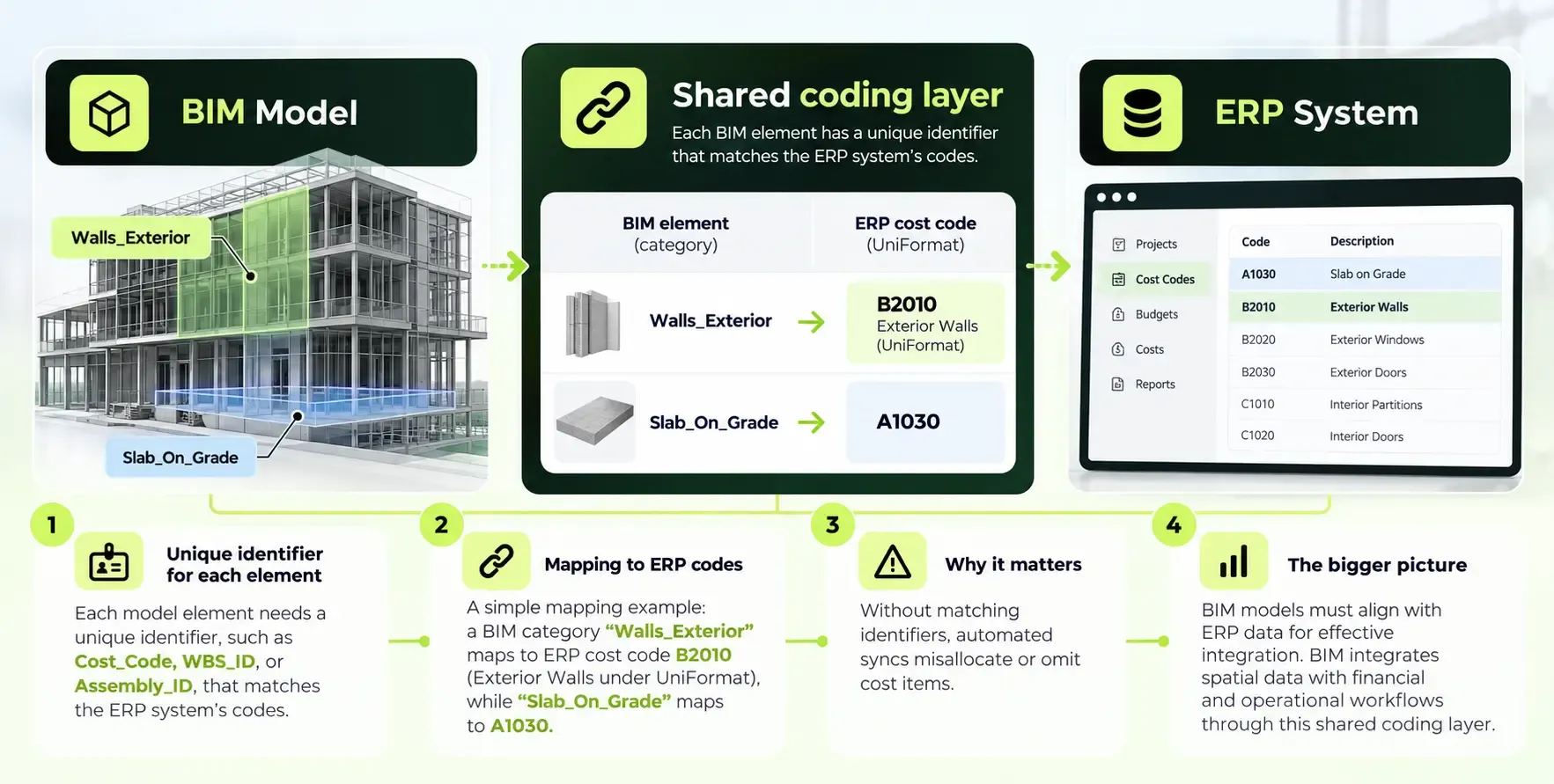
BIM and ERP speak different languages. Building information modeling organizes data around spatial elements (walls, slabs, columns), while ERP organizes data around cost codes and financial accounts. Integration starts by aligning these structures. Data quality and standardization are crucial for successful BIM and ERP integration.
BIM elements (families, types, instances in Revit) must be mapped to ERP cost codes. U.S. and Canadian teams commonly use CSI MasterFormat or UniFormat classifications. The BIM Forum's estimating guide recommends that model parameters include Assembly Code fields tied to UniFormat classification so cost items correlate to scope. Open standards like Industry Foundation Classes (IFC) enable reliable data exchange between BIM and ERP systems, giving teams flexibility across platforms.
Planning the BIM to Custom ERP Integration: Phase Zero
Phase Zero is a kickoff workshop between the BIM Manager, Cost Manager, and the ERP lead (or SoftDoes consultant). 4D BIM success relies 80% on strategic planning, and the same ratio applies to cost integration.
Decisions made in this phase:
- Which BIM authoring tools are in scope (Revit, Navisworks, ACC)
- Which ERP modules connect (budget, commitments, accounts payable)
- Which environments are needed (dev, test, production)
- Data direction: BIM to ERP, ERP to BIM, or bidirectional
- How non-modeled elements require dummy elements for simulation and cost tracking
A Michigan hospital system that aligned its construction ERP system and processes through structured planning saved $4 million in year one. Skipping this phase produces the opposite result. One commercial project in Ontario discovered at the end of schematic design that its BIM categories did not match its ERP budget lines, forcing six weeks of manual reconciliation. Over 40,000 activities can crash 4D BIM software, so scoping the model's complexity during Phase Zero prevents downstream failures.
Designing the Technical Architecture: APIs, Data Flows, and Security
Most modern BIM platforms and many ERP systems expose REST APIs, webhooks, or direct database access. BIM 360 can sync budgets with external ERP systems using API endpoints that include fields like externalSystem, externalId, and lastSyncTime for tracking integration state.
A typical architecture:
- BIM platform (ACC, Revit) exports quantities and model metadata
- Integration layer (custom middleware or iPaaS) transforms codes, validates data, handles mapping
- Custom ERP system receives budgets, cost items, contracts, change orders, and vendor master data
- Scheduled syncs run nightly; event based pushes fire on model publish or cost approval
For U.S. and Canadian projects, security requirements include role based access, audit logs, TLS encryption in transit, encryption at rest, and compliance boundaries. Healthcare construction projects must ensure HIPAA protected data stays out of BIM and ERP cost feeds. Whether integrating with an existing ERP or building a new custom ERP core with SoftDoes, stable APIs and versioning strategies prevent integration from breaking when platforms update.
Operational Workflows: How BIM and ERP Systems Work Together Day to Day
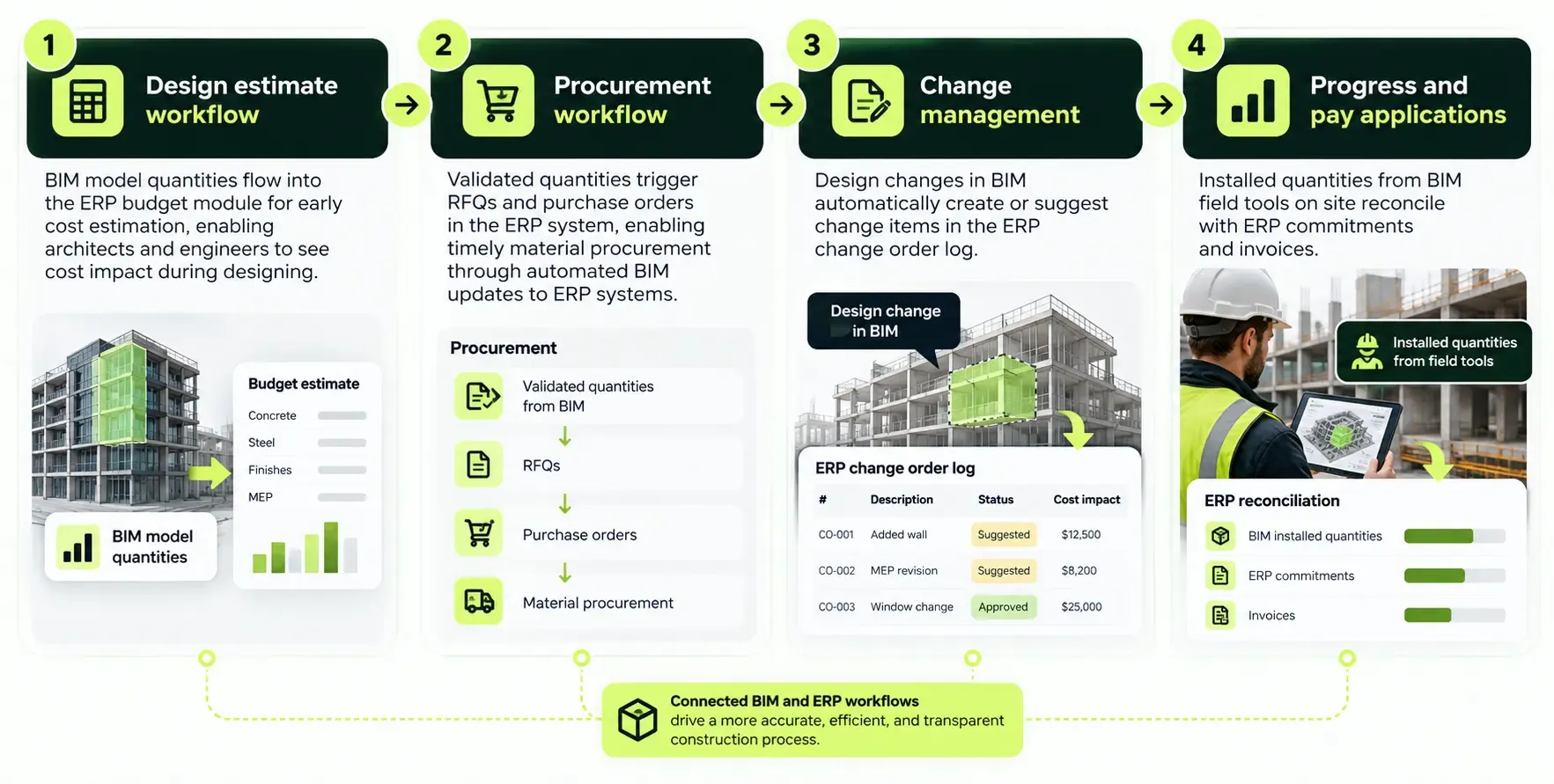
The value of integration comes from daily usage. Periodic updates are necessary for accurate 4D simulations and cost tracking alike. Here are the core workflows:
Consider this scenario: in March 2025, an architect changes the curtain wall type in the BIM model. Glass quantities and unit costs update. The integration layer pushes the new figures to the ERP, and within minutes, the cost dashboard shows a $48,000 variance on the building envelope trade. The contractor and project manager discuss options the same afternoon instead of discovering the gap at month end.
Integration fosters better collaboration among project teams by providing consistent data. Integration can lead to faster reporting and improved decision-making capabilities. These workflows deliver fewer errors than spreadsheet based approaches because there is clear traceability from BIM element to ERP cost line.
Common Pitfalls and How SoftDoes Helps You Avoid Them
Many BIM ERP projects fail not from technology limits but from poor modeling standards, weak governance, and mismatched expectations. A chaotic model can delay linking for weeks or months. Here are the most common pitfalls:
- BIM models not built with sufficient structure for cost extraction (inconsistent families, missing classification parameters). SoftDoes runs modeling standards workshops before development begins.
- ERP systems with rigid cost structures that do not match how the model is organized. SoftDoes designs flexible custom ERP systems with configurable cost code hierarchies.
- One time integrations that break when either platform updates its API. SoftDoes creates a managed integration layer with versioned endpoints and automated tests.
- Manual overrides in Excel that bypass the integrated workflow and reintroduce errors. SoftDoes builds validation rules that flag bypassed records.
- Lack of training so teams revert to old habits. SoftDoes provides documentation, onboarding sessions, and ongoing support.
A Canadian commercial developer reduced change order processing time by 30% after enforcing BIM to ERP coding standards with a managed middleware layer, eliminating the waste of manual reconciliation across three concurrent construction projects.
Benefits of Working with SoftDoes on BIM ERP Integration
SoftDoes focuses on custom software development and integration for enterprises and scale ups across the U.S. and Canada, with direct experience in BIM, data engineering, and ERP systems.
- End to end services: discovery, solution design, custom ERP development, integration build, and long term support
- Deep data and cloud engineering expertise to handle large BIM models and high volume cost management data
- Experience in regulated industries like healthcare, finance, and energy, relevant for hospital, data center, and utility projects
- Flexible engagement models (project based, dedicated teams, or staff augmentation) for owners, GCs, and specialty contractors
Every BIM ERP integration project SoftDoes delivers aims for three outcomes: reliable cost control with synchronized data, faster decision making through live dashboards, and measurable reduction in rework and administrative overhead.
If your team in the U.S. or Canada is ready to connect BIM and ERP, reach out to SoftDoes to discuss your current landscape and explore integration options.










Comments (0)
No comments yet.