
U.S.-Based
An AI IT helpdesk agent for your service desk
It answers how-to tickets, resets passwords and routes access requests, and admin rights wait for your IT team.
$7,000
Starting price of an IT agent build
40
AI projects delivered since 2020
5.0
Clutch rating from 40 reviews
























How the agent handles an IT ticket
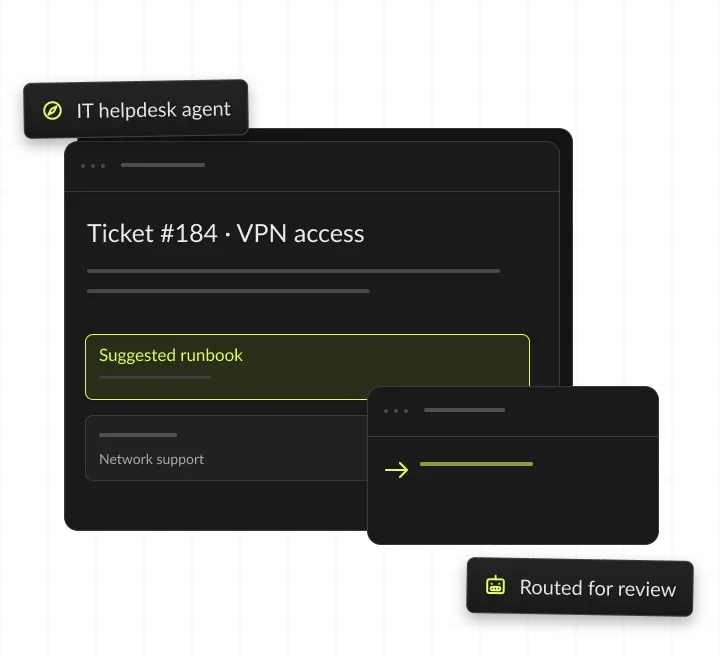
One access request in Teams: the agent checks role and policy, the manager approves in one click, and the group is updated and the ticket closed.
An access request
Asked in Microsoft Teams.
The agent checks policy
Role, manager and access rules.
The manager approves
One click in Teams or email.
Access is granted
Group updated, ticket closed.
AI IT helpdesk, in short
- Kansas City metro software and AI company
- AI IT helpdesk agents for internal IT teams
- Resolves routine tickets in your service desk and sends the rest to your IT staff
- Builds from $7,000 for one or two connected systems

Routine tickets. IT keeps admin rights.
- 01Build priceFrom $7,000; three or more connected systems from $13,000
- 02Who it's forInternal IT teams buried in resets, access requests and how-to tickets
- 03People approveAccess, admin rights, device wipes and account deletions
- 04You ownThe service accounts, prompts and code
What is an AI IT helpdesk?
An AI IT helpdesk is an AI agent that resolves routine IT tickets, such as how-to questions, password resets and access requests. It works inside your service desk and identity systems and hands anything risky to your IT team.
Where employees already ask
It is one kind of AI agent, built for internal IT. Employees ask in Microsoft Teams, Slack, email or the service portal, and the agent replies in the same thread and records every step on the ticket.
How an AI IT support agent resolves a ticket
It reads the request and works out the ticket type, confirms who is asking through your identity provider and finds the answer or the policy in your IT knowledge base.
Acts, routes or hands off
It acts through a service account with narrow rights, such as starting a password reset, and routes anything that needs approval to the owner named in your policy. It closes the ticket with a summary, or hands it to a technician with notes.
IT help desk vs IT service desk
A help desk usually means fixing problems as employees report them. A service desk also handles requests for access, software and equipment under written processes. An AI service desk agent covers both, because both arrive in the same queue.
AI agent vs IT chatbot
A chatbot answers questions from documents. An AI agent also reads your systems and takes approved actions, such as resetting a password or adding a user to a group. If you only need answers from IT articles, a chatbot on your own documents is simpler and cheaper, from $4,000.





Types of AI IT support agents we build
Six common setups, from an IT answers chatbot to monitoring for agents in production. Prices for each IT setup are starting points from our price list. Model usage is billed at cost, maintenance starts at $500 a month, and each extra system adds $3,000 for 1 or 2, or $9,000 for 3 or more.

IT answers chatbot
Answers how-to questions from your IT articles. Fits when questions repeat, and no actions are needed.
Service desk agent
Triages, summarizes and answers inside your service desk. Fits when technicians spend hours sorting tickets and asking for details.
Identity agent
Runs resets and approved access through your identity provider. Fits when resets and access requests fill the queue.
IT agent across 3 or more systems
Works across service desk, identity, device management and HR data. Fits when tickets need several systems to resolve.
Claude in Teams with your IT tools
Lets IT staff ask Claude about tickets and devices through a custom MCP server. Fits when your IT team already works in Claude.
Agent monitoring and cost control
Traces every action and alerts on cost, then from $500 a month. Fits when agents run in production.
ITSM and identity systems it connects to
We connect through each system's standard API, and the agent's rights follow your existing IT roles.
When an AI IT helpdesk pays off
An AI IT helpdesk pays off when resets, access requests and how-to questions fill a large share of your queue. The answers should already exist in your knowledge base or policies.
Signs we see before an IT team asks for an agent:
- Password resets and locked accounts pile up every morning.
- Access requests wait while someone finds the right approver.
- Technicians answer the same VPN, printer and software questions every week.
- Tickets arrive without the details needed to start work.
- Employees on early, late or weekend shifts wait for the desk to open.
When to wait
If your queue is mostly hardware repairs or one-off projects, an agent saves little. If your knowledge base is thin or outdated, fix the top articles first, because the agent answers only from approved sources. Before you scope an IT agent, the free AI readiness quiz scores your data, processes, people and security in 12 questions.
What to prepare before the first call
An export of three months of tickets with categories and resolutions, admin access to the service desk, your password reset and access policies with your identity provider's admin contact, your IT knowledge base, even if incomplete, and the measures that matter: first response time, resolution time or hours saved.
What the AI service desk agent handles
Password resets and MFA
Verifies the employee, triggers the reset and walks them through MFA setup. For example, an employee locked out before a 7 AM shift passes the identity check and gets a reset link, and the ticket closes with a log.
Access requests
Checks role and policy, routes to the right manager and applies approved access. For example, a sales rep asks for CRM access in Teams, and the agent checks the role, asks the manager and adds the group.
How-to answers
Answers VPN, printer and software questions from your IT knowledge base. For example, an employee asks how to connect to the VPN from home and gets the steps from your article with a link to it.
AI IT support agent triage
Tags, prioritizes and routes every ticket with a summary for technicians. For example, a laptop that will not start is tagged hardware, set to high priority and routed to desk-side support.
New starter and leaver tasks
Opens the tasks for each new starter or leaver from HR data, and tracks them until each owner closes them. For example, HR adds a Monday starter, and the agent opens laptop, account and access tickets.
Software and equipment requests
Takes license and equipment requests, checks your catalog and approval rules, and routes them to the budget owner. For example, a designer gets a design tool license after the manager approves it.
What you get at launch
You get a working IT agent in your service desk and chat tools, plus everything needed to run it. Service accounts, prompts, tests, approval routes and reports all sit in your accounts.




AI IT helpdesk ROI: a worked example
An AI IT helpdesk pays back when the technician hours it saves cost more than the build, maintenance and model usage. This example uses assumed IT ticket volumes and technician costs, not a client result: at these numbers, the agent pays for itself in under three months, after maintenance and before model usage. Answers at 7 AM, at night and on weekends are a second gain this math leaves out. Run your own IT ticket volumes in the AI ROI calculator, and estimate model usage per IT ticket with the LLM cost calculator.
How we build your IT help desk agent
Four steps from your ticket history to an agent your IT team trusts, with code and service accounts in your accounts.
We pick the ticket types worth automating from three months of history. Each type is ranked by volume and by how clear its rules are. You get ticket types ranked by volume.
We connect your service desk and identity system, then replay past tickets. Answers and actions are checked against what your technicians did. You get accuracy on your past tickets.
How-to answers go first, then resets and access as each proves accurate. Your IT lead decides when each ticket type moves from suggestions to actions. You get a staged rollout plan.
We document the agent and train your team to update articles, rules and approvers. Daily summaries show which ticket types to add next. You get runbooks, reports and admin access.
A day with the IT help desk agent

7 AM · Agent
What the agent does alone, and where people sign off. Resolves overnight password resets after identity checks.
8 AM · Agent
Answers VPN and printer questions with step-by-step guides.
9 AM · Person approves
A manager approves CRM access for a new employee.
2 PM · Person approves
The IT lead approves an admin rights request.
5 PM · Agent
Closes resolved tickets and sends a daily summary.
Guardrails: what the IT agent never does alone
We test each limit through AI red teaming and document it with our AI governance service.
> No admin rights <
> No access without the manager <
> No resets without identity checks <
> No wipes or deletions <
Which IT tickets an AI service desk agent should handle
Start with tickets that repeat and follow written rules. Leave anything that needs hands on a device, a security call or admin rights with your team.
Request tracking and AI in production
Builds from our case studies, and our record.

- Healthcare
Prior Authorization AI
Prior Authorization AI is a healthcare automation startup building AI-powered tools to streamline prior authorization for Medicare and Medicaid medical transportation providers in New Jersey.- 16Weekly hours saved
- 63%Admin time reduced
- 43%Fewer submission errors

- Startup
- Real Estate
Our Haus AI
A finance professional turned founder built Our Haus AI, an AI-powered collaborative workspace where homeowners and contractors scope, bid, contract, and document renovation projects together. SoftDoes took her prototype and made it production-ready.- 10XMVP scope delivered
- 2+years Ongoing partnership
- 1Fully owned Platform

- Real Estate
The building buyer
The Building Buyer is a Florida-based real estate investment firm co-founded by Dylan Troiano and Charles Hanlin. They acquire single-family, multifamily, and commercial properties across South Florida and beyond, with a focus on motivated seller opportunities.- 18Weekly hours saved
- 2+Years Ongoing partnership
- 1Fully owned Platform

- Healthcare
CareInTouch
CareInTouch is a Bay Area home health agency providing skilled nursing and therapy services to patients referred from hospitals and clinics. With over 100 staff, they operate in one of the most complex and compliance-driven healthcare markets in the country.- 40% Reduction In Billing Errors
- 100+Staff Operations Managed
- 0Missed Compliance Deadlines

- Startup
Sparkle The Cleaning Service
Sparkle The Cleaning Service is a Detroit-area residential cleaning company with 10 years in business, connecting homeowners with vetted, insured independent cleaners through a subscription-based marketplace platform.- 75% Platform Transparency
- 2XPlatform Growth
- 40%Higher User Retention

- Healthcare
FMY Orthodontics
FMY Orthodontics, a multi-location practice in West Tennessee, partnered with SoftDoes to replace a spreadsheet-based financial workflow with a custom web platform. The goal was to simplify how staff present treatment financing while allowing patients and families to review and complete decisions remotely.- 60%Workflow Reduction
- 75%Remote Adoption
- 5Locations Aligned

- Real Estate
Brizacorp
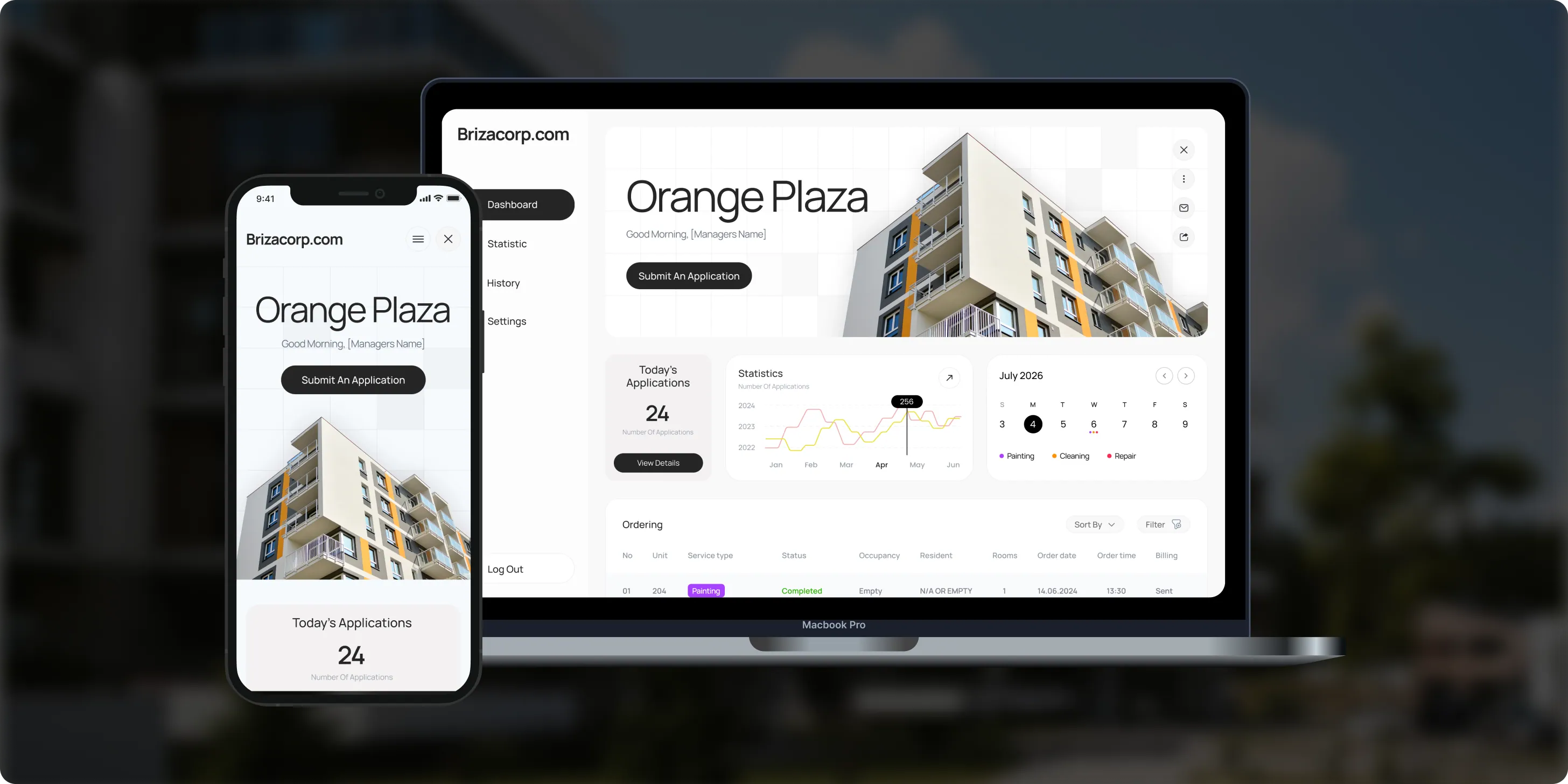
Brizacorp manages residential properties and coordinates the staff who handle painting, cleaning, and repair requests. Its team tracked work across messengers, phone calls, e-mail, and paper planners, with no single place to manage requests or measure performance.- 98%Application Stability
- 95%Utilization Rate
- 30%Faster Task Completion
Risks in an AI IT helpdesk, and how we handle them
Each risk gets a control in the agent before launch, tested on your past tickets and through red teaming.

How we keep identity and access safe
Limits enforced in code
The agent acts through service accounts with narrow rights, never holds admin roles and logs every action. Identity checks, approvals and limits are enforced in code, not only in prompts. Before launch, our AI red teaming service tries to trick the agent into resetting the wrong account or granting extra access, and our AI governance service documents its limits for your security team. For live tracing and cost alerts after launch, see AI agent monitoring: setup $3,500, then from $500 a month.
Narrow service accounts
The agent's service account can start resets and add approved groups. It cannot touch admin roles or security settings.
Identity checks first
Resets run only after your security team's check, through your identity provider's own flow, so new passwords never pass through the model.
Every action recorded
Every action records who asked, who approved and what changed.
Your vendor accounts
Model calls for each IT ticket run on your own Anthropic, OpenAI or cloud accounts, under your terms with each vendor.
Keys out of code
Service desk and identity API keys stay in your secrets manager, never in code or prompts.
Insured
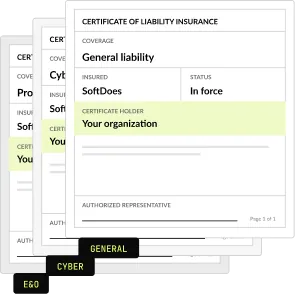
SoftDoes carries general liability, professional liability (errors and omissions) and cyber liability insurance. A certificate of insurance is available on request.
How the agent answers from your IT knowledge base
Answers from approved articles
The agent answers only from IT articles and policies you approve, and it links the article in each reply. When no article covers a question, it says so and hands the ticket to a person.
IT articles often sit in several places: the service desk, SharePoint or Confluence. We connect those sources, so the agent searches all of them and respects each employee's permissions.
Finding the gaps: daily summaries list the questions the agent could not answer. Your team writes the missing articles, and the agent uses them once they are approved.
The search layer is the same one we build in our RAG development service, with answers filtered by each user's permissions.
What makes answers accurate
One approved article per topic, so old and new steps never mix
Steps written with the exact names of menus and buttons
An owner and a review date on every article
A test set of real employee questions, replayed before every change

AI service desk features or a custom AI IT support agent
Your service desk vendor may offer AI features. A custom agent fits when tickets span several systems or your rules differ from the vendor's defaults.
The two can work together: a custom agent can run on top of the service desk you already have.
How to choose an AI IT helpdesk
Ask these questions of any AI IT helpdesk product or builder before you sign. A strong IT vendor answers each one in writing.
Questions to ask, and what a good answer includes
- Does it work inside our service desk and chat tools? Yes, in the queues, portal and Teams or Slack channels employees already use.
- How does it verify identity before a reset? With the check your security team sets, enforced in code.
- What can it never do alone? Grant admin rights, wipe devices, delete accounts or skip a named approver.
- How is accuracy measured before launch? A replay of your past tickets, with a result for each ticket type.
- Has it been tested against social engineering? Red teaming before launch, with findings fixed and tested again.
- How does it hand off to a technician? With the conversation, the checks done and a suggested next step.
- What does each ticket cost to run? Model usage at cost on your account, with an estimate per ticket.
- Who owns the service accounts, prompts and code? You do, in your own repository and tenant.
- What paperwork comes first? An NDA and a certificate of insurance before the first call.
What an AI IT helpdesk costs to run
The build, maintenance and model usage, each set out in writing before work starts. Each extra connected system, such as Intune or Jamf, adds $3,000 for 1 or 2 systems, or $9,000 for 3 or more; monitoring and cost control is optional: setup $3,500, then from $500 a month. See AI agent development cost.
Build: 1 or 2 connected systems
Service desk plus identity provider
From $7,000
Build: 3 or more systems
Adds device management or HR data
From $13,000
Maintenance and support
After launch
From $500 a month
AI model usage
On your own account, no markup
At cost
Project Discovery
Credited to the build
$490
Why IT teams build with SoftDoes
SoftDoes is a Claude Partner Network member and an OpenAI Registered Partner, rated 5.0 on Clutch. Your code and service accounts stay in your own accounts.

- 01
Claude and OpenAI partners
A Claude Partner Network member and an OpenAI Registered Partner, with 40 AI projects delivered since 2020.
- 02
Vendor documents first
Our NDA and certificate of insurance reach your procurement team before the first call.
- 03
You own the agent
Service accounts, prompts and code live in your accounts, and you own all of it.
- 04
Rated 5.0 on Clutch
5.0 from 40 client reviews, 36 verified by Clutch. More than half of the reviewers are founders, executives or department heads.
- 05
Top AI Company in Kansas City
Clutch named SoftDoes a Top AI Company and a Top Machine Learning Company in Kansas City for 2026.
- 06
Kansas City headquarters
Headquartered in Mission, KS, in the Kansas City metro. Call 800-909-2345 to reach the team.
AI IT helpdesks by industry
The same IT agent, built around each industry's systems, shifts and access rules. Each industry page shows the use cases in detail.
Healthcare
Access requests for clinical systems go to the system owner, and every change is logged.
Financial services
Access follows your approval policies, with an audit log your auditors can read.
Government
Answers from published IT policies, with approvals and records kept for every request.
Manufacturing
Shift workers get resets and how-to answers at any hour, and hardware faults go to plant IT.
Logistics
Drivers and warehouse staff get help with devices and accounts, with hardware routed to a technician.
Legal
Access to client and matter systems is routed to the named owner for approval.


Questions about AI IT help desk agents
Safety, scope, systems and cost.
What is an AI help desk?
An AI help desk uses an AI agent to answer and resolve support tickets for employees or customers. For IT, the agent answers how-to questions, resets passwords, routes access requests for approval and triages hardware issues. It works inside your service desk and identity systems, and hands anything risky or unclear to your IT staff.
Is the IT help desk being replaced by AI?
The repeat work is moving to AI, while the IT team keeps the judgment calls. Password resets, how-to questions and standard access requests suit an agent well. Hardware failures, security incidents, admin rights and anything unusual stay with people. Teams can then spend the saved hours on projects and security.
Is agentic AI for IT support real?
Yes, for well-defined tickets with clear rules and an approval step. An agent can verify an employee, reset a password through your identity system and close the ticket with a log. It struggles with vague problems and anything that needs hands on a device, so we launch it on the ticket types it handles reliably.
Is it safe to let AI reset passwords?
It is when identity checks and limits come first. The agent resets passwords only after the verification your security team sets, uses a service account that cannot touch admin roles and logs every action. Before launch, people try to trick it into resetting the wrong account through our AI red teaming service.
How much does an AI IT helpdesk agent cost?
An IT helpdesk agent starts at $7,000 when it connects to one or two systems, such as your service desk and identity provider. With three or more systems, such as device management or HR data too, it starts at $13,000. Helpdesk agent maintenance starts at $500 a month, and AI model usage is billed at cost on your own account.
How can AI help a service desk?
AI helps in three ways. It resolves routine tickets alone, such as how-to questions and password resets. It triages the rest, adding priority, category and a summary so technicians start faster. It also routes approvals to the right person. Your team keeps hardware, security incidents, admin rights and anything unusual.
Which AI is best for IT support?
The best fit depends on where your tickets live. If they stay in one service desk and its AI features match your rules, start there. If tickets need your identity provider, device management or HR data, a custom agent fits better. We build on Claude and OpenAI models and test them on your past tickets before choosing.
Which service desks and identity systems does it work with?
We connect through standard APIs, so the agent works with ServiceNow, Jira Service Management and Freshservice, among others. For identity, it works with Microsoft Entra ID and Okta. It can also read articles in Confluence or SharePoint and device data in Intune or Jamf. The plan lists each connection and its rights before any build.
Can employees use the agent in Microsoft Teams or Slack?
Yes. The agent can work where employees already ask for help: Teams, Slack, email or the service portal. The conversation and every action are saved on the ticket in your service desk, so technicians see the full history. To use Claude itself inside Teams, see Claude for Microsoft Teams.
What happens when the agent cannot solve a ticket?
It hands the ticket to the right queue with a summary, the checks it already ran and a suggested next step. The technician never starts from zero. Employees can ask for a person at any point. Daily summaries show which tickets were handed off, so your team can add articles or rules.
Do we need a complete knowledge base first?
No, but the top articles must be right. We start with the ticket types your articles already cover, such as VPN setup or printer issues. Daily summaries then list the questions the agent could not answer, so your team knows which articles to write next. The agent never answers from outside your approved sources.
Will it replace our ITSM tool?
No. The agent works inside the service desk you already run, such as ServiceNow, Jira Service Management or Freshservice. Tickets, SLAs and reports stay where they are. The agent adds answers, triage and approved actions on top, and every step it takes is recorded on the ticket.
How do you measure the agent's results?
Before launch, we replay your past tickets and report a result for each ticket type. After launch, daily summaries show tickets resolved, routed and reopened by type. Your service desk reports keep tracking first response and resolution times, so you can compare them with the months before launch.
Who owns the agent and the ticket data?
You do. Ticket data stays in your service desk and your own vendor accounts. The code, prompts, rules and service accounts live in your repository and your tenant, documented for your team. Your IT staff can run the agent without us, or we maintain it from $500 a month.
What does an AI IT helpdesk cost to run each month?
Running costs have two parts. Model usage is billed at cost on your own account and depends on ticket volume and model choice. Maintenance and support, if you want us to run it, start at $500 a month. Optional monitoring with cost alerts adds $3,500 for setup, then from $500 a month. Estimate usage with our LLM cost calculator.
Updated · Reviewed by Orest Andrusyshyn, Founder and CEO