
U.S.-Based
Computer vision development services
We build software that reads images and video for inspection, recognition and counting, and a person reviews every uncertain result.
$9,000
Computer vision builds from
40
AI projects delivered since 2020
5.0
Clutch rating from 40 reviews
























How a visual inspection runs
One part on the line: the model checks it, an inspector confirms uncertain rejects, and the result lands in your quality system.
A part passes the camera
Each item on the line is photographed as it moves.
The model checks for defects
It flags scratches, dents or missing parts, with a confidence score.
An inspector confirms rejects
Low-confidence results wait for a person's decision.
The result is recorded
Pass, fail and the photo land in your quality system.
Computer vision development company, in short
- Software and AI company in the Kansas City metro
- Computer vision for manufacturing, logistics and healthcare teams
- Visual inspection, image recognition and document reading that write results into your systems
- Builds from $9,000, and you own the model, the data and the code

See it. Check it. Record it.
- 01Build priceFrom $9,000: a model trained or configured on your images, tested and deployed with a review queue. AI development cost
- 02DocumentsFrom $5,000: reading forms, invoices and records from scans and faxes, into fields your systems use. Intelligent document processing
- 03Who it's forTeams that look at images all day to make the same decision
- 04You ownThe trained model, the labeled images and the code
What is computer vision?
Computer vision is software that turns images or video into data: a label, a count, a location or a pass or fail. Computer vision development builds that software around your cameras and decisions. A camera or scanner captures the image, a model finds what matters in it, and the result goes to a person or straight into your systems. Two kinds of models do this work today: vision-language models such as Claude and GPT read images from instructions alone, and custom models are trained on your labeled images for one narrow task.
Common computer vision tasks
Image classification
What is in this image? For example, sort product photos into catalog categories.
Object detection
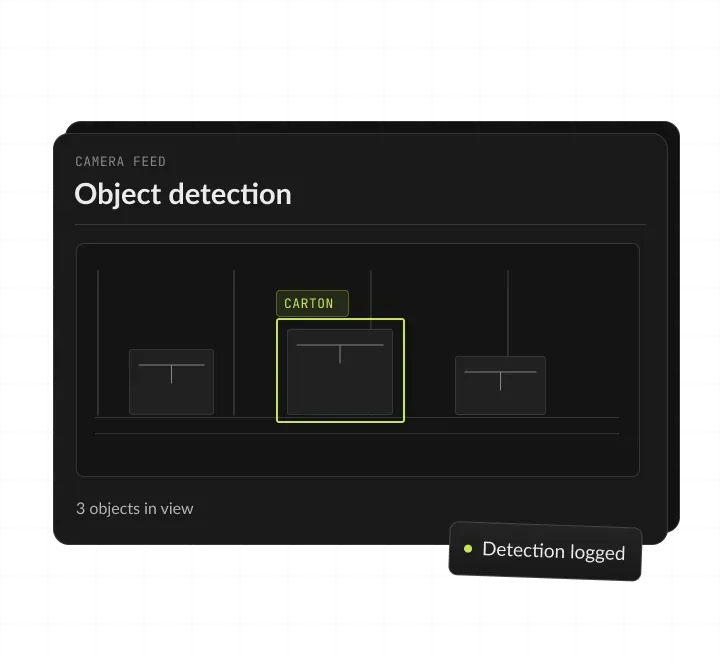
Where are the objects, and how many? For example, count pallets in a loading bay.
Segmentation
Which pixels belong to each object? For example, measure the area of a scratch on a panel.
Text reading (OCR)
What does the text say? For example, read serial numbers, labels and forms.
Video analytics
What happened, and when? For example, log each truck's arrival at a dock door.
Visual search
Which stored images look like this one? For example, find the matching part from a photo.


How a computer vision system works
A camera, phone or scanner captures the image at a set moment, such as when a part passes a sensor. Software crops, resizes or adjusts the image so the detail is clear. The model returns its answer with a confidence score. Results above the threshold go straight to your system, and the rest go to a person. Reviewed cases are saved and join the next training round, so the model keeps up with new items.
Types of computer vision systems we build
Six common systems, what each does and when it fits. Each price is the starting point for that system on our price list. Cloud and model usage are billed at cost on your own accounts. Maintenance starts at $500 a month.
Visual inspection
Flags defects on parts or products, with a person confirming rejects. Fits when inspection is manual and misses are costly.
Image recognition
Classifies products, parts or documents in photos. Fits when teams sort or tag images by hand.
Object detection and counting
Finds and counts items in photos or video. Fits when stock, parts or vehicles are counted by hand.
Video analytics
Logs events in recorded or live video, with clips for review. Fits when cameras exist, but nobody watches the footage.
Document and image reading
Turns scans, faxes, receipts and IDs into fields. Fits when staff retype data from images.
Photo check inside your app
A vision-language model reviews photos users upload. Fits when your app collects photos that need a quick check.
Cameras, models and systems we connect
From the camera or scanner you have to the system that acts on the result.
When computer vision pays off
Computer vision pays off when people look at images all day to make the same decision. The detail they look for must be visible to a camera.
These signs usually come before a strong computer vision project:
- Inspectors check every item by eye, and misses reach customers.
- Staff count stock, parts or vehicles by hand.
- Photos, scans or faxes are retyped into your systems.
- Cameras are already installed, but nobody watches the footage.
- The same visual decision happens thousands of times a month.
When to wait
If the defect cannot be seen in a photo, a better model will not find it. Fix the camera, the lighting or the angle first. If you see only a few cases a month, a person with a checklist costs less than a model.
What to prepare before the first call
Sample images, including the hard cases: bad light, odd angles and rare defects; the decision the system must make, and the cost of each kind of mistake; camera or scanner details, and where the images are stored today; and the system where results should go, such as your ERP or quality system.
Image recognition software development and visual inspection
Vision systems that see a specific thing in your images and send the result where your team works.
Image recognition software development
Models that classify products, parts or documents in photos, trained and tested on your own images. For example, product photos sorted into 40 catalog categories, with uncertain ones sent to a merchandiser.
Visual inspection and defect detection
Cameras on the line flag scratches, dents or missing parts, and a person confirms each reject. For example, each cast part is photographed on the line, and a scratch above a set size sends it to an inspector.
Document and image reading
Scans, faxes, receipts and IDs turned into fields your systems can use. For example, delivery receipts photographed by drivers become dated, signed records in your system. See intelligent document processing.
Object detection and counting
Count stock on shelves, vehicles in a yard or items on a pallet, from photos or video. For example, shelf photos taken by store staff count the facings for each product and flag empty slots.
Computer vision consulting
We check whether your images, labels and cameras can support a model before you fund a build. For example, before a build, 200 sample images show whether the defect is visible at the camera's resolution.
Video analytics
Recorded or live video checked for events, with short clips saved for a person to review. For example, yard cameras log each trailer's arrival and dock door from the number painted on its side.
What you get from a computer vision project
You get a working system and everything needed to keep it accurate. The model, the labeled images, the test results and the code all sit in your own accounts.
Vision-language models or a custom vision model?
Vision-language models such as Claude and GPT read images with no training, which suits documents and varied photos. A custom model suits narrow, high-volume tasks that need exact counts, precise locations or on-site results.
Vendor guides are clear about the limits. Anthropic's vision guide says Claude's counts and locations are approximate, and warns that low-quality, rotated or very small images, under 200 pixels, can cause mistakes. OpenAI's vision guide lists similar limits for rotated images, small text, counting and precise spatial tasks. Both say their models are not meant for diagnostic scans such as CTs, and Anthropic adds that Claude will not name people in images. A system can also combine both: a vision-language model reads labels and paperwork, and a small trained model runs the high-volume check. We test both routes on a sample of your images before you fund a build.
Computer vision ROI: a worked example
Visual inspection pays back when the inspector hours it saves cost more than the build and the cloud usage. This example uses assumed numbers for 40,000 parts a month, not a client result, so swap in your own. At these numbers, the build pays for itself in under two months, before cloud usage and maintenance. Missed defects can cost more than inspection hours: add your own cost of a missed defect to the math, measured on your line. Enter your inspectors' hours and loaded cost in the AI ROI calculator; for vision-language models, estimate API usage with the LLM cost calculator. After launch we track accuracy and review-queue volume on live images, so you see the real saving next to this estimate.
Risks in computer vision, and how we handle them
Each risk below gets a control before release, tested on your own images.

How we keep image data safe
Images stay in your own cloud or on site, and model calls run on your own vendor accounts. Every result is logged with the image it came from.
Patient records and private models
For images that include patient records, our guide to HIPAA-compliant AI explains what changes. For models that must run inside your own cloud, see private AI.
Your cloud or devices
Images are stored in your own cloud account or on your own devices, never in a SoftDoes account.
On-site models
On-site models keep images inside the building when they must not leave it.
Your vendor accounts
Vision-language model calls run on your own Anthropic, OpenAI or Google accounts, under your terms.
Role-based access
Access to images and results follows the roles your team already has.
Every result logged
Every result is logged with its image, confidence score and model version.
Insured
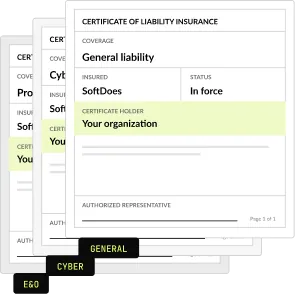
SoftDoes carries general liability, professional liability (errors and omissions) and cyber liability insurance. A certificate of insurance is available on request.
How computer vision consulting turns into a working system
Four steps from sample images to a system your team relies on.
We review sample images and the decision the model must make. You get a go or no-go with an accuracy target.
We label training images, or pick a vision-capable model that needs no training. You get a labeled dataset you own.
We train or configure the model and test it on images it has never seen. You get an accuracy report on your own images.
We deploy to the cloud or on site, with a review queue for uncertain results. You get a live system and a retraining plan.
AI in production
AI builds from our case studies, and the record behind them.

- Healthcare
Prior Authorization AI
Prior Authorization AI is a healthcare automation startup building AI-powered tools to streamline prior authorization for Medicare and Medicaid medical transportation providers in New Jersey.- 16Weekly hours saved
- 63%Admin time reduced
- 43%Fewer submission errors

- Startup
- Real Estate
Our Haus AI
A finance professional turned founder built Our Haus AI, an AI-powered collaborative workspace where homeowners and contractors scope, bid, contract, and document renovation projects together. SoftDoes took her prototype and made it production-ready.- 10XMVP scope delivered
- 2+years Ongoing partnership
- 1Fully owned Platform

- Real Estate
The building buyer
The Building Buyer is a Florida-based real estate investment firm co-founded by Dylan Troiano and Charles Hanlin. They acquire single-family, multifamily, and commercial properties across South Florida and beyond, with a focus on motivated seller opportunities.- 18Weekly hours saved
- 2+Years Ongoing partnership
- 1Fully owned Platform

- Healthcare
CareInTouch
CareInTouch is a Bay Area home health agency providing skilled nursing and therapy services to patients referred from hospitals and clinics. With over 100 staff, they operate in one of the most complex and compliance-driven healthcare markets in the country.- 40% Reduction In Billing Errors
- 100+Staff Operations Managed
- 0Missed Compliance Deadlines

- Startup
Sparkle The Cleaning Service
Sparkle The Cleaning Service is a Detroit-area residential cleaning company with 10 years in business, connecting homeowners with vetted, insured independent cleaners through a subscription-based marketplace platform.- 75% Platform Transparency
- 2XPlatform Growth
- 40%Higher User Retention

- Healthcare
FMY Orthodontics
FMY Orthodontics, a multi-location practice in West Tennessee, partnered with SoftDoes to replace a spreadsheet-based financial workflow with a custom web platform. The goal was to simplify how staff present treatment financing while allowing patients and families to review and complete decisions remotely.- 60%Workflow Reduction
- 75%Remote Adoption
- 5Locations Aligned

- Real Estate
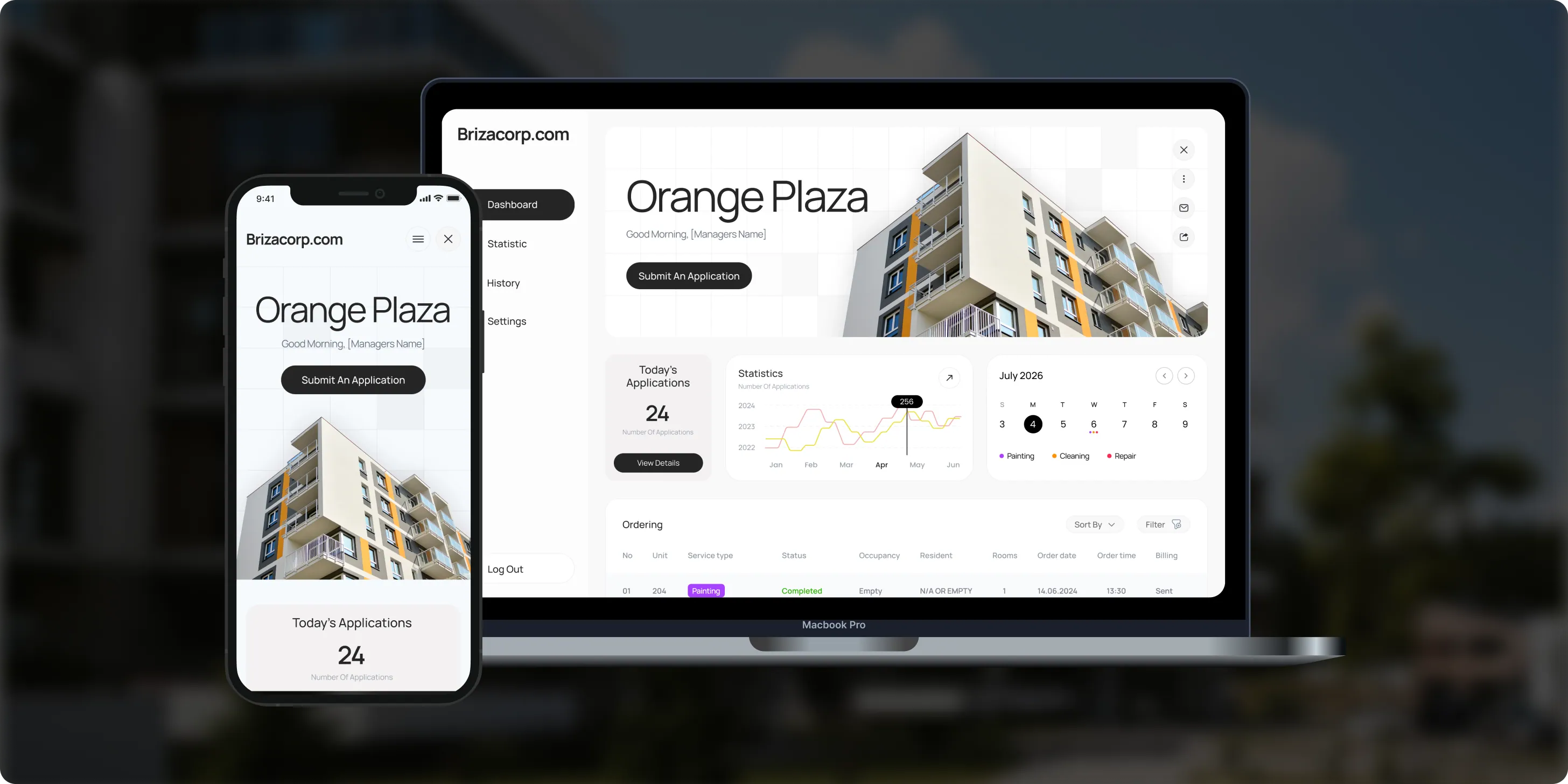
Brizacorp
Brizacorp manages residential properties and coordinates the staff who handle painting, cleaning, and repair requests. Its team tracked work across messengers, phone calls, e-mail, and paper planners, with no single place to manage requests or measure performance.- 98%Application Stability
- 95%Utilization Rate
- 30%Faster Task Completion
Why teams choose SoftDoes for computer vision
Teams choose SoftDoes for computer vision because they own the trained models, labeled images and code, and low-confidence detections go to a person. Clutch named SoftDoes a 2026 Top Machine Learning Company in Kansas City.

- 01
You own the model and data
Trained models, labeled images and code are yours, on your own cloud account.
- 02
A person on uncertain results
Low-confidence detections go to a review queue, so mistakes are caught before they cost money.
- 03
Vendor documents first
Our NDA and certificate of insurance reach your procurement team before the first call.
- 04
40 AI projects since 2020
About 80% of our projects include AI, from reading faxed records to filing through Medicare's API.
- 05
Rated 5.0 on Clutch
5.0 from 40 client reviews, and named a Clutch 2026 Top Machine Learning Company in Kansas City.
- 06
Kansas City headquarters
Headquartered in Mission, KS, in the Kansas City metro. Call 800-909-2345 to reach the team.
Computer vision by industry
The same vision steps, built around each industry's cameras, documents and rules. Each industry page has the use cases in full.
Manufacturing
Defect checks, counting and safety monitoring on the line.
Logistics
Labels, damage photos and proof of delivery read into your systems.
Insurance
Damage photos and claim documents sorted for adjusters, with a person approving every payout.
Healthcare
Faxed records and intake forms read into your systems, with HIPAA controls.
Construction
Site photos and project documents organized by job, with people approving.
Defense and edge
Models that run next to the camera, with no connection required.


How to choose a computer vision development company
Ask these questions before you sign. A strong computer vision partner answers each one in writing.
Questions to ask, and what a good answer includes
- Will you test on our images before we commit? A feasibility check on a sample of your images, with a go or no-go.
- How will you measure accuracy? A target agreed up front and tested on images the model never saw.
- What happens with uncertain results? A review queue where a person decides, logged for retraining.
- Who owns the model and the labeled data? You do, on your own accounts.
- Should it run in the cloud or on site? A recommendation based on your connection, speed and privacy needs.
- How will the model stay accurate? Monitoring on live images and a written retraining plan.
- What paperwork comes first? An NDA and a certificate of insurance before the first call.
What computer vision development costs
A fixed price agreed after the feasibility check. Cloud and model usage go on your own accounts, at cost. You own the trained model, the labeled images and the code. See AI development cost.
Computer vision build
Data, model, testing and deployment
From $9,000
Document reading
Forms, invoices and records from scans
From $5,000
Photo check inside your app
On a vision-language model
From $4,000
Project Discovery
Credited to the build
$490
Maintenance, monitoring and updates
After launch
From $500 a month
Questions about computer vision development
Cost, data, models and where the system runs. Can't find your answer?
What are computer vision development services?
Computer vision development services build software that reads images or video and acts on what it sees. Typical jobs are visual inspection, image recognition, document reading and counting objects. The work covers labeling, model training or setup, testing on your own images and deployment.
What is the difference between computer vision and image recognition?
Image recognition is one computer vision task. It tells you what an image shows, such as a product type or a part number. Computer vision also covers finding and counting objects, measuring them, reading text and following events in video. A single system often combines two or three of these tasks.
How much does computer vision development cost?
A computer vision build starts at $9,000. The price depends on how many images need labeling and how accurate the model must be. Running on devices on site, rather than in the cloud, also adds work. Reading documents such as forms and invoices starts at $5,000. Cloud usage is billed at cost, and maintenance starts at $500 a month.
Do we need to train a custom model?
Not always. Vision-capable models such as Claude and GPT can describe photos, read documents and flag obvious problems with no training. A custom model makes sense when you need high accuracy on narrow tasks, such as one defect type, or when images must stay on site. We test both routes on your images first.
How many images do we need?
There is no fixed number. It depends on how many classes the model must tell apart, how much they vary and the accuracy you need. A feasibility check on a sample of your images shows whether you have enough, and whether a vision-capable model can do the job without training.
Can computer vision run on site without the cloud?
Yes. Models can run on edge devices next to the camera, so images never leave the building and results arrive in real time. That suits factories, warehouses and sites with weak connections. On-site setups add hardware and update planning for each location. Our edge AI software development page covers edge AI in more depth.
Should we use a development company or add engineers?
Choose a development company when you need a working system end to end: data, model, app and deployment, at a fixed price. Add an engineer to your team when you already run the product and need more hands. We offer both: see computer vision engineers for a dedicated specialist or a full team.
How accurate is computer vision?
It depends on the task, the image quality and how much the items vary. We agree an accuracy target during the feasibility check and test on images the model has never seen. Results below a confidence threshold go to a person, so uncertain cases never pass unchecked. The target is in writing before the build starts.
Can you add computer vision to our existing app?
Yes. If your app already collects photos, a vision-language model can check them as an AI feature, from $4,000. A custom model runs behind an API that your app calls. Either way, each result comes back with a confidence score, and low-confidence results go to a review queue for a person to decide.
Can you use our existing cameras?
Often, yes. What matters is whether the detail you care about is visible: resolution, focus, lighting and angle. The feasibility check runs on images from your current cameras. If they cannot show the defect or the label clearly, we say so. We then recommend the camera or lighting change before any model work.
How long does a computer vision project take?
It depends on the number of images to label, the accuracy target and where the system runs. We set the scope, price and schedule in a written plan after the feasibility check. Many teams begin with Project Discovery for $490, which is credited to the build. The plan also lists what we need from you, such as sample images.
Do we need to label the images ourselves?
No. We label the training images as part of the build, or we use a vision-language model that needs no training. Your experts help where only they can tell, such as the line between an acceptable mark and a defect. You own the labeled dataset at the end.
Can computer vision read text and documents?
Yes. Reading text from images, often called OCR, is a common computer vision task. Serial numbers, labels, receipts, IDs and faxed forms can all become fields in your systems. Document reading for forms, invoices and records starts at $5,000. Our intelligent document processing page covers document work in depth.
Who owns the trained model and the images?
You do. The trained model, labeled images, test results and code are yours from day one, on your own cloud account. If you change vendors or build an in-house team, you keep everything needed to retrain and run the system without us.
Updated · Reviewed by Orest Andrusyshyn, Founder and CEO