User Interface Design in Anchorage, AK
User Interface Design in Anchorage, AK
Clear screens shorten training, reduce errors, and keep customers moving, which is the focus of our user interface design in Anchorage. SoftDoes designs interfaces that make complex software feel simple.
Let's build together.
Talk with a senior engineer about your product idea, architecture, and what it would take to build it.
90+
Active Client Partnerships
80+ Person
Product & Engineering Team
100%
Your Code & IP Ownership
U.S.-Led
Delivery & Accountability
Services We Offer
- 01User Interface Design
> SCREENS THAT GUIDE EVERY CLICK <
When software confuses the people using it, support tickets pile up, and that is where user interface design in Anchorage starts to pay for itself. User interface design shapes the visual and interactive layer of a product. It covers layout, typography, color, controls, and the feedback users see after each action. Weak interfaces slow staff and frustrate customers. We study how people complete their most common tasks, then arrange screens so the next step is always obvious. Responsive design keeps layouts usable on phones, tablets, and wide monitors.
- Clear visual hierarchy
- Obvious primary actions
- Helpful feedback messages
- Responsive layouts
- Accessible contrast and type
> CONSISTENCY ACROSS EVERY SCREEN <
Products that add features quickly often end up with several versions of the same button, and design system development in Anchorage solves that drift. A design system is a shared library of colors, typography, icons, and components with clear usage rules. Designers stop recreating elements for every new page. Developers receive matching coded components in React or Vue. Updates to one component apply everywhere at once. The result is a consistent visual identity and faster releases.
- Component library
- Usage guidelines
- Coded UI components
- Design tokens
- 02User Experience Design
> DESIGN DECISIONS BACKED BY USERS <
Teams often redesign screens based on opinion and still see users struggle, so our UX work relies on interactive prototype design in Anchorage before development starts. User experience design focuses on how people move through a product from first visit to finished task. We interview users, review analytics, and map the journeys that matter most. Clickable prototypes let real participants test flows while changes are still inexpensive. Observed problems are fixed before a single line of code is written. The outcome is software that feels natural and needs less explanation.
- User interviews
- Journey mapping
- Clickable prototypes
- Usability testing
- Findings reports
- 03Product Design Services
> ONE TEAM FROM CONCEPT TO RELEASE <
Many products lose momentum when strategy, design, and engineering sit with separate vendors, and our app UI design in Anchorage keeps those pieces in one team. Product design services cover research, user experience, visual design, and handoff for an entire product. We work as a product design agency alongside your developers or our own engineers. Wireframes define structure, while detailed Figma files define every state and interaction. Engineers join design reviews, so plans stay realistic for mobile app development and web releases. After launch, analytics guide the next round of improvements.
- Product discovery workshops
- Wireframes and flows
- Detailed visual design
- Developer handoff specs
- Improvements after launch
> SCREENS THAT GUIDE EVERY CLICK <
When software confuses the people using it, support tickets pile up, and that is where user interface design in Anchorage starts to pay for itself. User interface design shapes the visual and interactive layer of a product. It covers layout, typography, color, controls, and the feedback users see after each action. Weak interfaces slow staff and frustrate customers. We study how people complete their most common tasks, then arrange screens so the next step is always obvious. Responsive design keeps layouts usable on phones, tablets, and wide monitors.
- Clear visual hierarchy
- Obvious primary actions
- Helpful feedback messages
- Responsive layouts
- Accessible contrast and type
> CONSISTENCY ACROSS EVERY SCREEN <
Products that add features quickly often end up with several versions of the same button, and design system development in Anchorage solves that drift. A design system is a shared library of colors, typography, icons, and components with clear usage rules. Designers stop recreating elements for every new page. Developers receive matching coded components in React or Vue. Updates to one component apply everywhere at once. The result is a consistent visual identity and faster releases.
- Component library
- Usage guidelines
- Coded UI components
- Design tokens

PRODUCTS BUILT ACROSS INDUSTRIES
Finance
Financial firms rely on our dashboard UI design in Anchorage for account views, transaction histories, and reports that present complex figures clearly.
Healthcare
Patient portals and scheduling tools need calm, readable layouts. Our UI design in Anchorage applies accessibility standards with HIPAA requirements in mind.
Education
Schools turn to our website redesign in Anchorage to simplify enrollment pages, course catalogs, and parent resources across devices.
Construction
Field crews need large controls and short workflows, so our app UI design in Anchorage shapes reporting tools that work even with gloves on.
Technology
Software companies use our design system development in Anchorage to unify product interfaces and speed up feature releases.
Startups
New products need proof before funding, and our interactive prototype design in Anchorage gives investors something real to click through.
Compliance
Regulated organizations get clear forms, disclosure screens, and approval flows from our Figma design services in Anchorage, reducing errors in required steps.
Energy
Energy providers comparing a web design company in Anchorage and across the U.S. choose SoftDoes for customer portals, billing pages, and usage dashboards.


Transparency at each stage
Discovery & Research
We audit audiences and competitors to define pain points, ensuring design solves your specific business challenges.
Design Strategy
Creating concepts and user flows to build an intuitive product structure and seamless interaction logic.
Iterative Prototyping
Real-time progress you can see, from wireframes to high-fidelity mockups that bring your digital vision to life.
Usability Testing
We validate every button and transition through real-world scenarios to eliminate friction before development.
Handoff & Support
Complete design systems and asset delivery with ongoing expert support to ensure pixel-perfect implementation.

Numbers Don’t Lie
Recent projects showcasing how we design, engineer, and deliver production-ready software solutions.

- Startup
- Real Estate
Our Haus AI
A finance professional turned founder built Our Haus AI, an AI-powered collaborative workspace where homeowners and contractors scope, bid, contract, and document renovation projects together. SoftDoes took her prototype and made it production-ready.- 10XMVP scope delivered
- 2+years Ongoing partnership
- 1Fully owned Platform

- Finance
- Energy
Deepwater Insights
Deepwater Insights delivers proprietary alternative data and niche research on the offshore drilling and energy sector to institutional investors, family offices, and high-net-worth individuals who require coverage that larger firms don't provide.- 100%Brand Continuity
- 2Platform Distribution
- 100%Paywall-Ready Content

- Real Estate
The building buyer
The Building Buyer is a Florida-based real estate investment firm co-founded by Dylan Troiano and Charles Hanlin. They acquire single-family, multifamily, and commercial properties across South Florida and beyond, with a focus on motivated seller opportunities.- 18Weekly hours saved
- 2+Years Ongoing partnership
- 1Fully owned Platform

- Education
- Non-Profit
WOVEN & NICE
Woven is a Spring Valley, NY nonprofit running the NICE program (New Training Inclusive Community Environment) in four Rockland County schools. Their team supports students through restorative practices, mediation, and professional development for teachers and administrators.- 4Schools Served
- 4Weeks to Launch
- 1STTime on Upwork

- Healthcare
CareInTouch
CareInTouch is a Bay Area home health agency providing skilled nursing and therapy services to patients referred from hospitals and clinics. With over 100 staff, they operate in one of the most complex and compliance-driven healthcare markets in the country.- 40% Reduction In Billing Errors
- 100+Staff Operations Managed
- 0Missed Compliance Deadlines

- Startup
Sparkle The Cleaning Service
Sparkle The Cleaning Service is a Detroit-area residential cleaning company with 10 years in business, connecting homeowners with vetted, insured independent cleaners through a subscription-based marketplace platform.- 75% Platform Transparency
- 2XPlatform Growth
- 40%Higher User Retention

- Startup
DineMate
DineMate is a Maryland-based dating and connecting platform built around verified profiles, restaurant reservations, and prepaid dining experiences. Founded to bring back authenticity to how people meet and connect.- 60% Time Saved
- 99%System Reliability
- 40%Higher User Retention

- Healthcare
Prior Authorization AI
Prior Authorization AI is a healthcare automation startup building AI-powered tools to streamline prior authorization for Medicare and Medicaid medical transportation providers in New Jersey.- 16Weekly hours saved
- 63%Admin time reduced
- 43%Fewer submission errors

- Education
Grand Central Language Services
Grand Central Language Services provides translation and interpretation for organizations operating in complex, multilingual environments. As demand grew, internal workflows became harder to manage. SoftDoes built a custom platform to streamline coordination, improve visibility, and support scalable operations.- 72%Workflow Reduction
- 48%Coordination Reduction
- 83%Visibility Increase

- Healthcare
FMY Orthodontics
FMY Orthodontics, a multi-location practice in West Tennessee, partnered with SoftDoes to replace a spreadsheet-based financial workflow with a custom web platform. The goal was to simplify how staff present treatment financing while allowing patients and families to review and complete decisions remotely.- 60%Workflow Reduction
- 75%Remote Adoption
- 5Locations Aligned

Forbidden Alchemy
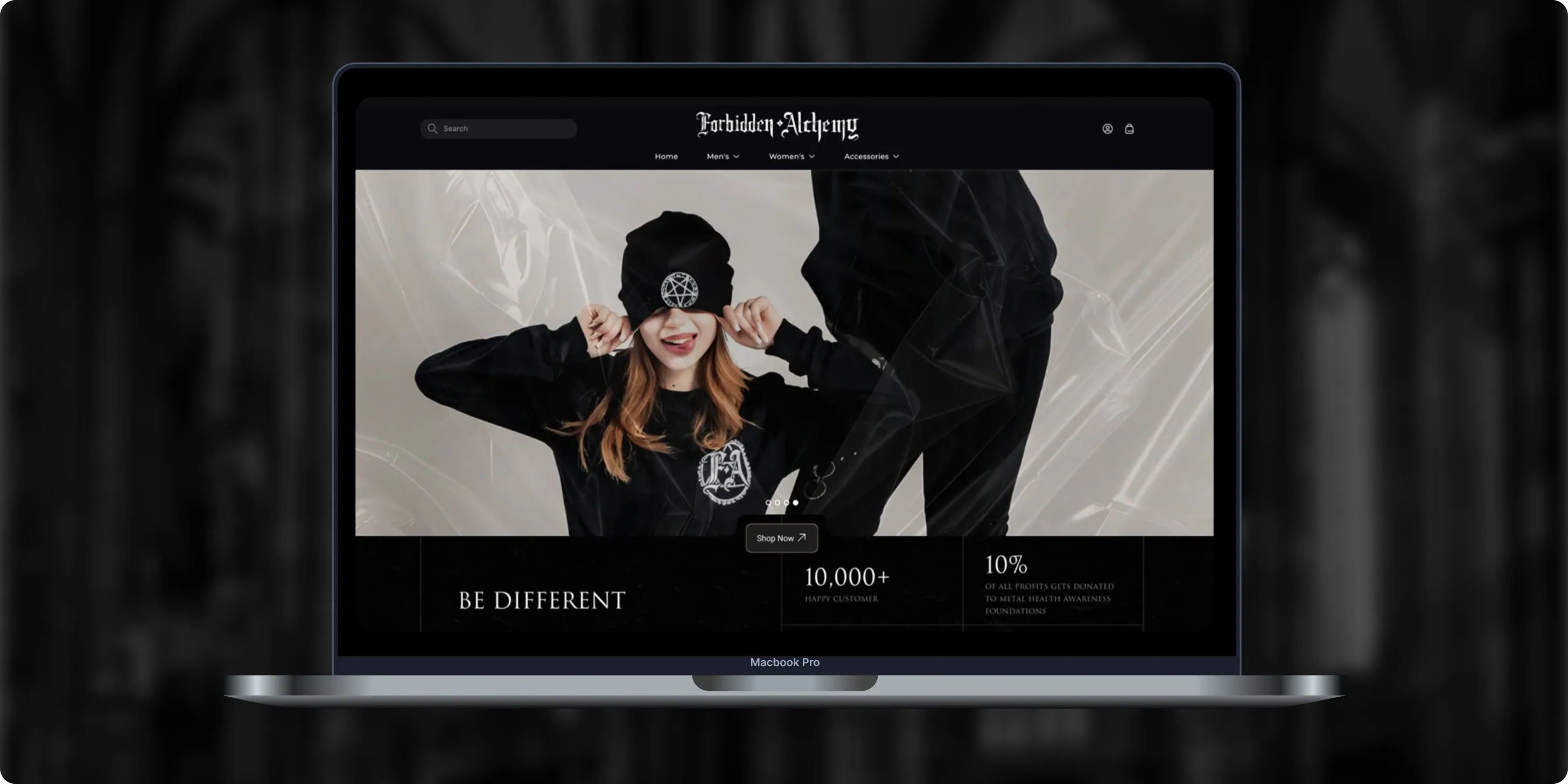
Forbidden Alchemy is an alternative fashion brand creating dark, provocative clothing for the metalhead community, with 10% of profits donated to mental health awareness. Its mostly mobile audience struggled with a store that was hard to navigate and weak on functionality.- +44%Revenue Month Over Month
- 86%Design Satisfaction
- 2.8XUser Retention Growth
Altera
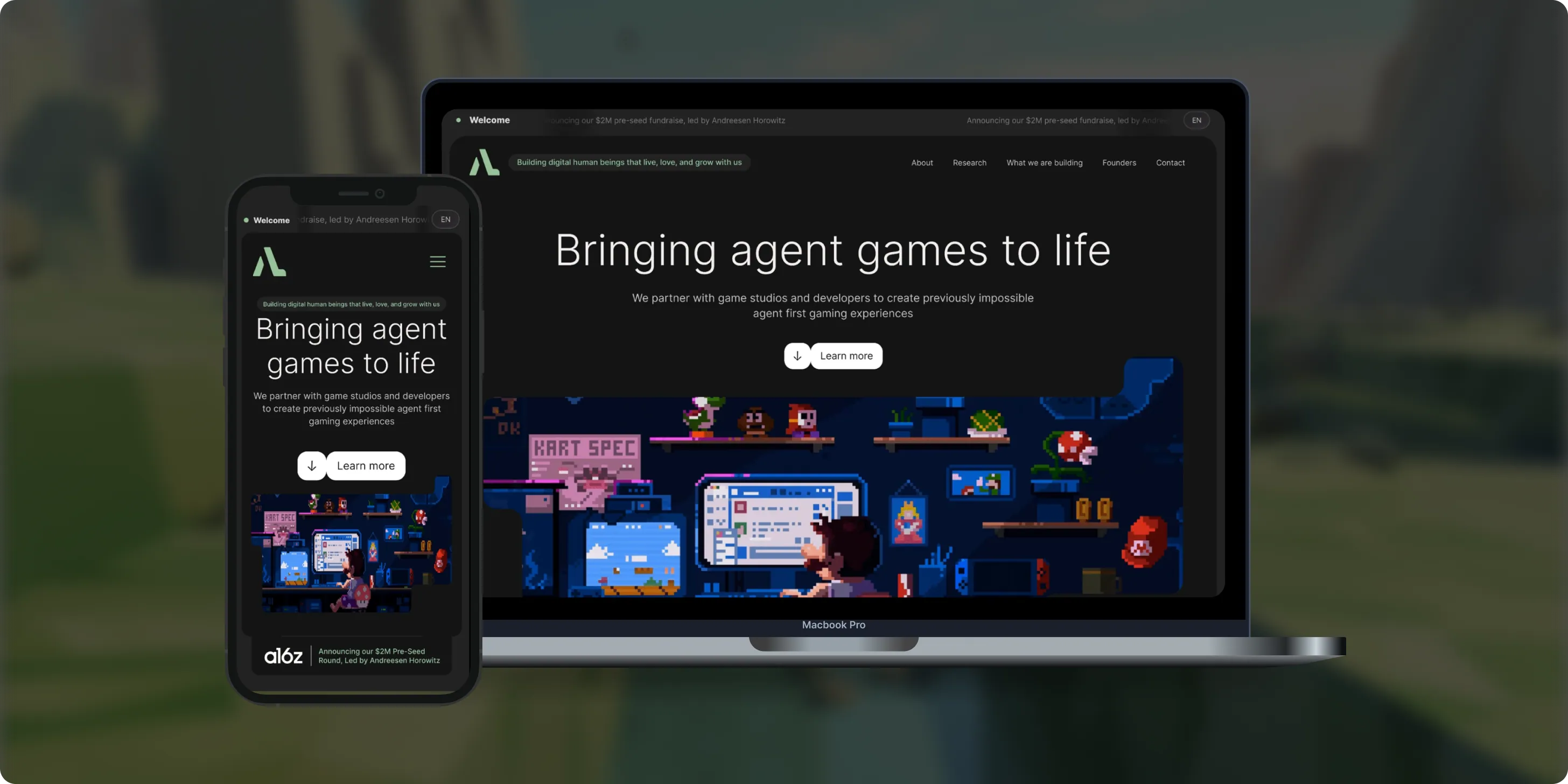
Altera builds on decades of computational neuroscience research to create digital human beings for gaming. Backed by a $2M pre-seed round led by Andreessen Horowitz, the team needed a landing page that could explain complex agent technology to players, partners, and investors.- 98%Dynamic Customization
- 100%Streamlined Navigation
- $2MPre-Seed Round
- Real Estate
Brizacorp
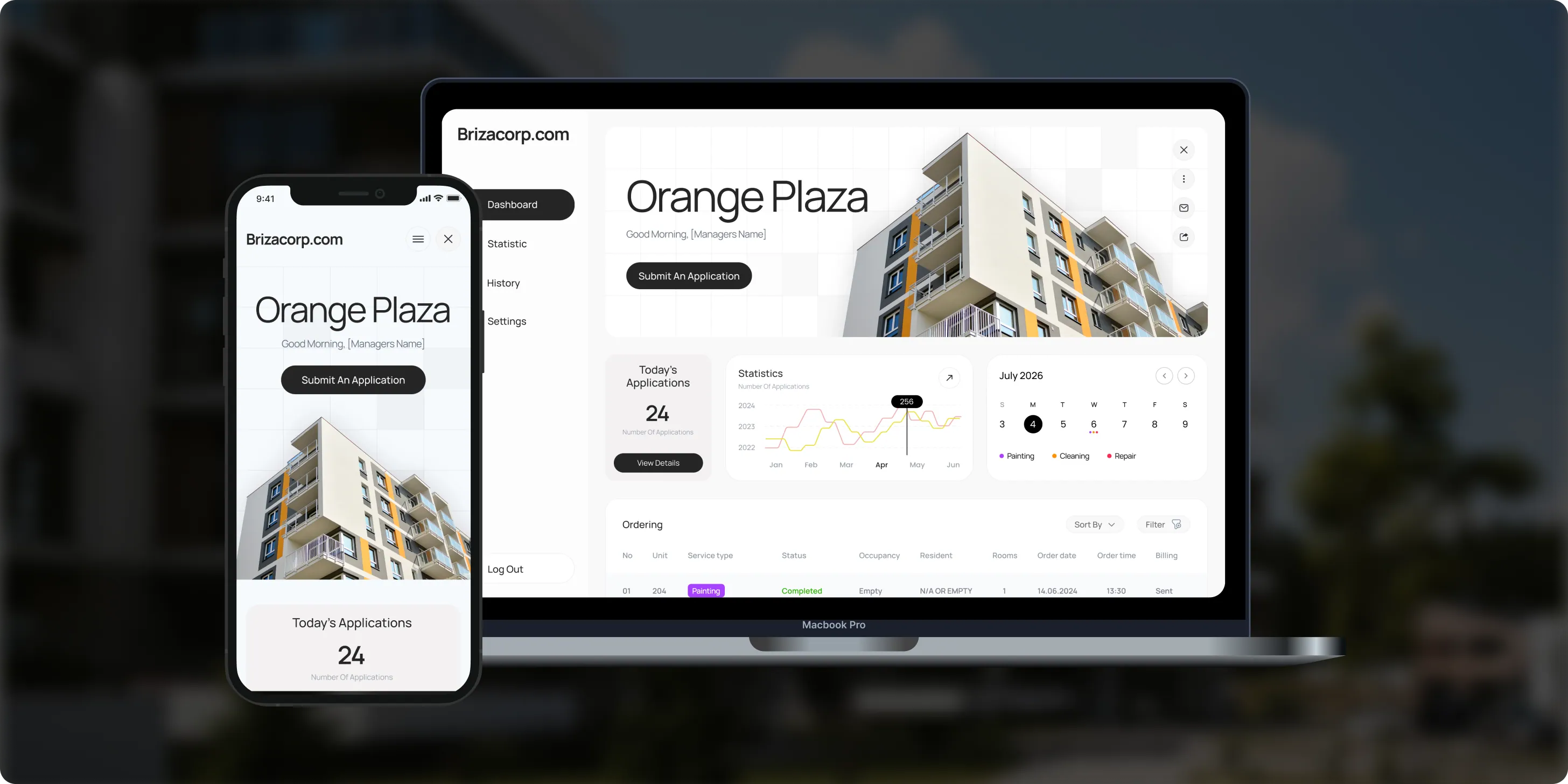
Brizacorp manages residential properties and coordinates the staff who handle painting, cleaning, and repair requests. Its team tracked work across messengers, phone calls, e-mail, and paper planners, with no single place to manage requests or measure performance.- 98%Application Stability
- 95%Utilization Rate
- 30%Faster Task Completion
Color & Harmony
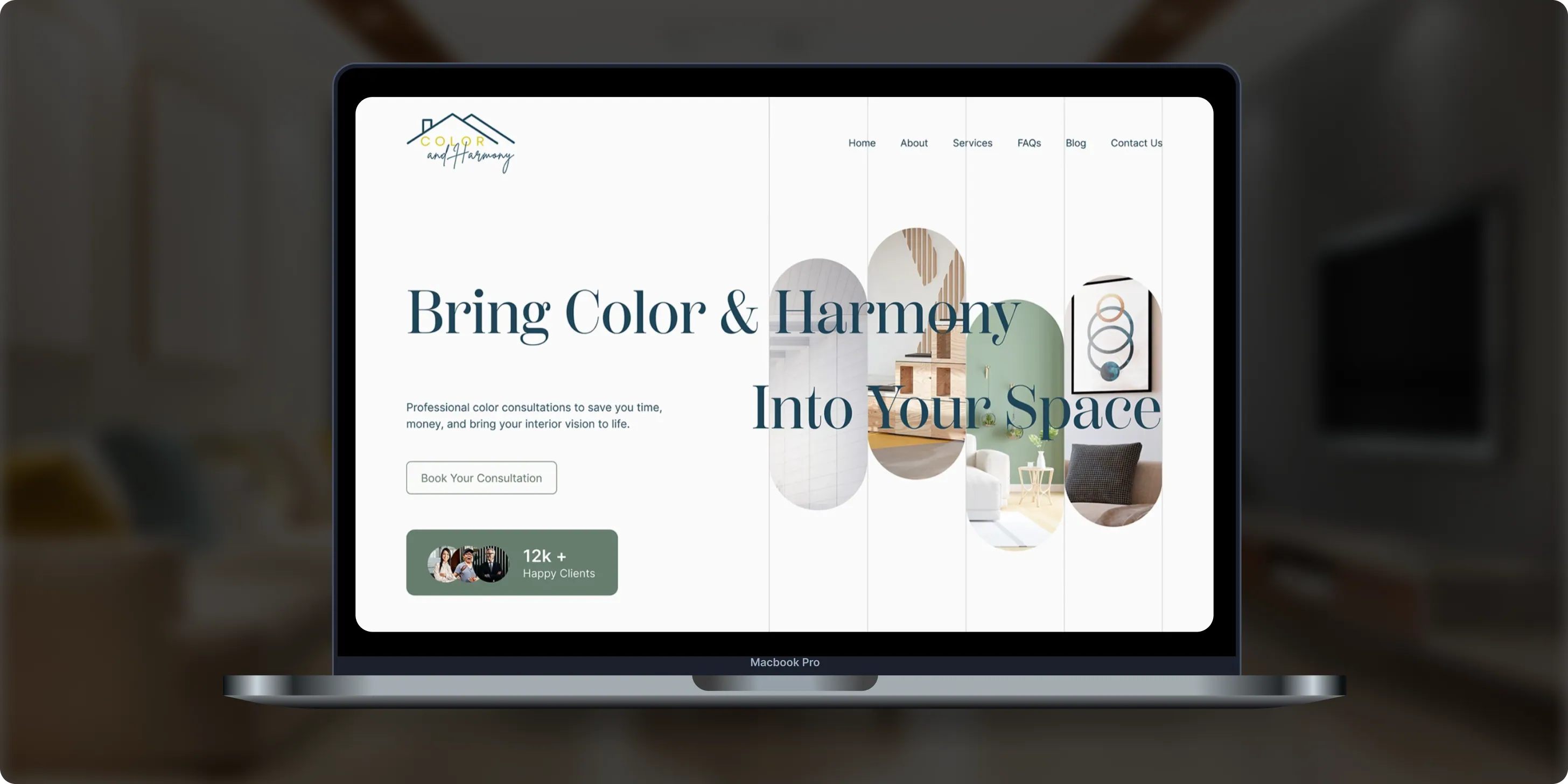
Color & Harmony is a Kentucky-based color consulting studio led by certified color strategist Diana Cartaya. The studio needed a website that reflects its refined aesthetic, showcases its portfolio, and explains a science-based color process in simple language.- 45%Conversion Rate Increase
- 50%Higher User Engagement
- 2Months to Launch
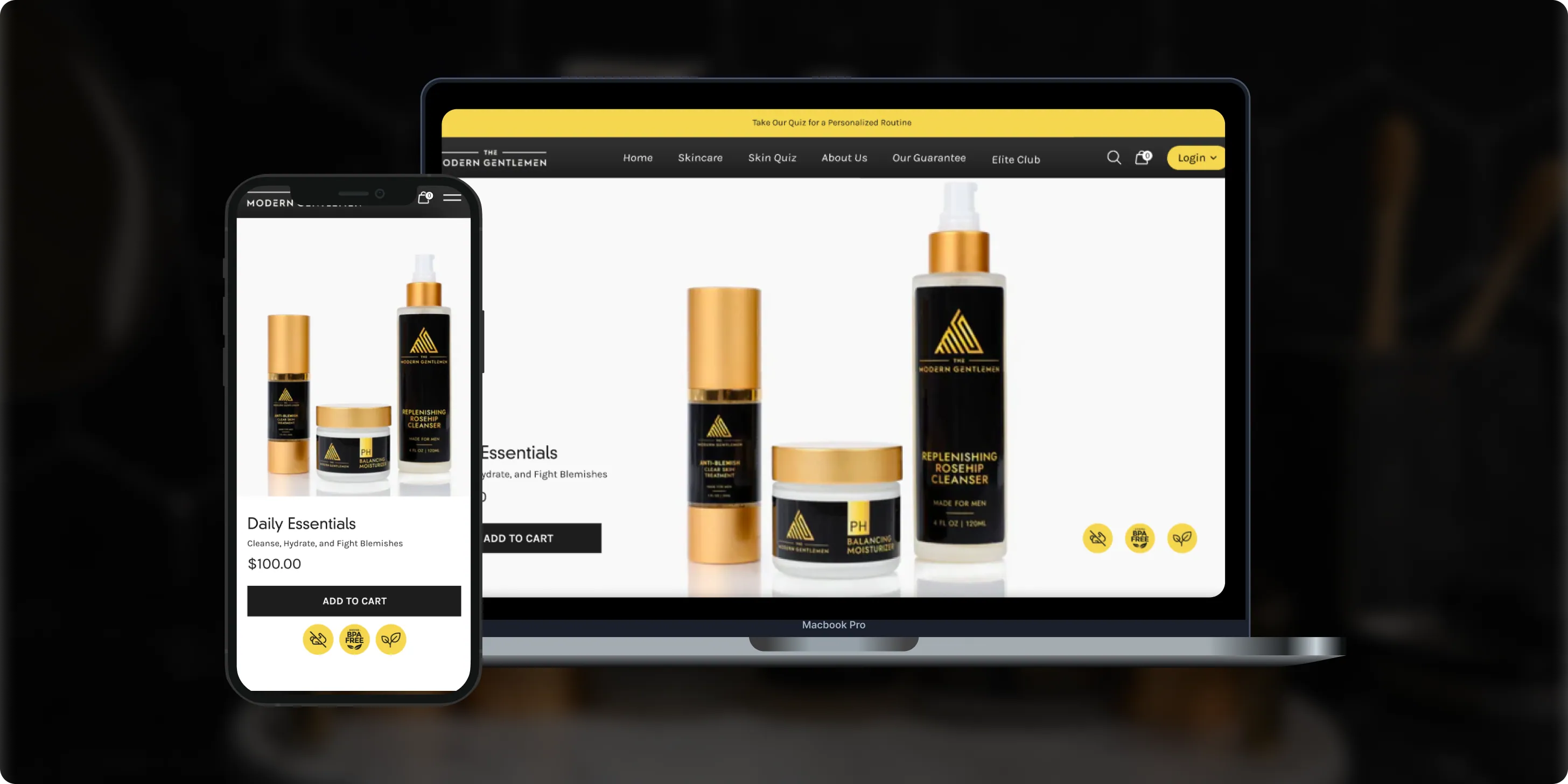
The Modern Gentlemen
The Modern Gentlemen sells premium men's skincare featured in Men's Health, GQ, and Men's Journal. Its customers wanted an efficient routine, but generic product suggestions and limited skincare knowledge made choosing the right products hard.- 30%Increase in Conversions
- 25%Higher Customer Retention
- 92%Mobile Purchases
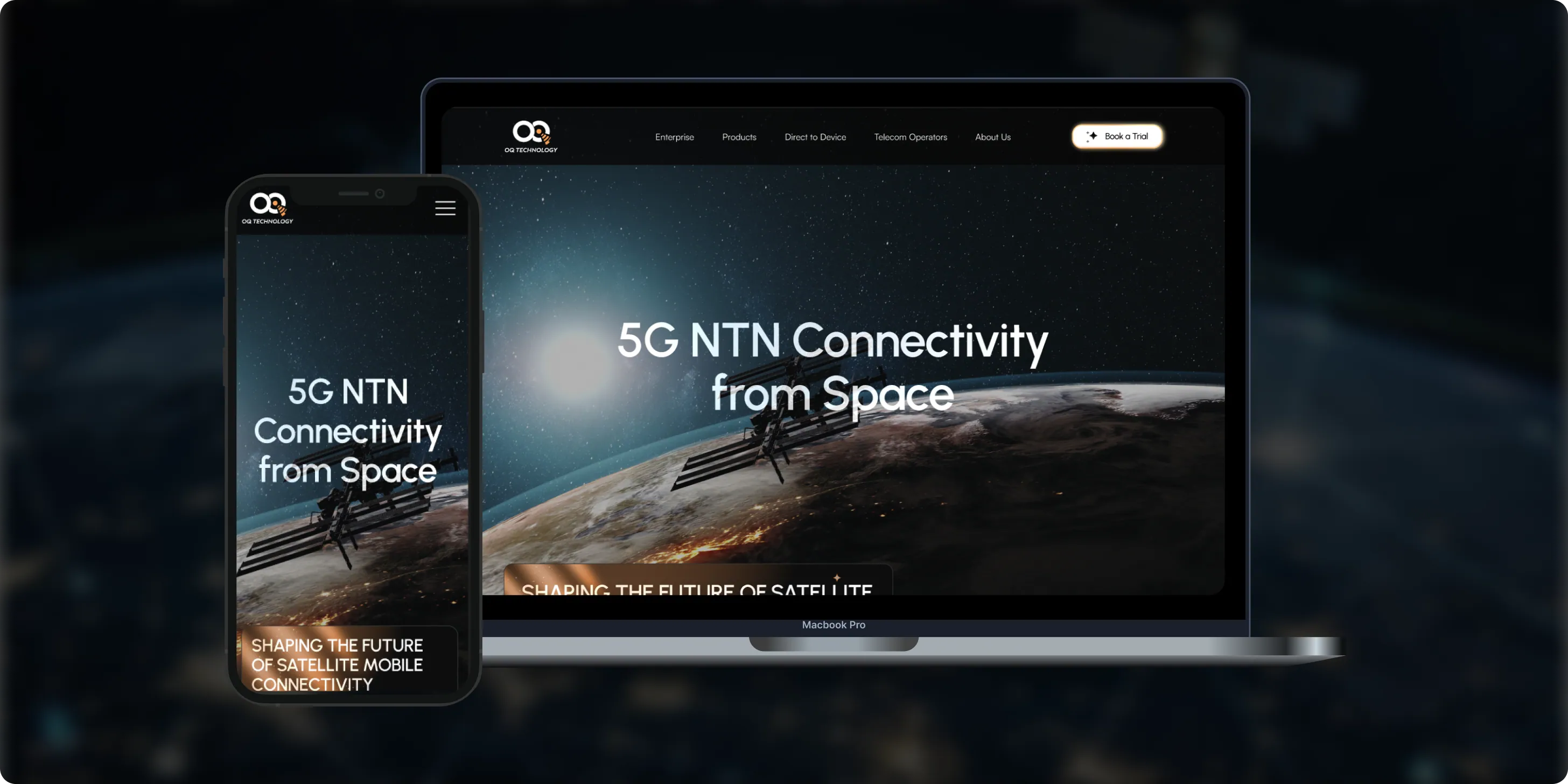
OQ Technology
OQ Technology connects IoT devices, machines, and people anywhere on the planet through its satellite network, serving energy, maritime, logistics, agriculture, and mobile operators. Its website made it hard to explore products and reach pricing plans.- 4Pricing Plans Clarified
- 3Dedicated User Flows
- 1Unified Platform
- Real Estate
- Finance
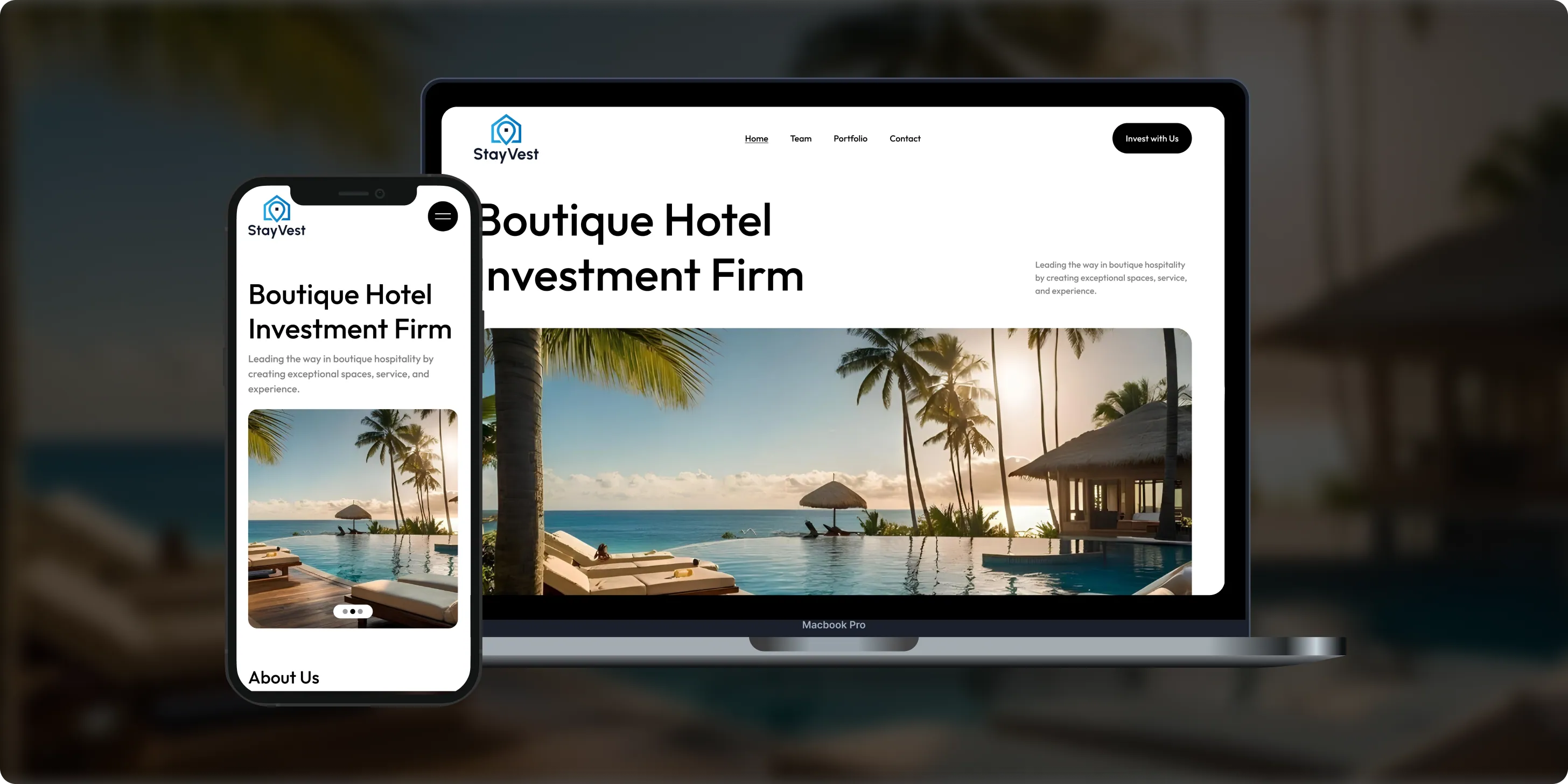
Stay Vest
Stay Vest is a private real estate investment firm that acquires, renovates, and operates boutique hotels for cash flow, tax benefits, and equity gain. It needed a platform that explains its strategy and earns the trust of passive investors.- 1,500+Guest Stays
- 200+Rooms Managed
- 5States Covered
Bokeyno Motorsports
Bokeyno Motorsports is the leading mobile installer of vertical doors for high-performance cars. This Shopify website isn’t just about services—it’s a bold statement of power, style, and expertise. With a sharp layout, strong visuals, and real-world case studies, the site delivers all the information car enthusiasts need to book confidently and instantly.- 54%Booking Requests
- 43%Lead Conversion
- 32%Qualified Inquiries

ai document processing platform
A comprehensive talent solution designed to help companies attract, hire, and retain top talent more effectively. The platform combines AI-powered recruitment technology with employee financial wellbeing programs, enabling smarter hiring decisions while supporting employees’ financial stability and long-term engagement.- 62%Faster Processing Time
- 78%Less Manual Work
- 35%Improved Accuracy

WHAT CLIENTS SAY
Independently verified reviews from real clients on Clutch.co


Client Story
Real feedback from
FMY Orthodontics

“SoftDoes consistently found ways to make things work, added features we had not originally envisioned, and never became frustrated. It felt like working with a true partner who cared about the success of our practice.”
Dan Merwin
DDS, MS, President, FMY Orthodontics

Client Story
Real feedback from
Prior Authorization AI
“Every time I sent a request, if there was anything that didn't work, they were able to turn it around quickly. Even when there were no updates yet, they always reached out to let me know they were working on it.”
Joseph Oluwo
Founder of Prior Authorization AI


Client Story
Real feedback from
WOVEN
“What stood out most was their commitment to understanding our needs before presenting solutions.”
Danna Pastran
Administrative Operations Manager, WOVEN

Client Story
Real feedback from
Grand Central Language Services
“The site performs as intended and provides the foundation for our company's digital presence.”
Joe Goldstein
QA Manager, Grand Central Language Services


Client Story
Real feedback from
DineMate
“They go above and beyond.”
Eric Snead
CEO, DineMate "Dating Connecting Platform"
WHAT CHANGED IN PRACTICE
Clients didn’t stay because of promises. They stayed because delivery became predictable, ownership was clear, and the product kept moving forward after launch.
- 01SENIOR ENGINEERS, NOT LAYERS
Strong interfaces come from designers who understand both people and code. SoftDoes assigns senior designers who work alongside experienced engineers. The person presenting your screens is the person who designed them. Feedback goes straight to the expert, without account managers in between. Technical limits are considered early, so designs stay practical. Your product benefits from that experience at every stage.
- 02PREDICTABLE DELIVERY
Design work follows a clear sequence of research, structure, visuals, and handoff. Dates for each stage are agreed before work begins. Reviews happen at set checkpoints, which keeps feedback organized. If findings change direction, we explain the impact and adjust the plan with you. You always know what comes next.
- 03BUILT TO LAST PAST LAUNCH
Interfaces should stay consistent as new features arrive. We create design systems, documented patterns, and naming rules your team can follow. Research findings are stored for future decisions. Developers receive specs that remain useful long after release. Your product keeps one coherent look for years.
- 04NO BABYSITTING REQUIRED
You should not have to manage designers to see progress. We recruit test participants, schedule sessions, and organize feedback ourselves. Updates arrive on a regular schedule. Decisions that need you come with options and a recommendation. Your attention stays on the business.
Technologies We Use
 Figma
 Sketch
 Adobe XD
 Photoshop
 Framer























Frequently Asked Questions
Everything you need to know about working with SoftDoes. Can’t find an answer?
What does a UI/UX designer handle for an Anchorage company, and what do developers handle?
A UI/UX designer researches users, sketches wireframes, builds interactive prototypes and creates the final screens and design system. They map how people move through a product, test designs with real users and refine them. Developers then build from those files and join design reviews, so plans stay realistic. For Anchorage companies, SoftDoes designers work alongside developers on the same project, with matching coded components in React or Vue. See our user interface design services.
How can a UI designer improve an Anchorage company's software?
A UI designer improves your software by making screens clear, consistent and easy to scan, which lowers user errors and support requests. A shared component library also speeds up development and keeps new features on brand. For Anchorage businesses, better UI often lifts sign-ups and daily use of internal tools, and clearer screens shorten training for new staff. SoftDoes provides this through its user interface design services.
Is healthcare app UI design priced separately from the build for Anchorage providers?
No, at SoftDoes healthcare app UI design for Anchorage providers is usually priced with the build, not as a separate fee. A HIPAA mobile app on one platform starts from $14,000 and a HIPAA patient portal from $38,500, design included. Cost depends on the number of screens and user roles, accessibility needs, patient and clinician flows, and how much research and testing is included. A discovery of 2 to 4 days sets the exact quote. See our user interface design.
What dashboard UI design mistakes should Anchorage teams avoid?
Anchorage teams should avoid dashboards with too many metrics, unclear labels, wrong chart types, numbers without context and cluttered layouts that hide what matters. Poor color choices also confuse users, especially those with color blindness. Each dashboard should answer a few clear questions. SoftDoes designs dashboards for Anchorage teams, including account views, transaction histories and reports that present complex figures clearly, through its user interface design services.
Should an Anchorage app's UI design include a dark mode?
Yes, an Anchorage app can benefit from a dark mode, since long winter nights make a low-glare option welcome. Dark mode UI design uses light text and elements on dark backgrounds to reduce glare in low light. Good dark themes use dark gray instead of pure black, softer accent colors and enough contrast for readability. SoftDoes designs both themes, with shared design tokens so each component works in either one, through its user interface design services.
How soon can an Anchorage logistics company have UI design ready for a first release?
UI design for an Anchorage logistics company is usually ready for a first release within several weeks to a few months. Screens and user roles set the pace, and the exact plan comes from a discovery of 2 to 4 days. A tracking portal or driver app can be designed first, while larger systems are designed in phases alongside development. Clickable prototypes let real users test flows before code is written. See our logistics software.
Which healthcare UI screens should an Anchorage provider redesign first?
An Anchorage provider should first redesign patient portal home screens, mobile-friendly appointment pages and staff dashboards, because they pay off fastest. Clear buttons and readable text cut support calls and data entry errors. Patient portals and scheduling tools need calm, readable layouts, and SoftDoes applies accessibility standards with HIPAA requirements in mind. A reporting dashboard starts from $7,000 at SoftDoes. Explore our healthcare software.
Can SoftDoes build a UI design system with coded React or Vue components for an Anchorage product?
Yes, SoftDoes builds design systems for Anchorage products with a component library, usage guidelines, design tokens and matching coded components in React or Vue. Products that add features quickly often end up with several versions of the same button, and a shared library stops that drift. Designers stop recreating elements for every page, and an update to one component applies everywhere at once. The result is a consistent visual identity and faster releases.
How do you design a field reporting app UI that Anchorage crews can use with gloves on?
Design a field reporting app for gloved hands with large controls, short workflows and few steps per report. Anchorage construction crews need to log work quickly on site, so primary actions stay big and easy to reach, and text stays readable on a phone. SoftDoes tests these flows with clickable prototypes before development starts. A mobile app for one platform starts from $4,500, and an iOS and Android app from $20,000, design included.
Can SoftDoes review an Anchorage company's current screens before a UI redesign?
Yes, an Anchorage company can send its current screens or a rough concept, and SoftDoes designers will review them and recommend clear improvements. Project Discovery starts from $490 and takes 2 to 4 days to audit audiences and competitors, define pain points and set the exact quote. Meetings run over video calls. Design then moves through user flows, wireframes, high-fidelity mockups and usability testing, ending with a full handoff and ongoing support.
Custom Energy Management Software Building: A Practical Guide for 2026
Energy
Energy costs across the U.S. and Canada are rising fast, and the tools many organizations rely on to manage those costs are not keeping up. If your portfolio spans multiple buildings, complex loads, or distributed energy resources, off the shelf platforms often fall short. This guide walks through when and how to invest in custom energy management software building, from scoping and architecture to AI features and long term maintenance.
How to Build Utility Billing Software: A Practical Guide for U.S. and Canadian Utilities
Energy
Game Platform Development: Building Scalable, Profitable Ecosystems in 2026
Web development
Game platform development is where studios and enterprises build the shared backend, tools, stores, and analytics that power not just one game but many. This article covers the strategy, software architecture, core modules, engine choices, and phased roadmap you need to launch or upgrade a game platform in the U.S. or Canadian market.